This example demonstrates how to use the JasperReports Library in a Spring MVC application. JasperReports is an open-source reporting engine. It takes input data from a data source (a JRDataSource implementation), fills the data source values into a user-defined report template (an XML file with the .jrxml extension), and then uses an exporter (an implementation of Jasper's Exporter interface) to render the resulting document in a variety of formats, including HTML, PDF, Excel, OpenDocument and Word.
Note: this tutorial targets Spring Framework 7 (Java 17+, Jakarta Servlet 6.1) and JasperReports 7. See the Version Notes (2026) section at the end for what has been deprecated or removed.
Example
In this example, we will use the following Jasper components:
- JRBeanCollectionDataSource An implementation of JRDataSource, which is Jasper's abstraction of a data source. It wraps a collection of JavaBean objects.
- HtmlExporter An implementation of Jasper's Exporter interface which renders the report in HTML format.
- JRXML file We also need to write a JRXML file that defines the report template.
Additional Maven Dependency
pom.xml<dependency>
<groupId>net.sf.jasperreports</groupId>
<artifactId>jasperreports</artifactId>
<version>7.0.8</version>
</dependency>
Since version 7, JasperReports has moved several optional features into separate artifacts (for example jasperreports-pdf for PDF export). Keep that in mind if you extend this example to other output formats.
Java Config class
In this example, we are going to use BeanNameViewResolver for resolving the Jasper view. We will register an implementation of View as a bean and return the bean name as the view name from the Spring controller. Check out this simple example of BeanNameViewResolver as well.
Make sure that BeanNameViewResolver has a higher precedence (a lower order value) than the JSP resolver. InternalResourceViewResolver accepts any view name, so it must be the last resolver in the chain.
package com.logicbig.example;

import org.springframework.context.annotation.ComponentScan;
import org.springframework.context.annotation.Configuration;
import org.springframework.web.servlet.config.annotation.EnableWebMvc;
import org.springframework.web.servlet.config.annotation.ViewResolverRegistry;
import org.springframework.web.servlet.config.annotation.WebMvcConfigurer;
import org.springframework.web.servlet.view.BeanNameViewResolver;
import org.springframework.web.servlet.view.InternalResourceViewResolver;

@EnableWebMvc
@Configuration
@ComponentScan
public class MyWebConfig implements WebMvcConfigurer {
    @Override
    public void configureViewResolvers(ViewResolverRegistry registry) {
        BeanNameViewResolver resolver = new BeanNameViewResolver();
        resolver.setOrder(0);
        registry.viewResolver(resolver);

        InternalResourceViewResolver viewResolver = new InternalResourceViewResolver();
        viewResolver.setPrefix("/WEB-INF/views/");
        viewResolver.setSuffix(".jsp");
        viewResolver.setOrder(1);
        registry.viewResolver(viewResolver);
    }
}
Implementing the View
Spring no longer provides JasperReports view classes (such as JasperReportsMultiFormatView). They were built on Jasper's legacy JRExporter API and were removed in Spring Framework 5.0. Instead, we extend AbstractView and use the current JasperReports API directly.
The view is a singleton bean shared by all requests, so the report template should be compiled once, in a thread-safe way (for example at startup), and then reused.
package com.logicbig.example;

import net.sf.jasperreports.engine.*;
import net.sf.jasperreports.engine.data.JRBeanCollectionDataSource;
import net.sf.jasperreports.engine.export.HtmlExporter;
import net.sf.jasperreports.export.SimpleExporterInput;
import net.sf.jasperreports.export.SimpleHtmlExporterOutput;
import org.springframework.stereotype.Component;
import org.springframework.web.servlet.view.AbstractView;

import jakarta.servlet.http.HttpServletRequest;
import jakarta.servlet.http.HttpServletResponse;
import java.io.InputStream;
import java.util.List;
import java.util.Map;

@Component("forexView")
public class CurrencyRateHtmlView extends AbstractView {
    private JasperReport currencyRatesReport;

    @Override
    protected void renderMergedOutputModel(Map<String, Object> model,
                                           HttpServletRequest request,
                                           HttpServletResponse response)
            throws Exception {
        response.setContentType("text/html");
        List<CurrencyRate> rates = (List<CurrencyRate>) model.get(
                "todayCurrencyRates");
        //data source
        JRDataSource dataSource = getDataSource(rates);
        //compile jrxml template and get report
        JasperReport report = getReport();
        //fill the report with data source objects
        JasperPrint jasperPrint = JasperFillManager.fillReport(report,
                                                               null,
                                                               dataSource);
        //export to html
        HtmlExporter exporter =
                new HtmlExporter(DefaultJasperReportsContext.getInstance());
        exporter.setExporterInput(new SimpleExporterInput(jasperPrint));
        exporter.setExporterOutput(
                new SimpleHtmlExporterOutput(response.getWriter()));
        exporter.exportReport();
    }

    private JRDataSource getDataSource(List<CurrencyRate> rates) {
        JRBeanCollectionDataSource dataSource =
                new JRBeanCollectionDataSource(rates);
        return dataSource;
    }

    public JasperReport getReport() throws JRException {
        if (currencyRatesReport == null) {//compile only once lazily
            InputStream stream =
                    getClass().getResourceAsStream("/rates.jrxml");
            currencyRatesReport = JasperCompileManager.compileReport(stream);
        }
        return currencyRatesReport;
    }
}
package com.logicbig.example;

import java.math.BigDecimal;
import java.time.LocalDateTime;
import java.util.Date;

public class CurrencyRate {
    private String currencyPair;
    private Date date;
    private BigDecimal askPrice;
    private BigDecimal bidPrice;
    .............
}
src/main/resources/rates.jrxml<!-- Created with Jaspersoft Studio version 7.0.8.final using JasperReports Library version 7.0.8-6f896111 -->
<jasperReport name="rates-template" language="java" pageWidth="595" pageHeight="300" columnWidth="555" leftMargin="20"
rightMargin="20" topMargin="20" bottomMargin="10" uuid="3737c8f8-35e7-4ea0-bf9f-c557f6bbbdf3">
<field name="currencyPair" class="java.lang.String"/>
<field name="date" class="java.util.Date"/>
<field name="askPrice" class="java.math.BigDecimal"/>
<field name="bidPrice" class="java.math.BigDecimal"/>
<columnHeader height="50">
<element kind="staticText" uuid="df050cc4-0718-4a93-8cbf-4d4258df45b7"
x="0" y="0" width="120" height="50" fontSize="16.0"
bold="true" vTextAlign="Middle">
<text><![CDATA[Currency Pair]]></text>
</element>
<element kind="staticText" uuid="e0bfa0a2-482e-40a3-a841-9f71fd3ef3b8"
x="120" y="0" width="120" height="50"
fontSize="16.0" bold="true" vTextAlign="Middle">
<text><![CDATA[Date]]></text>
</element>
<element kind="staticText" uuid="cea7371d-60ae-4333-9b33-89378dd9e7ac"
x="240" y="0" width="120" height="50"
fontSize="16.0" bold="true" vTextAlign="Middle">
<text><![CDATA[Ask Price]]></text>
</element>
<element kind="staticText" uuid="2b86a62d-a7d3-4b66-aa9a-f6a53dcdd1e4"
x="360" y="0" width="120" height="50"
fontSize="16.0" bold="true" vTextAlign="Middle">
<text><![CDATA[Bid Price]]></text>
</element>
</columnHeader>
<detail>
<band height="25">
<element kind="textField" uuid="bf01c9c9-44c0-4a1e-b21d-9ebc87ef7776"
x="0" y="0" width="120" height="25"
fontSize="14.0">
<expression><![CDATA[$F{currencyPair}]]></expression>
</element>
<element kind="textField" uuid="d4c9975d-73fc-4ca1-8845-2d4f08656fb0"
x="120" y="0" width="120" height="25"
fontSize="14.0" pattern="dd.MM.yyyy">
<expression><![CDATA[$F{date}]]></expression>
</element>
<element kind="textField" uuid="55a6795d-4d07-4b46-8863-2d7e8dcc69c5"
x="240" y="0" width="120" height="25"
fontSize="14.0" pattern="#,##0.00">
<expression><![CDATA[$F{askPrice}]]></expression>
</element>
<element kind="textField" uuid="5d9319ce-5ebc-4275-930f-a63d193a3835"
x="360" y="0" width="120" height="25"
fontSize="14.0" pattern="#,##0.00">
<expression><![CDATA[$F{bidPrice}]]></expression>
</element>
</band>
</detail>
</jasperReport>
The template above uses the JasperReports 7 JRXML format. JRXML files created with version 6 or older can no longer be loaded by version 7 as they are. Open them in Jaspersoft Studio 7, which can convert them to the new format.
Writing a Spring Controller
@Controller
@RequestMapping("/")
public class CurrencyRateController {

    @GetMapping("/")
    public String mainView() {
        return "main";
    }

    @GetMapping("/exchangeRates")
    public String handleForexRequest(Model model) {
        model.addAttribute("todayCurrencyRates", getTodayForexRates());
        return "forexView";
    }

    private List<CurrencyRate> getTodayForexRates() {
        //dummy rates
        List<CurrencyRate> currencyRates = new ArrayList<>();
        Date today = new Date();
        List<Currency> currencies =
                new ArrayList<>(Currency.getAvailableCurrencies());

        int size = currencies.size();
        size = Math.min(size, 10);

        for (int i = 0; i + 1 < size; i += 2) {
            String currencyPair = currencies.get(i) + "/" +
                    currencies.get(i + 1);
            CurrencyRate cr = new CurrencyRate();
            cr.setCurrencyPair(currencyPair);
            cr.setDate(today);
            BigDecimal bidPrice = new BigDecimal((i + 1) * 2);
            bidPrice = bidPrice.setScale(3, RoundingMode.CEILING);
            cr.setBidPrice(bidPrice);
            BigDecimal askPrice = new BigDecimal(bidPrice.doubleValue() +
                                                         (i + 1) * 2);
            askPrice = askPrice.setScale(3, RoundingMode.CEILING);
            cr.setAskPrice(askPrice);

            currencyRates.add(cr);
        }
        return currencyRates;
    }
}
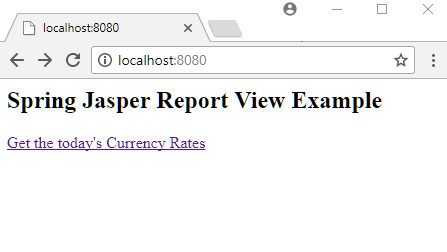
src/main/webapp/WEB-INF/views/main.jsp<html>
<body>
<h2>Spring Jasper Report View Example</h2>
<a href="/exchangeRates">Get the today's Currency Rates</a>
</body>
</html>
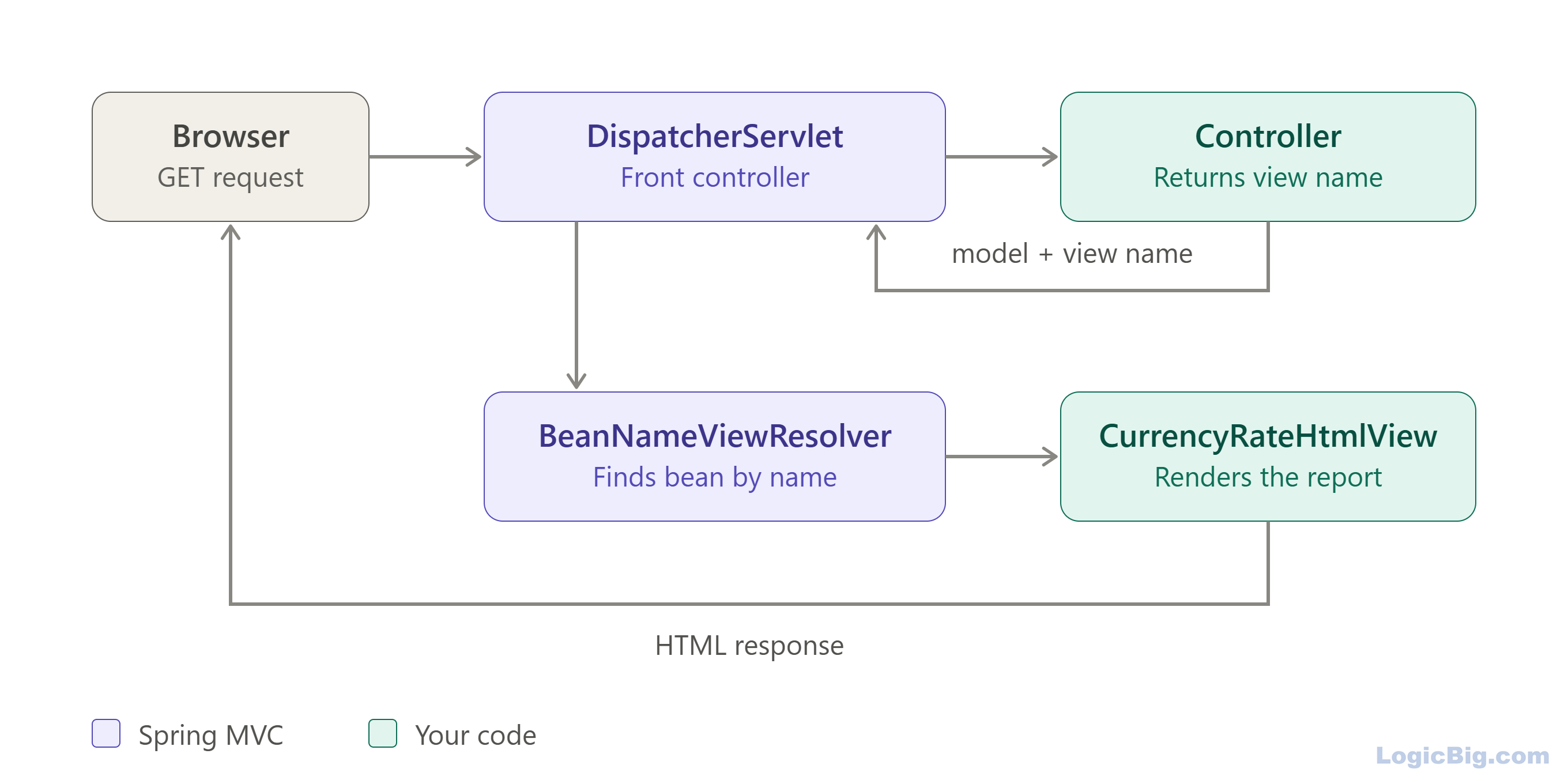
Following digram shows how JasperReports work in Spring:
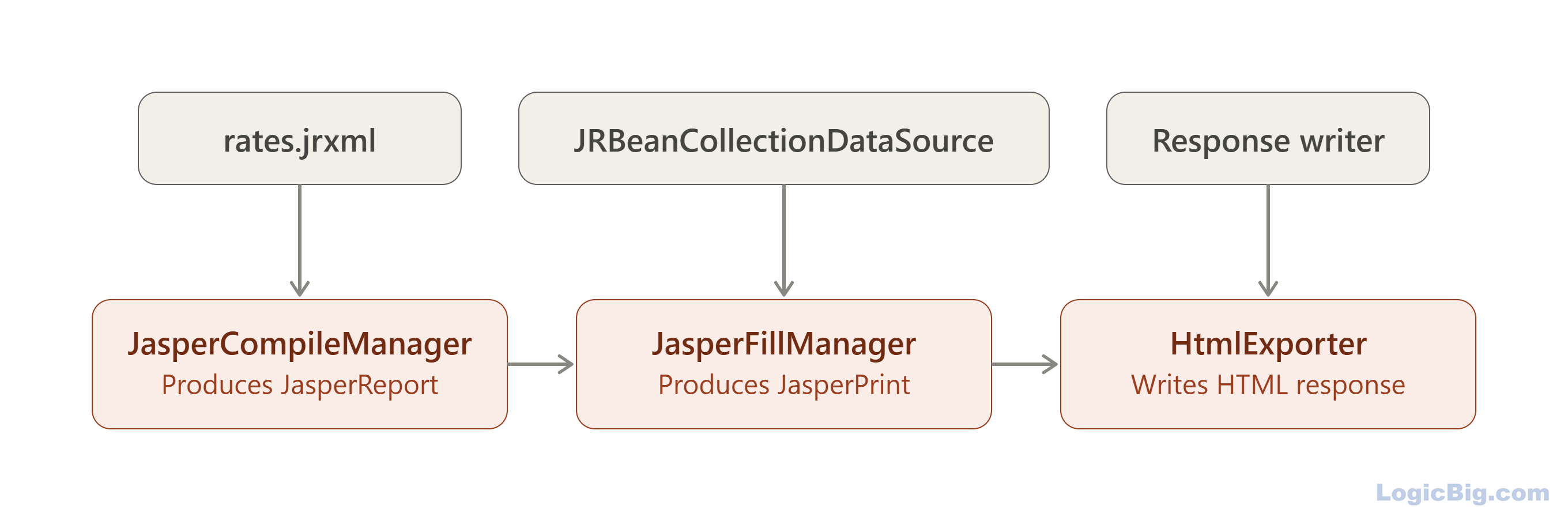
Following digram shows Jasper view internal steps:
Running the example
To try examples, run embedded Jetty (configured in pom.xml of example project below):
mvn jetty:run Output
$ curl -s "http://localhost:8080/exchangeRates"
<!DOCTYPE html PUBLIC "-//W3C//DTD XHTML 1.0 Transitional//EN" "http://www.w3.org/TR/xhtml1/DTD/xhtml1-transitional.dtd">
<html>
<head>
  <title></title>
  <meta http-equiv="Content-Type" content="text/html; charset=UTF-8"/>
  <style type="text/css">
    a {text-decoration: none}
  </style>
</head>
<body text="#000000" link="#000000" alink="#000000" vlink="#000000">
<table role="none" width="100%" cellpadding="0" cellspacing="0" border="0">
<tr><td width="50%"> </td><td align="center">

<table id="JR_PAGE_ANCHOR_0_1" role="none" class="jrPage" data-jr-height="300" cellpadding="0" cellspacing="0" border="0" style="empty-cells: show; width: 595px; border-collapse: collapse; background-color: white;">
<style type="text/css">
  #JR_PAGE_ANCHOR_0_1 th {font-weight: normal;}
  #JR_PAGE_ANCHOR_0_1 ul {list-style-type: disc; padding-inline-start: 40px; margin: 0px;}
  #JR_PAGE_ANCHOR_0_1 ol {list-style-type: decimal; padding-inline-start: 40px; margin: 0px;}
</style>
<tr role="none" valign="top" style="height:0">
<td style="width:20px"></td>
<td style="width:120px"></td>
<td style="width:120px"></td>
<td style="width:120px"></td>
<td style="width:120px"></td>
<td style="width:95px"></td>
</tr>
<tr valign="top" style="height:20px">
<td colspan="6">
</td>
</tr>
<tr valign="top" style="height:50px">
<td>
</td>
<td style="text-indent: 0px;  vertical-align: middle;text-align: left;">
<span style="font-family: SansSerif; color: #000000; font-size: 16px; line-height: 1.2578125; font-weight: bold;">Currency Pair</span></td>
<td style="text-indent: 0px;  vertical-align: middle;text-align: left;">
<span style="font-family: SansSerif; color: #000000; font-size: 16px; line-height: 1.2578125; font-weight: bold;">Date</span></td>
<td style="text-indent: 0px;  vertical-align: middle;text-align: left;">
<span style="font-family: SansSerif; color: #000000; font-size: 16px; line-height: 1.2578125; font-weight: bold;">Ask Price</span></td>
<td style="text-indent: 0px;  vertical-align: middle;text-align: left;">
<span style="font-family: SansSerif; color: #000000; font-size: 16px; line-height: 1.2578125; font-weight: bold;">Bid Price</span></td>
<td>
</td>
</tr>
<tr valign="top" style="height:25px">
<td>
</td>
<td style="text-indent: 0px; text-align: left;">
<span style="font-family: SansSerif; color: #000000; font-size: 14px; line-height: 1.2578125;">MRU/CSD</span></td>
<td style="text-indent: 0px; text-align: left;">
<span style="font-family: SansSerif; color: #000000; font-size: 14px; line-height: 1.2578125;">08.10.2026</span></td>
<td style="text-indent: 0px; text-align: left;">
<span style="font-family: SansSerif; color: #000000; font-size: 14px; line-height: 1.2578125;">4.00</span></td>
<td style="text-indent: 0px; text-align: left;">
<span style="font-family: SansSerif; color: #000000; font-size: 14px; line-height: 1.2578125;">2.00</span></td>
<td>
</td>
</tr>
<tr valign="top" style="height:25px">
<td>
</td>
<td style="text-indent: 0px; text-align: left;">
<span style="font-family: SansSerif; color: #000000; font-size: 14px; line-height: 1.2578125;">NLG/NGN</span></td>
<td style="text-indent: 0px; text-align: left;">
<span style="font-family: SansSerif; color: #000000; font-size: 14px; line-height: 1.2578125;">08.10.2026</span></td>
<td style="text-indent: 0px; text-align: left;">
<span style="font-family: SansSerif; color: #000000; font-size: 14px; line-height: 1.2578125;">12.00</span></td>
<td style="text-indent: 0px; text-align: left;">
<span style="font-family: SansSerif; color: #000000; font-size: 14px; line-height: 1.2578125;">6.00</span></td>
<td>
</td>
</tr>
<tr valign="top" style="height:25px">
<td>
</td>
<td style="text-indent: 0px; text-align: left;">
<span style="font-family: SansSerif; color: #000000; font-size: 14px; line-height: 1.2578125;">ATS/MDL</span></td>
<td style="text-indent: 0px; text-align: left;">
<span style="font-family: SansSerif; color: #000000; font-size: 14px; line-height: 1.2578125;">08.10.2026</span></td>
<td style="text-indent: 0px; text-align: left;">
<span style="font-family: SansSerif; color: #000000; font-size: 14px; line-height: 1.2578125;">20.00</span></td>
<td style="text-indent: 0px; text-align: left;">
<span style="font-family: SansSerif; color: #000000; font-size: 14px; line-height: 1.2578125;">10.00</span></td>
<td>
</td>
</tr>
<tr valign="top" style="height:25px">
<td>
</td>
<td style="text-indent: 0px; text-align: left;">
<span style="font-family: SansSerif; color: #000000; font-size: 14px; line-height: 1.2578125;">SVC/ROL</span></td>
<td style="text-indent: 0px; text-align: left;">
<span style="font-family: SansSerif; color: #000000; font-size: 14px; line-height: 1.2578125;">08.10.2026</span></td>
<td style="text-indent: 0px; text-align: left;">
<span style="font-family: SansSerif; color: #000000; font-size: 14px; line-height: 1.2578125;">28.00</span></td>
<td style="text-indent: 0px; text-align: left;">
<span style="font-family: SansSerif; color: #000000; font-size: 14px; line-height: 1.2578125;">14.00</span></td>
<td>
</td>
</tr>
<tr valign="top" style="height:25px">
<td>
</td>
<td style="text-indent: 0px; text-align: left;">
<span style="font-family: SansSerif; color: #000000; font-size: 14px; line-height: 1.2578125;">TPE/CLF</span></td>
<td style="text-indent: 0px; text-align: left;">
<span style="font-family: SansSerif; color: #000000; font-size: 14px; line-height: 1.2578125;">08.10.2026</span></td>
<td style="text-indent: 0px; text-align: left;">
<span style="font-family: SansSerif; color: #000000; font-size: 14px; line-height: 1.2578125;">36.00</span></td>
<td style="text-indent: 0px; text-align: left;">
<span style="font-family: SansSerif; color: #000000; font-size: 14px; line-height: 1.2578125;">18.00</span></td>
<td>
</td>
</tr>
<tr valign="top" style="height:105px">
<td colspan="6">
</td>
</tr>
</table>

</td><td width="50%"> </td></tr>
</table>
</body>
</html>
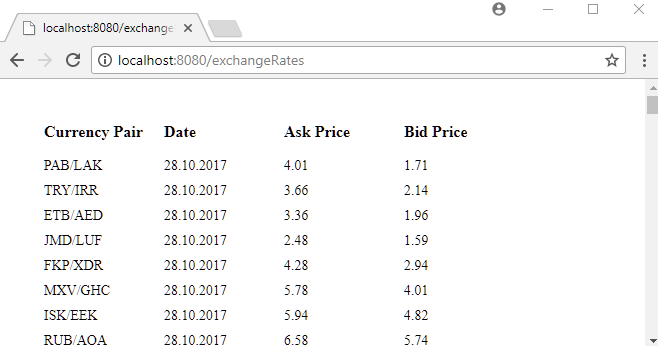
After clicking the link:
Version Notes
Deprecations and removals that affect this example:
- Spring and JasperReports: Spring has no built-in JasperReports support in any current version. The view classes were dropped in Spring Framework 5.0, which is why this example implements
AbstractView itself.
- JasperReports 7: source JRXML/JRTX templates written for version 6 or older cannot be loaded without conversion, compiled
.jasper files must be recompiled, some Java packages were renamed, and optional features were split into separate artifacts. Upgrade to the latest 7.0.x patch release.
- JasperReports 7.0.2: removed the Google Maps component, the Chrome server-side rendering of JavaScript visualizations, the interactivity extension and the PL/SQL and Oracle stored procedure query executer.
- JFreeChart: JasperReports 7 upgraded to JFreeChart 1.5.4, which no longer supports 3D charts. 3D pie and bar charts are rendered as 2D charts.
- Legacy exporters: the classic
JRExporter API has been deprecated since JasperReports 5.5.2, and the old JRHtmlExporter was removed in 6.4.3. Use HtmlExporter with SimpleExporterInput and SimpleHtmlExporterOutput, as shown above.
Example ProjectDependencies and Technologies Used: - spring-webmvc 7.0.6 (Spring Web MVC)
Version Compatibility: 3.2.9.RELEASE - 7.0.6 Version compatibilities of spring-webmvc with this example: Versions in green have been tested.
- jakarta.servlet-api 6.1.0 (Jakarta Servlet API documentation)
- jasperreports 7.0.8 (Free Java Reporting Library)
- JDK 25
- Maven 3.9.11
|



