This example demonstrates how to use XSLT as the view technology in a Spring MVC application. Instead of rendering a template, Spring transforms an XML source (supplied in the model) into the response, using an XSLT stylesheet as the view.
Two classes are involved:
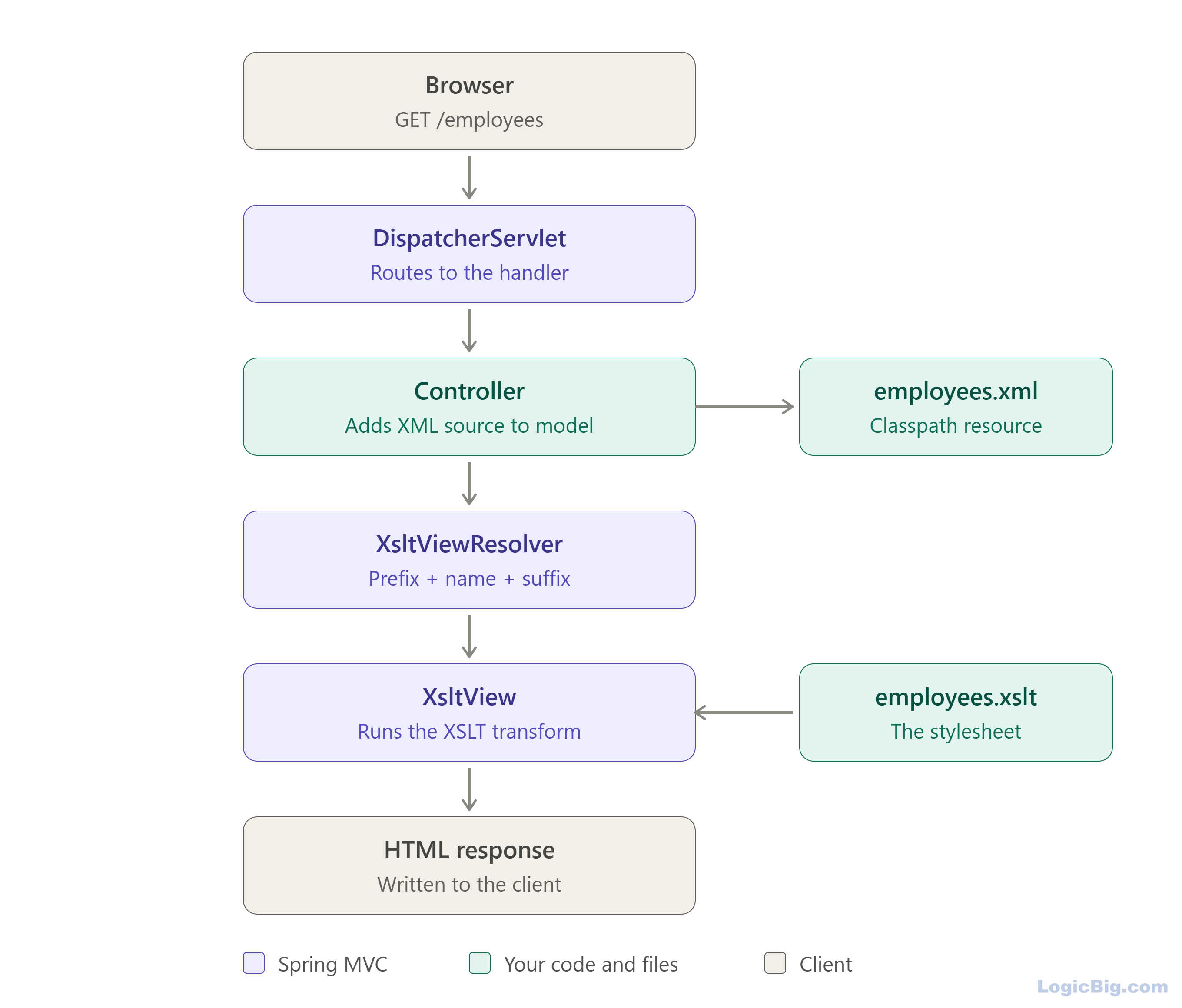
XsltViewResolver: maps a view name to the location of an XSLT stylesheet (through prefix and suffix) and creates XsltView instances. XsltView: finds the XML source in the model, converts it to a javax.xml.transform.Source and runs the transformation. Other model attributes are passed to the stylesheet as transformer parameters.
Example
Java Config class
package com.logicbig.example;

import org.springframework.context.annotation.ComponentScan;
import org.springframework.context.annotation.Configuration;
import org.springframework.web.servlet.config.annotation.EnableWebMvc;
import org.springframework.web.servlet.config.annotation.ViewResolverRegistry;
import org.springframework.web.servlet.config.annotation.WebMvcConfigurer;
import org.springframework.web.servlet.view.xslt.XsltViewResolver;

@EnableWebMvc
@Configuration
@ComponentScan
public class MyWebConfig implements WebMvcConfigurer {

    @Override
    public void configureViewResolvers(ViewResolverRegistry registry) {
        XsltViewResolver viewResolver = new XsltViewResolver();
        viewResolver.setPrefix("/WEB-INF/xsl/");
        viewResolver.setSuffix(".xslt");
        registry.viewResolver(viewResolver);
    }
}
Writing a Spring Controller
package com.logicbig.example;

import org.springframework.beans.factory.annotation.Autowired;
import org.springframework.core.io.Resource;
import org.springframework.core.io.ResourceLoader;
import org.springframework.stereotype.Controller;
import org.springframework.ui.Model;
import org.springframework.web.bind.annotation.RequestMapping;
import org.springframework.web.bind.annotation.GetMapping;
import org.springframework.web.bind.annotation.RequestMethod;

@Controller
@RequestMapping("/")
public class MyController {
    @Autowired
    private ResourceLoader resourceLoader;

    @GetMapping("/")
    public String javaTutorial(Model model) {
        Resource resource = resourceLoader.getResource("classpath:employees.xml");
        model.addAttribute("employees", resource);
        return "employees";
    }
}
In this example, we load an XML file from the classpath and add the resource to the model. The XML data is then transformed by the target XSLT file.
Note that we can alternatively build the XML content as a DOM document and add it to the model:
Document document = DocumentBuilderFactory.newInstance().newDocumentBuilder().newDocument();
 Element root = document.createElement("employees");
 document.appendChild(root);
 model.addAttribute("employees", document);
Other supported source types include Source, Node, Reader, InputStream and Resource. If the model contains several candidates, set the sourceKey property on XsltViewResolver to tell Spring which model attribute to transform.
XML Resource
src/main/resources/employees.xml<?xml version='1.0' encoding='UTF-8' standalone='no'?>
<employees>
<employee>
<id>100</id>
<name>Sara</name>
<dept>Admin</dept>
</employee>
<employee>
<id>200</id>
<name>Mike</name>
<dept>Account</dept>
</employee>
<employee>
<id>300</id>
<name>Joe</name>
<dept>IT</dept>
</employee>
<employee>
<id>400</id>
<name>Cindy</name>
<dept>IT</dept>
</employee>
</employees>
XSLT file
src/main/webapp/WEB-INF/xsl/employees.xslt<?xml version="1.0"?>
<xsl:stylesheet xmlns:xsl="http://www.w3.org/1999/XSL/Transform"
version="1.0">
<xsl:output method="html" indent="yes"/>
<xsl:template match="/">
<html>
<head>
<style>
table.emp {
border-collapse: collapse;
}
table.emp, table.emp th, table.emp td {
border: 1px solid gray;
}
</style>
</head>
<body>
<div align="center">
<xsl:apply-templates/>
</div>
</body>
</html>
</xsl:template>
<xsl:template match="employees">
<table class="emp" style="width:100%;">
<tr bgcolor="#eee">
<th>Id</th>
<th>Name</th>
<th>Department</th>
</tr>
<xsl:for-each select="employee">
<tr>
<td>
<xsl:value-of select="id"/>
</td>
<td>
<xsl:value-of select="name"/>
</td>
<td>
<xsl:value-of select="dept"/>
</td>
</tr>
</xsl:for-each>
</table>
</xsl:template>
</xsl:stylesheet>
Following diagram shows how XSLT View is used:
Running the example
To try examples, run embedded Jetty (configured in pom.xml of example project below):
mvn jetty:run Output
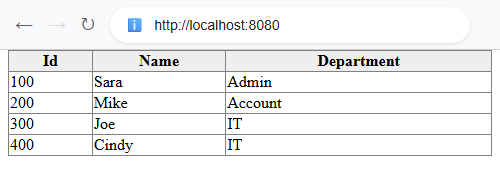 $ curl -s "http://localhost:8080"
<html>
<head>
<META http-equiv="Content-Type" content="text/html; charset=UTF-8">
<style>
table.emp {
border-collapse: collapse;
}
table.emp, table.emp th, table.emp td {
border: 1px solid gray;
}
</style>
</head>
<body>
<div align="center">
<table class="emp" style="width:100%;">
<tr bgcolor="#eee">
<th>Id</th><th>Name</th><th>Department</th>
</tr>
<tr>
<td>100</td><td>Sara</td><td>Admin</td>
</tr>
<tr>
<td>200</td><td>Mike</td><td>Account</td>
</tr>
<tr>
<td>300</td><td>Joe</td><td>IT</td>
</tr>
<tr>
<td>400</td><td>Cindy</td><td>IT</td>
</tr>
</table>
</div>
</body>
</html>
Example ProjectDependencies and Technologies Used: - spring-webmvc 7.0.6 (Spring Web MVC)
Version Compatibility: 3.2.9.RELEASE - 7.0.6 Version compatibilities of spring-webmvc with this example: Versions in green have been tested.
- jakarta.servlet-api 6.1.0 (Jakarta Servlet API documentation)
- JDK 25
- Maven 3.9.11
|



