Thymeleaf is a modern server-side Java template engine that can process HTML, XML, JavaScript, CSS and plain text. It can be integrated with Spring MVC as a view technology. Let's walk through a quick example to see how to do that.
Example
Maven dependency
pom.xml<dependency>
<groupId>org.thymeleaf</groupId>
<artifactId>thymeleaf</artifactId>
<version>3.1.3.RELEASE</version>
</dependency>
<dependency>
<groupId>org.thymeleaf</groupId>
<artifactId>thymeleaf-spring6</artifactId>
<version>3.1.3.RELEASE</version>
</dependency>
The first artifact (thymeleaf) is the Thymeleaf core library and the second one (thymeleaf-spring6) contains the Spring integration components. Use the integration artifact that matches your Spring Framework generation: thymeleaf-spring6 for Spring Framework 6.x and later (JDK 17 or newer is required), and thymeleaf-spring5 for the legacy Spring 5.x. The old thymeleaf-spring4 artifact is no longer published for Thymeleaf 3.1.
Thymeleaf configuration
package com.logicbig.example;

import org.springframework.beans.factory.annotation.Autowired;
import org.springframework.context.ApplicationContext;
import org.springframework.context.annotation.Bean;
import org.springframework.context.annotation.ComponentScan;
import org.springframework.context.annotation.Configuration;
import org.springframework.web.servlet.ViewResolver;
import org.springframework.web.servlet.config.annotation.EnableWebMvc;
import org.thymeleaf.spring6.SpringTemplateEngine;
import org.thymeleaf.spring6.templateresolver.SpringResourceTemplateResolver;
import org.thymeleaf.spring6.view.ThymeleafViewResolver;

@EnableWebMvc
@Configuration
@ComponentScan
public class MyWebConfig {

    @Autowired
    ApplicationContext applicationContext;

    @Bean
    public SpringTemplateEngine templateEngine(){
        SpringTemplateEngine templateEngine = new SpringTemplateEngine();
        templateEngine.setTemplateResolver(templateResolver());
        return templateEngine;
    }

    @Bean
    public SpringResourceTemplateResolver templateResolver(){
        SpringResourceTemplateResolver templateResolver = new SpringResourceTemplateResolver();
        templateResolver.setApplicationContext(this.applicationContext);
        templateResolver.setPrefix("/WEB-INF/views/");
        templateResolver.setSuffix(".html");
        return templateResolver;
    }

    @Bean
    public ViewResolver viewResolver(){
        ThymeleafViewResolver viewResolver = new ThymeleafViewResolver();
        viewResolver.setTemplateEngine(templateEngine());
        return viewResolver;
    }
}
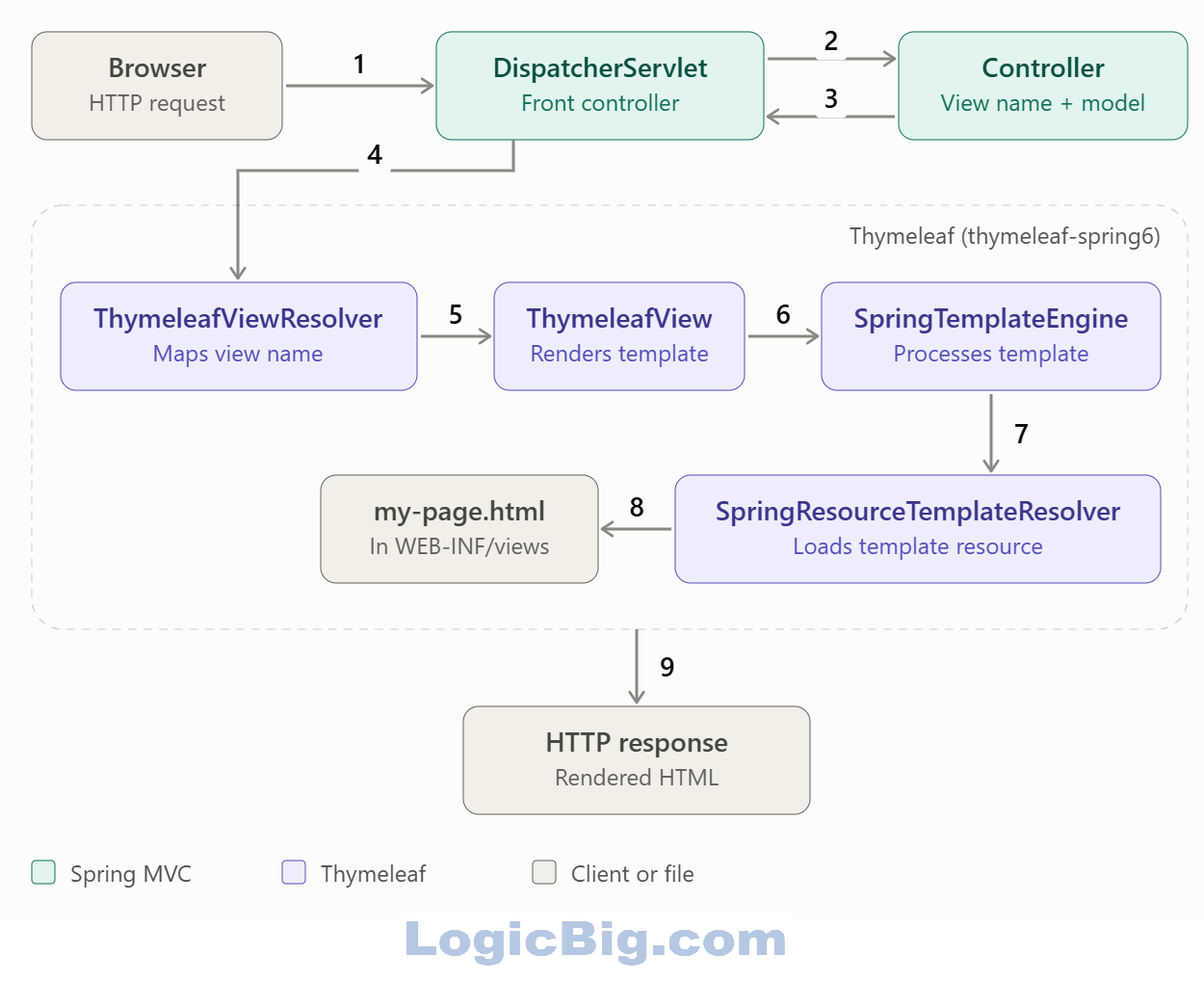
All of the above components are provided by the Thymeleaf framework for Spring integration. Following is a quick description of each of them:
SpringTemplateEngine This class hooks up an instance of SpringStandardDialect (a subclass of org.thymeleaf.standard.StandardDialect). Thymeleaf dialects define a set of template processors.
SpringResourceTemplateResolver It resolves templates using Spring's resource resolution mechanism (see ResourceLoader.getResource(String), implemented by ApplicationContext).
ThymeleafViewResolver It is an implementation of org.springframework.web.servlet.ViewResolver. The View implementation managed by this ViewResolver is ThymeleafView, which is responsible for carrying out the template processing.
Writing a Spring Controller
package com.logicbig.example;

import org.springframework.stereotype.Controller;
import org.springframework.ui.Model;
import org.springframework.web.bind.annotation.RequestMapping;
import org.springframework.web.bind.annotation.ResponseBody;

import java.time.LocalTime;

@Controller
@RequestMapping("/")
public class MyController {

    @RequestMapping
    public String handleRequest (Model model) {
        model.addAttribute("msg", "A message from the controller");
        model.addAttribute("time", LocalTime.now());
        return "my-page";
    }
}
The Thymeleaf template
src/main/webapp/WEB-INF/views/my-page.html<!DOCTYPE html>
<html xmlns="http://www.w3.org/1999/xhtml"
xmlns:th="http://www.thymeleaf.org">
<body>
<h2>A Thymeleaf view</h2>
<div th:text="${msg}"/>
<div th:text="${time}"/>
</body>
</html>
Running the example
To try examples, run embedded Jetty (configured in pom.xml of example project below):
mvn jetty:run Output
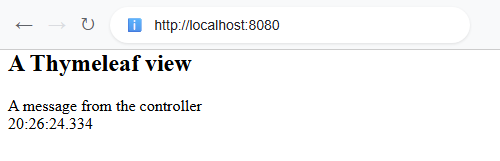 $ curl -s "http://localhost:8080"
<!DOCTYPE html>
<html xmlns="http://www.w3.org/1999/xhtml">
<body>
<h2>A Thymeleaf view</h2>
<div>A message from the controller</div>
<div>20:26:24.334</div>
</body>
</html>
As seen above, the model attributes are rendered using Thymeleaf-specific th:* attributes such as th:text (details here).
The request flow
Example ProjectDependencies and Technologies Used: - spring-webmvc 7.0.6 (Spring Web MVC)
Version Compatibility: 3.2.9.RELEASE - 7.0.6 Version compatibilities of spring-webmvc with this example: Versions in green have been tested.
- thymeleaf 3.1.3.RELEASE (thymeleaf)
- thymeleaf-spring6 3.1.3.RELEASE (thymeleaf-spring6)
- jakarta.servlet-api 6.1.0 (Jakarta Servlet API documentation)
- JDK 25
- Maven 3.9.11
|



