This example shows how to use the ROME library to generate an RSS feed in a Spring MVC application.
Deprecation notice: As of Spring Framework 7.0 (released in November 2025), all view classes in the org.springframework.web.servlet.view.feed package, including AbstractRssFeedView and AbstractAtomFeedView, are deprecated. They still work in 7.0, but new code should render the feed directly in a web handler, as shown at the end of this tutorial. Spring 7 also requires Jakarta EE 11 (Servlet 6.1, for example Tomcat 11 or later), so the old javax.servlet imports must be replaced with jakarta.servlet.
Example
Additional Maven Dependency
pom.xml<dependency>
<groupId>com.rometools</groupId>
<artifactId>rome</artifactId>
<version>2.1.0</version>
</dependency>
Java Config class
package com.logicbig.example;

import org.springframework.context.annotation.ComponentScan;
import org.springframework.context.annotation.Configuration;
import org.springframework.web.servlet.config.annotation.EnableWebMvc;
import org.springframework.web.servlet.config.annotation.ViewResolverRegistry;
import org.springframework.web.servlet.config.annotation.WebMvcConfigurer;
import org.springframework.web.servlet.view.BeanNameViewResolver;
import org.springframework.web.servlet.view.InternalResourceViewResolver;

@EnableWebMvc
@Configuration
@ComponentScan
public class MyWebConfig implements WebMvcConfigurer {
    @Override
    public void configureViewResolvers(ViewResolverRegistry registry) {
        BeanNameViewResolver resolver = new BeanNameViewResolver();
        resolver.setOrder(0);
        registry.viewResolver(resolver);

        InternalResourceViewResolver viewResolver = new InternalResourceViewResolver();
        viewResolver.setPrefix("/WEB-INF/views/");
        viewResolver.setSuffix(".jsp");
        viewResolver.setOrder(1);
        registry.viewResolver(viewResolver);
    }
}
In the above configuration, we are using BeanNameViewResolver for resolving the RSS view by its bean name. Both resolvers have the same default order, so the registration order matters: the BeanNameViewResolver must be declared first. It returns null when no view bean matches the name, which lets the InternalResourceViewResolver handle the remaining view names (otherwise the JSP resolver would accept every name and the RSS view would never be found).
Implementing the View
Spring provides the AbstractRssFeedView support class for generating ROME's RSS feed. Override buildFeedMetadata() to set the channel properties, and buildFeedItems() to create the feed items.
package com.logicbig.example;

import com.rometools.rome.feed.rss.Channel;
import com.rometools.rome.feed.rss.Content;
import com.rometools.rome.feed.rss.Item;
import org.springframework.stereotype.Component;
import org.springframework.web.servlet.view.feed.AbstractRssFeedView;
import jakarta.servlet.http.HttpServletRequest;
import jakarta.servlet.http.HttpServletResponse;
import java.util.ArrayList;
import java.util.List;
import java.util.Map;

@Component("rssFeedView")
public class MyRssFeedView extends AbstractRssFeedView {

    @Override
    protected void buildFeedMetadata(Map<String, Object> model,
                                     Channel feedChannel,
                                     HttpServletRequest request) {

        FeedInfo feedInfo = (FeedInfo) model.get("feedInfo");
        feedChannel.setTitle(feedInfo.getTitle());
        feedChannel.setLink(feedInfo.getLink());
        feedChannel.setDescription(feedInfo.getDesc());
    }

    @Override
    protected List<Item> buildFeedItems(Map<String, Object> model,
                                        HttpServletRequest httpServletRequest,
                                        HttpServletResponse httpServletResponse)
            throws Exception {

        List<Item> items = new ArrayList<>();
        FeedInfo feedInfo = (FeedInfo) model.get("feedInfo");

        for (FeedEntry feedEntry : feedInfo.getFeedEntries()) {
            Item item = new Item();
            item.setTitle(feedEntry.getTitle());
            item.setLink(feedEntry.getLink());
            item.setPubDate(feedEntry.getDate());

            Content content = new Content();
            content.setValue(feedEntry.getContent());
            item.setContent(content);

            items.add(item);
        }

        return items;
    }
}
package com.logicbig.example;

import java.util.ArrayList;
import java.util.List;

public class FeedInfo {
    private String title;
    private String link;
    private String desc;
    private List<FeedEntry> feedEntries = new ArrayList<>();
    .............
}
package com.logicbig.example;

import java.util.Date;

public class FeedEntry {
    String title;
    String link;
    String content;
    Date date;
    .............
}
A Spring Controller
package com.logicbig.example;

import org.springframework.stereotype.Controller;
import org.springframework.ui.Model;
import org.springframework.web.bind.annotation.RequestMapping;
import org.springframework.web.bind.annotation.GetMapping;
import org.springframework.web.bind.annotation.RequestMethod;
import java.util.ArrayList;
import java.util.Date;
import java.util.List;

@Controller
@RequestMapping("/")
public class RssFeedController {

    @GetMapping("/")
    public String mainView() {
        return "main";
    }

    @GetMapping("/rssFeed")
    public String handleForexRequest(Model model) {
        model.addAttribute("feedInfo", getFeedInfo());
        return "rssFeedView";
    }

    private static FeedInfo getFeedInfo() {
        //todo: move it to service layer
        FeedInfo feedInfo = new FeedInfo();
        feedInfo.setTitle("Logicbig Tutorials");
        feedInfo.setLink("http://www.logicbig.com");
        feedInfo.setDesc("Logicbig tutorials feed");

        List<FeedEntry> list = new ArrayList<>();
        list.add(createFeedEntry("Spring Framework", "spring-framework",
                                 "Spring Framework Tutorials", new Date()));
        list.add(createFeedEntry("Java EE", "java-ee-tutorial",
                                 "Java EE Tutorials", new Date()));
        list.add(createFeedEntry("Java Core", "core-java-tutorial",
                                 "Core Java Tutorials", new Date()));
        feedInfo.setFeedEntries(list);
        return feedInfo;
    }

    private static FeedEntry createFeedEntry(String title,
                                             String uri,
                                             String content,
                                             Date date) {
        FeedEntry fe = new FeedEntry();
        fe.setTitle(title);
        fe.setLink("http://www.logicbig.com/tutorials/" + uri);
        fe.setContent(content);
        fe.setDate(date);
        return fe;
    }
}
src/main/webapp/WEB-INF/views/main.jsp<html>
<body>
<h2>Spring RSS Feed Example</h2>
<a href="/rssFeed">Tutorials Feed</a>
</body>
</html>
To try examples, run embedded Jetty (configured in pom.xml of example project below):
mvn jetty:run Output
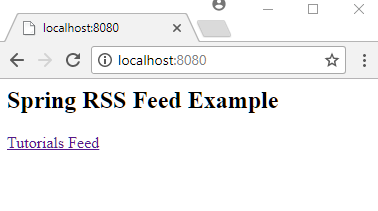
On clicking the 'Tutorials Feed' link:
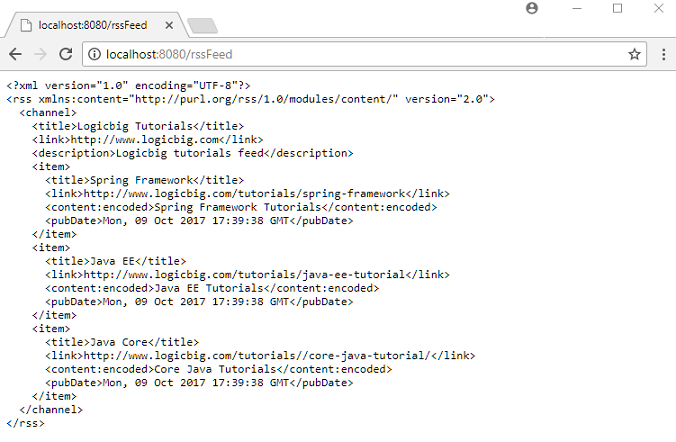
$ curl -s "http://localhost:8080/rssFeed"
<?xml version="1.0" encoding="UTF-8"?>
<rss xmlns:content="http://purl.org/rss/1.0/modules/content/" version="2.0">
  <channel>
    <title>Logicbig Tutorials</title>
    <link>http://www.logicbig.com</link>
    <description>Logicbig tutorials feed</description>
    <item>
      <title>Spring Framework</title>
      <link>http://www.logicbig.com/tutorials/spring-framework</link>
      <content:encoded>Spring Framework Tutorials</content:encoded>
      <pubDate>Tue, 06 Oct 2026 11:01:02 GMT</pubDate>
    </item>
    <item>
      <title>Java EE</title>
      <link>http://www.logicbig.com/tutorials/java-ee-tutorial</link>
      <content:encoded>Java EE Tutorials</content:encoded>
      <pubDate>Tue, 06 Oct 2026 11:01:02 GMT</pubDate>
    </item>
    <item>
      <title>Java Core</title>
      <link>http://www.logicbig.com/tutorials/core-java-tutorial</link>
      <content:encoded>Core Java Tutorials</content:encoded>
      <pubDate>Tue, 06 Oct 2026 11:01:02 GMT</pubDate>
    </item>
  </channel>
</rss>
Alternative for Spring 7 and later: rendering the feed directly
Since the feed view classes are deprecated, a handler method can build the ROME Channel and write the XML itself, with no custom view and no BeanNameViewResolver required:
@GetMapping(value = "/rssFeed", produces = "application/rss+xml;charset=UTF-8")
@ResponseBody
public String rssFeed() throws FeedException {
    Channel channel = new Channel("rss_2.0");
    channel.setTitle("Logicbig Tutorials");
    channel.setLink("https://www.logicbig.com");
    channel.setDescription("Logicbig tutorials feed");
    channel.setItems(getFeedInfo().getFeedEntries().stream()
                                  .map(RssFeedController::toItem)
                                  .toList());
    return new WireFeedOutput().outputString(channel);
}

private static Item toItem(FeedEntry entry) {
    Item item = new Item();
    item.setTitle(entry.getTitle());
    item.setLink(entry.getLink());
    item.setPubDate(entry.getDate());
    Description description = new Description();
    description.setValue(entry.getContent());
    item.setDescription(description);
    return item;
}
The imports come from com.rometools.rome.feed.rss (Channel, Item, Description) and com.rometools.rome.io (WireFeedOutput, FeedException).
Example ProjectDependencies and Technologies Used: - spring-webmvc 7.0.6 (Spring Web MVC)
Version Compatibility: 4.1.0.RELEASE - 7.0.6 Version compatibilities of spring-webmvc with this example: Versions in green have been tested.
- jakarta.servlet-api 6.1.0 (Jakarta Servlet API documentation)
- rome 2.1.0 (All Roads Lead to ROME. ROME is a set of Atom/RSS Java utilities that make it
easy to work in Java with most syndication formats. Today it accepts all flavors of RSS
(0.90, 0.91, 0.92, 0.93, 0.94, 1.0 and 2.0), Atom 0.3 and Atom 1.0 feeds. Rome includes
a set of parsers and generators for the various flavors of feeds, as well as converters
to convert from one format to another. The parsers can give you back Java objects that
are either specific for the format you want to work with, or a generic normalized
SyndFeed object that lets you work on with the data without bothering about the
underlying format. [Description from rome-2.1.0.pom])
- JDK 25
- Maven 3.9.11
|



