This example shows how to render a Spring MVC view in JSON format. Since Spring Framework 7.0, the class for this is JacksonJsonView, which is based on Jackson 3. By default, the entire content of the model Map (populated in a controller method) is rendered as a JSON object, except for framework-specific objects such as BindingResult.
Note: The older MappingJackson2JsonView (based on Jackson 2) is deprecated as part of the deprecation of Jackson 2 support in Spring Framework 7.0. Both classes are used in the same way; only the class name and the Jackson dependency differ. Use MappingJackson2JsonView only if you are still on Spring Framework 6.x or earlier.
Example
Additional Maven Dependency
pom.xml<dependency>
<groupId>tools.jackson.core</groupId>
<artifactId>jackson-databind</artifactId>
<version>3.1.0</version>
</dependency>
This is the Jackson 2 artifact, which is used with MappingJackson2JsonView. For JacksonJsonView (Spring Framework 7.0 or later), use tools.jackson.core:jackson-databind instead. Jackson 3 uses the tools.jackson package, while the Jackson annotations (for example @JsonView) remain in com.fasterxml.jackson.annotation.
Java Config class
package com.logicbig.example;

import org.springframework.context.annotation.Bean;
import org.springframework.context.annotation.ComponentScan;
import org.springframework.context.annotation.Configuration;
import org.springframework.web.servlet.View;
import org.springframework.web.servlet.config.annotation.EnableWebMvc;
import org.springframework.web.servlet.config.annotation.ViewResolverRegistry;
import org.springframework.web.servlet.config.annotation.WebMvcConfigurer;
import org.springframework.web.servlet.view.BeanNameViewResolver;
import org.springframework.web.servlet.view.InternalResourceViewResolver;
import org.springframework.web.servlet.view.json.JacksonJsonView;

@EnableWebMvc
@Configuration
@ComponentScan
public class MyWebConfig implements WebMvcConfigurer {

    @Override
    public void configureViewResolvers(ViewResolverRegistry registry) {
        BeanNameViewResolver resolver = new BeanNameViewResolver();
        resolver.setOrder(0);
        registry.viewResolver(resolver);

        InternalResourceViewResolver viewResolver = new InternalResourceViewResolver();
        viewResolver.setPrefix("/WEB-INF/views/");
        viewResolver.setSuffix(".jsp");
        viewResolver.setOrder(1);
        registry.viewResolver(viewResolver);
    }

    @Bean(name = "currencyRateView")
    public View jsonView() {
        JacksonJsonView view = new JacksonJsonView();
        return view;
    }
}
In the above configuration, we are using BeanNameViewResolver to resolve the JSON view by its bean name. Because InternalResourceViewResolver accepts any view name, make sure that BeanNameViewResolver has a higher precedence (for example, by calling setOrder(0)), so that it is consulted first.
To render only some of the model attributes, use setModelKeys(Set) on the view.
Spring Controller
package com.logicbig.example;

import org.springframework.stereotype.Controller;
import org.springframework.ui.Model;
import org.springframework.web.bind.annotation.RequestMapping;
import org.springframework.web.bind.annotation.GetMapping;
import org.springframework.web.bind.annotation.RequestMethod;
import java.math.BigDecimal;
import java.math.RoundingMode;
import java.util.ArrayList;
import java.util.Currency;
import java.util.Date;
import java.util.List;

@Controller
@RequestMapping("/")
public class MyController {

    @GetMapping("/")
    public String mainView() {
        return "main";
    }

    @GetMapping("/rates")
    public String handleForexRequest(Model model) {
        model.addAttribute("currencyRates", getCurrencyRates());
        return "currencyRateView";
    }
    .............
}
package com.logicbig.example;

import java.math.BigDecimal;
import java.time.LocalDateTime;
import java.util.Date;

public class CurrencyRate {
    private String currencyPair;
    private Date date;
    private BigDecimal askPrice;
    private BigDecimal bidPrice;
    .............
}
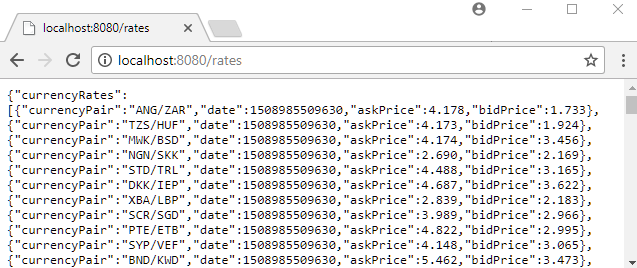
The handler method adds the currencyRates attribute to the model and returns the view name currencyRateView. That name is resolved to the JSON view bean, and the resulting JSON has currencyRates as its top-level key.
src/main/webapp/WEB-INF/views/main.jsp<html>
<body>
<h2>Spring JSON view Example</h2>
<a href="/rates">Currency Rates</a>
</body>
</html>
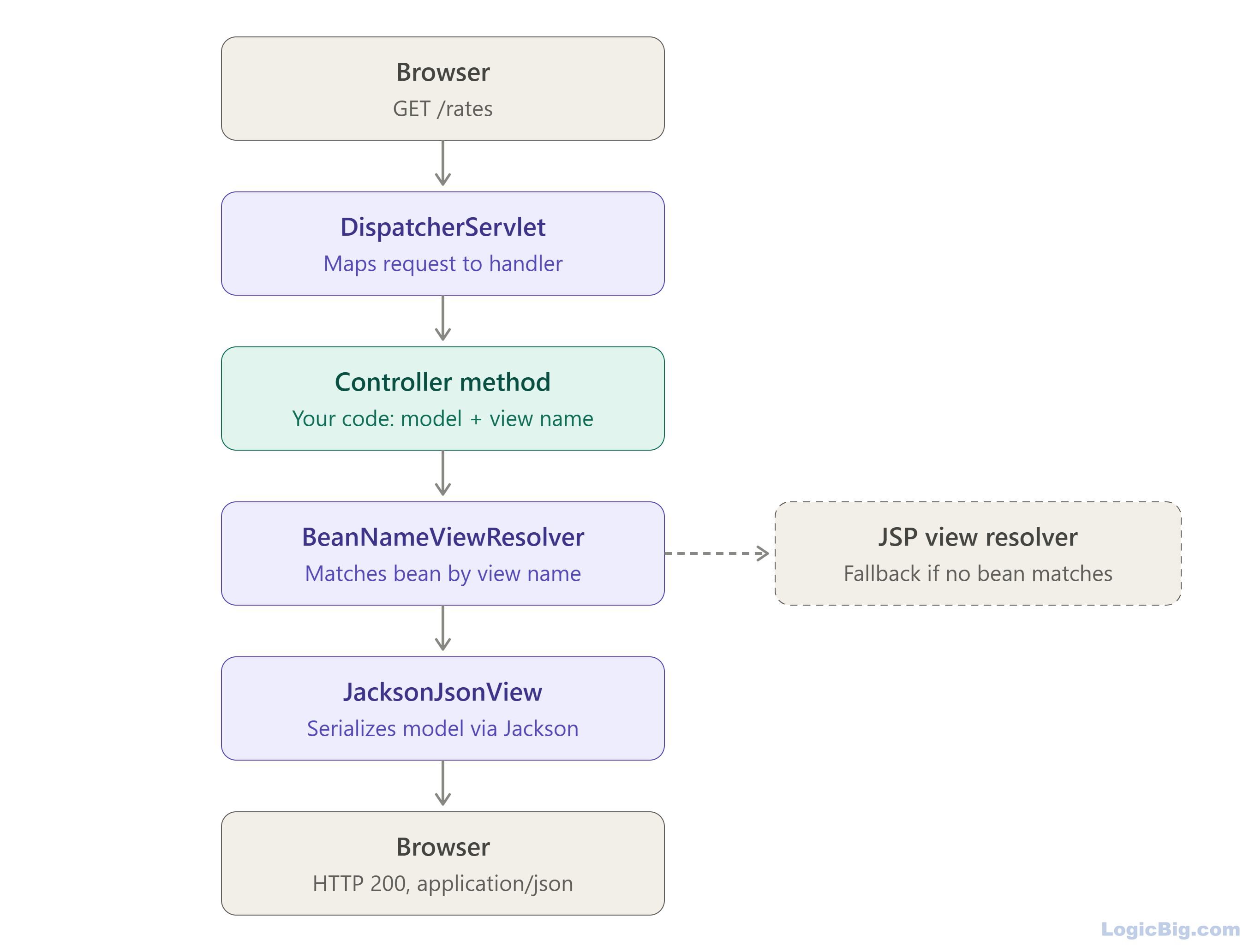
Following diagram shows how Json View works in Spring MVC:
Running the example
To try examples, run embedded tomcat (configured in pom.xml of example project below):
mvn tomcat7:run-war Output
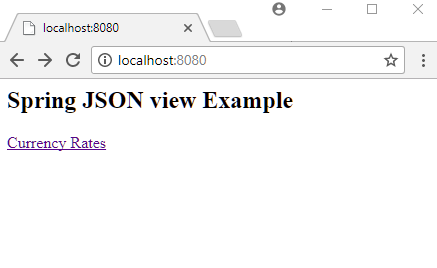
On clicking the 'Currency Rates' link:
$ curl -s "http://localhost:8080/rates"
{"currencyRates":[{"currencyPair":"CUP/IDR","date":1791333407254,"askPrice":4.573,"bidPrice":3.732},{"currencyPair":"BND/LTL","date":1791333407254,"askPrice":5.436,"bidPrice":2.992},{"currencyPair":"SKK/NIO","date":1791333407254,"askPrice":4.897,"bidPrice":4.330},{"currencyPair":"PTE/GHC","date":1791333407254,"askPrice":6.570,"bidPrice":5.513},{"currencyPair":"XAF/XAU","date":1791333407254,"askPrice":3.733,"bidPrice":1.601}]}
Download JSON view as file
To download the JSON as a file, set the 'Content-Disposition' header in the controller method:
@GetMapping("/rates")
public String handleForexRequest(Model model, HttpServletResponse response) {
    response.setHeader(HttpHeaders.CONTENT_DISPOSITION,
            ContentDisposition.attachment().filename("rates.json").build().toString());
    model.addAttribute("currencyRates", getCurrencyRates());
    return "currencyRateView";
}
Here HttpServletResponse comes from the jakarta.servlet.http package (Spring Framework 6 and later). Older versions use javax.servlet.http.
Example ProjectDependencies and Technologies Used: - spring-webmvc 7.0.6 (Spring Web MVC)
Version Compatibility: 3.2.9.RELEASE - 7.0.6 Version compatibilities of spring-webmvc with this example: Versions in green have been tested.
- jakarta.servlet-api 6.1.0 (Jakarta Servlet API documentation)
- jackson-databind 3.1.0 (General data-binding functionality for Jackson: works on core streaming API)
- JDK 25
- Maven 3.9.11
|



