This example demonstrates how to generate a PDF document and use it as the view technology in a Spring MVC application. We will use the iText library to create the document programmatically.
Example
Additional Maven Dependency
pom.xml<dependency>
<groupId>com.itextpdf</groupId>
<artifactId>itext7-core</artifactId>
<version>7.0.4</version>
</dependency>
Java Config class
In this example, we use BeanNameViewResolver to resolve the PDF view. This means we need to register an implementation of View as a bean and return that bean's name as the view name from the Spring controller. See this simple example of BeanNameViewResolver for more details.
package com.logicbig.example;

import org.springframework.context.annotation.ComponentScan;
import org.springframework.context.annotation.Configuration;
import org.springframework.web.servlet.config.annotation.EnableWebMvc;
import org.springframework.web.servlet.config.annotation.ViewResolverRegistry;
import org.springframework.web.servlet.config.annotation.WebMvcConfigurer;
import org.springframework.web.servlet.view.BeanNameViewResolver;
import org.springframework.web.servlet.view.InternalResourceViewResolver;

@EnableWebMvc
@Configuration
@ComponentScan
public class MyWebConfig implements WebMvcConfigurer {
    @Override
    public void configureViewResolvers(ViewResolverRegistry registry) {
        BeanNameViewResolver resolver = new BeanNameViewResolver();
        resolver.setOrder(0);
        registry.viewResolver(resolver);

        InternalResourceViewResolver viewResolver = new InternalResourceViewResolver();
        viewResolver.setPrefix("/WEB-INF/views/");
        viewResolver.setSuffix(".jsp");
        viewResolver.setOrder(1);
        registry.viewResolver(viewResolver);
    }
}
Note that InternalResourceViewResolver accepts any view name, so it must always be consulted last. BeanNameViewResolver returns null when no bean matches, which lets the next resolver try. The configuration above relies on registration order. In a real application, make the order explicit by calling setOrder(..) on both resolvers, giving BeanNameViewResolver the lower value.
Implementing the View
Spring provides the support class AbstractPdfView, but it is built on a legacy iText 2.x-style API (the com.lowagie package, as continued by OpenPDF). In addition, as of Spring Framework 7.0 the entire org.springframework.web.servlet.view.document package is deprecated (see the notes at the end of this tutorial). Instead, we extend AbstractView and use the iText API directly.
package com.logicbig.example;

import com.itextpdf.io.font.FontConstants;
import com.itextpdf.kernel.font.PdfFontFactory;
import com.itextpdf.kernel.pdf.PdfDocument;
import com.itextpdf.kernel.pdf.PdfWriter;
import com.itextpdf.layout.Document;
import com.itextpdf.layout.element.Paragraph;
import org.springframework.stereotype.Component;
import org.springframework.web.servlet.view.AbstractView;

import jakarta.servlet.http.HttpServletRequest;
import jakarta.servlet.http.HttpServletResponse;
import java.time.format.DateTimeFormatter;
import java.time.format.FormatStyle;
import java.util.Map;

@Component("reportView")
public class ReportPdfView extends AbstractView {

    @Override
    protected void renderMergedOutputModel(Map<String, Object> model,
                                           HttpServletRequest request,
                                           HttpServletResponse response) throws Exception {
        response.setContentType("application/pdf");
        response.setHeader("Content-Disposition", "attachment; filename=myReport.pdf");
        Report report = (Report) model.get("report");

        //IText API
        PdfWriter pdfWriter = new PdfWriter(response.getOutputStream());
        PdfDocument pdf = new PdfDocument(pdfWriter);
        Document pdfDocument = new Document(pdf);

        //title
        Paragraph title = new Paragraph(report.getName());
        title.setFont(PdfFontFactory.createFont(FontConstants.HELVETICA));
        title.setFontSize(18f);
        title.setItalic();
        pdfDocument.add(title);

        //date
        Paragraph date = new Paragraph(report.getDate().format(
                DateTimeFormatter.ofLocalizedDate(FormatStyle.FULL)));
        date.setFontSize(16f);
        pdfDocument.add(date);

        //content
        Paragraph content = new Paragraph(report.getContent());
        pdfDocument.add(content);

        pdfDocument.close();
    }
}
package com.logicbig.example;

import java.time.LocalDateTime;

public class Report {
    private String name;
    private String content;
    private LocalDateTime date;
    .............
}
Writing a Spring Controller
The controller returns the bean name reportView, which BeanNameViewResolver maps to our ReportPdfView bean. The model attribute report is read by the view when it renders the PDF.
package com.logicbig.example;

import org.springframework.stereotype.Controller;
import org.springframework.ui.Model;
import org.springframework.web.bind.annotation.RequestMapping;
import org.springframework.web.bind.annotation.GetMapping;
import org.springframework.web.bind.annotation.RequestMethod;
import java.time.LocalDateTime;

@Controller
@RequestMapping("/")
public class MyController {

    @GetMapping("/")
    public String mainView() {
        return "main";
    }

    @GetMapping("/report")
    public String handleForexRequest(Model model) {
        model.addAttribute("report", getReport());
        return "reportView";
    }

    public Report getReport() {
        //dummy report
        Report report = new Report();
        report.setName("My Report");
        report.setContent(
                "Lorem ipsum dolor sit amet, consectetuer adipiscing elit. "
                        + "Aenean commodo ligula eget dolor. Aenean massa.");
        report.setDate(LocalDateTime.now());
        return report;
    }
}
A page with a link to the report
src/main/webapp/WEB-INF/views/main.jsp<html>
<body>
<h2>Spring Pdf View Example</h2>
<a href="/report">Get the Report</a>
</body>
</html>
Output
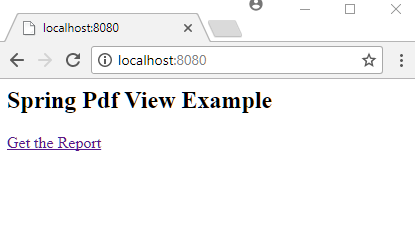
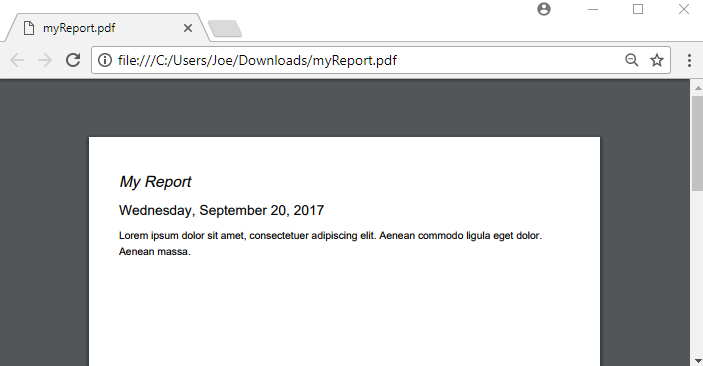
Clicking on the link downloads the generated PDF:
Tests
package com.logicbig.example;

import com.itextpdf.kernel.pdf.PdfDocument;
import com.itextpdf.kernel.pdf.PdfReader;
import com.itextpdf.kernel.pdf.canvas.parser.PdfTextExtractor;
import org.junit.jupiter.api.BeforeEach;
import org.junit.jupiter.api.Test;
import org.junit.jupiter.api.extension.ExtendWith;
import org.springframework.beans.factory.annotation.Autowired;
import org.springframework.test.context.ContextConfiguration;
import org.springframework.test.context.junit.jupiter.SpringExtension;
import org.springframework.test.context.web.WebAppConfiguration;
import org.springframework.test.web.servlet.MockMvc;
import org.springframework.test.web.servlet.setup.MockMvcBuilders;
import org.springframework.web.context.WebApplicationContext;
import java.io.ByteArrayInputStream;
import java.io.IOException;
import java.nio.charset.StandardCharsets;
import java.time.LocalDate;
import java.time.format.DateTimeFormatter;
import java.time.format.FormatStyle;
import static org.hamcrest.MatcherAssert.assertThat;
import static org.hamcrest.Matchers.*;
import static org.springframework.test.web.servlet.request.MockMvcRequestBuilders.get;
import static org.springframework.test.web.servlet.result.MockMvcResultMatchers.*;

@ExtendWith(SpringExtension.class)
@WebAppConfiguration
@ContextConfiguration(classes = MyWebConfig.class)
public class MyControllerTest {

    @Autowired
    private WebApplicationContext webApplicationContext;

    private MockMvc mockMvc;

    @BeforeEach
    public void setUp() {
        mockMvc = MockMvcBuilders.webAppContextSetup(webApplicationContext)
                                 .build();
    }

    @Test
    public void reportIsDownloadedAsPdfAttachment() throws Exception {
        mockMvc.perform(get("/report"))
               .andExpect(status().isOk())
               .andExpect(header().string(
                       "Content-Disposition",
                       containsString("filename=myReport.pdf")));
    }

    @Test
    public void reportBodyIsAPdfFile() throws Exception {
        assertThat(new String(mockMvc.perform(get("/report"))
                                     .andExpect(status().isOk())
                                     .andReturn()
                                     .getResponse()
                                     .getContentAsByteArray(),
                              StandardCharsets.ISO_8859_1),
                   startsWith("%PDF-"));
    }

    @Test
    public void reportContainsTitleDateAndContent() throws Exception {
        assertThat(extractNormalizedText(
                           mockMvc.perform(get("/report"))
                                  .andExpect(status().isOk())
                                  .andReturn()
                                  .getResponse()
                                  .getContentAsByteArray()),
                   allOf(containsString("My Report"),
                         containsString(
                                 LocalDate.now()
                                          .format(DateTimeFormatter.ofLocalizedDate(
                                                  FormatStyle.FULL))),
                         containsString(
                                 "Lorem ipsum dolor sit amet, "
                                         + "consectetuer adipiscing elit."),
                         containsString(
                                 "Aenean commodo ligula eget dolor. "
                                         + "Aenean massa.")));
    }

    @Test
    public void reportContentTypeIsPdf() throws Exception {
        mockMvc.perform(get("/report"))
               .andExpect(status().isOk())
               .andExpect(content().contentType("application/pdf"));
    }

    private static String extractNormalizedText(byte[] pdfBytes)
            throws IOException {
        try (PdfDocument pdfDocument =
                     new PdfDocument(new PdfReader(new ByteArrayInputStream(
                             pdfBytes)))) {
            return PdfTextExtractor.getTextFromPage(
                                           pdfDocument.getPage(1))
                                   .replaceAll("\\s+", " ");
        }
    }
}
mvn clean test -Dtest="MyControllerTest" Output (filtered)$ mvn clean test -Dtest="MyControllerTest"
[INFO] -------------------------------------------------------
[INFO] T E S T S
[INFO] -------------------------------------------------------
[INFO] Running com.logicbig.example.MyControllerTest
[INFO] Tests run: 4, Failures: 0, Errors: 0, Skipped: 0, Time elapsed: 2.849 s -- in com.logicbig.example.MyControllerTest
[INFO]
[INFO] Results:
[INFO]
[INFO] Tests run: 4, Failures: 0, Errors: 0, Skipped: 0
[INFO]
[INFO] ------------------------------------------------------------------------
[INFO] BUILD SUCCESS
[INFO] ------------------------------------------------------------------------
[INFO] Total time: 14.852 s
[INFO] Finished at: 2026-10-06T05:09:11-05:00
[INFO] ------------------------------------------------------------------------
Versions Notes
- Spring document views are deprecated. As of Spring Framework 7.0, all view classes in
org.springframework.web.servlet.view.document (AbstractPdfView, AbstractXlsView, and related classes) are deprecated, and removal is planned for Spring Framework 7.1 or 7.2. Spring's recommendation is that libraries provide their own View implementations, or that applications render directly in web handlers. The approach in this tutorial (a custom AbstractView subclass) follows that recommendation and does not depend on the deprecated package.
- iText artifact and API. The
itext7-core artifact has been moved to com.itextpdf:itext-core (a POM-type dependency), and the current line is iText 9.x. In current iText versions, FontConstants is replaced by com.itextpdf.io.font.constants.StandardFonts. Check the current iText documentation for any other API differences.
- iText licensing. iText is dual-licensed under AGPL and a commercial license. The AGPL is a copyleft license, so check that it is compatible with your project before using it in production. OpenPDF is a commonly used alternative with a more permissive license.
- Content type.
AbstractView defaults to an HTML content type. Call setContentType("application/pdf") on the view (for example, in its constructor) so the response is labeled correctly.
- Resource handling. Create the iText
PdfDocument and Document in a try-with-resources block so they are closed even if rendering fails.
- JSP. The sample uses JSP only for the landing page. JSP still works with Spring MVC but is a legacy choice for new projects. Template engines such as Thymeleaf are generally preferred. A plain static HTML page would also work for this example.
Example ProjectDependencies and Technologies Used: - spring-webmvc 7.0.6 (Spring Web MVC)
Version Compatibility: 3.2.9.RELEASE - 7.0.6 Version compatibilities of spring-webmvc with this example: Versions in green have been tested.
- spring-test 7.0.6 (Spring TestContext Framework)
- junit-jupiter-engine 6.0.3 (Module "junit-jupiter-engine" of JUnit)
- hamcrest 3.0 (Core API and libraries of hamcrest matcher framework)
- jakarta.servlet-api 6.1.0 (Jakarta Servlet API documentation)
- itext7-core 7.0.4 (A Free Java-PDF library)
- JDK 25
- Maven 3.9.11
|



