The following example shows how to use the internationalization capabilities that come with Spring MVC's theme functionality. By default, ResourceBundleThemeSource (which implements ThemeSource) is used to load theme properties via a ResourceBundle. That means we can also add i18n-based, multiple theme properties files. One of them will be picked depending on the client's locale (based on the 'Accept-Language' header value). Check out our MVC i18n tutorial as well.
Note: Spring MVC's theme support (ThemeResolver, ThemeSource, ResourceBundleThemeSource, and the related implementations shown below) was deprecated as of Spring Framework 6.0 in favor of using CSS directly, and was removed entirely in Spring Framework 7.0. The example on this page will not compile against Spring Framework 7.0 or later, and against Spring Boot 4 and later, since those classes no longer exist. It remains useful for understanding how theming worked in earlier Spring MVC versions.
Example
Java Config Class
In this example, we are using the default FixedThemeResolver.
In addition to multiple theme.properties files, we are also going to add some i18n-based message files. For that, we have to configure our own ResourceBundleMessageSource bean:
package com.logicbig.example;

import org.springframework.context.MessageSource;
import org.springframework.context.annotation.Bean;
import org.springframework.context.annotation.ComponentScan;
import org.springframework.context.annotation.Configuration;
import org.springframework.context.support.ResourceBundleMessageSource;
import org.springframework.web.servlet.config.annotation.*;

@EnableWebMvc
@Configuration
@ComponentScan
public class MyWebConfig implements WebMvcConfigurer {

    @Bean
    public MessageSource messageSource() {
        //this is only needed for text messages and not needed for theme internationalization
        ResourceBundleMessageSource messageSource = new ResourceBundleMessageSource();
        messageSource.setBasenames("texts/msg");
        return messageSource;
    }

    @Override
    public void addViewControllers(ViewControllerRegistry registry) {
        //mapping '/' to index view name without a controller
        ViewControllerRegistration r = registry.addViewController("/");
        r.setViewName("index");
    }

    @Override
    public void configureViewResolvers(ViewResolverRegistry registry) {
        registry.jsp();//default prefix=/WEB-INF/", suffix=".jsp"
    }
}
Theme Properties Files
src/main/resources/theme.propertiesbackground=beige
content-style=width:500px;border:solid 2px blue;margin:auto;padding:30px;
src/main/resources/theme_fr.propertiesbackground=darkBlue
content-style=width:500px;border:solid 2px white;color:white;margin:auto;padding:30px;
Also note that, by default, the theme's ResourceBundleThemeSource uses an empty base name prefix, so we don't need to use a prefix with the theme properties file names. In the next example, we will learn how to use a custom prefix base name.
Message Properties Files
src/main/resources/texts/msg.propertiesapp.msg = hi there
src/main/resources/texts/msg_fr.propertiesapp.msg = salut
JSP View
/src/main/webapp/WEB-INF/index.jsp<%@ taglib prefix="spring" uri="http://www.springframework.org/tags"%>
<html>
<body style="background-color:<spring:theme code='background'/>;">
<div style="<spring:theme code='content-style'/>">
<spring:message code="app.msg"/>
</div>
</body>
</html>
To try examples, run embedded Jetty (configured in pom.xml of example project below):
mvn jetty:run Output
From a browser with the default locale of 'en-US':
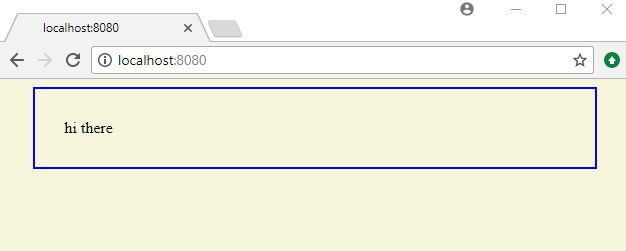
Using curl:
$ curl -s "http://localhost:8080/"

<html>
<body style="background-color:beige;">
<div style="width:500px;border:solid 2px blue;margin:auto;padding:30px;">
    hi there
</div>
</body>
</html>
Using curl with an explicit 'Accept-Language' header value of 'fr-FR':
$ curl -s "http://localhost:8080/" -H "Accept-Language: fr-FR"

<html>
<body style="background-color:darkBlue ;">
<div style="width:500px;border:solid 2px white;color:white;margin:auto;padding:30px;">
    salut
</div>
</body>
</html>
Example ProjectDependencies and Technologies Used: - spring-webmvc 6.0.0 (Spring Web MVC)
Version Compatibility: 4.1.0.RELEASE - 6.2.19 Version compatibilities of spring-webmvc with this example: Versions in green have been tested.
- jakarta.servlet-api 6.0.0 (Jakarta Servlet API documentation)
- JDK 17
- Maven 3.9.11
|



