The following example shows how to use themes in Spring MVC with the default settings. An implementation of ThemeResolver is used by DispatcherServlet to handle theme-related logic. By default, FixedThemeResolver is used, and with this setting, a properties file named theme.properties should be on the classpath. This properties file defines the 'codes' (as property keys) that can be referenced in a view (e.g. a JSP file). Let's understand this with an example.
Note: As of Spring Framework 6.0, theme support (ThemeResolver, ThemeSource, FixedThemeResolver, and related classes) is deprecated in favor of using CSS directly, with no direct replacement planned. This tutorial remains useful for understanding how theme resolution worked in earlier versions of Spring MVC, but it should not be used as a basis for new applications.
Example
Theme Property File
By default, the name 'theme' is used for the property file (as set by AbstractThemeResolver#defaultThemeName).
src/main/resources/theme.propertiesbackground=pink
content-width=400px
main-css=/themes/theme-1/main.css
The CSS File
As specified in the properties file above, we need to provide the following CSS file:
src/main/webapp/app-themes/theme-1/main.css.summary{
width: 100px;
margin: 50px 50px 50px 50px;
background: yellow;
border: solid 2px blue;
}
Java Config Class
package com.logicbig.example;

import org.springframework.context.annotation.ComponentScan;
import org.springframework.context.annotation.Configuration;
import org.springframework.web.servlet.config.annotation.*;

@EnableWebMvc
@Configuration
@ComponentScan
public class MyWebConfig implements WebMvcConfigurer {

    @Override
    public void addViewControllers(ViewControllerRegistry registry) {
        //mapping '/' to index view name without a controller
        ViewControllerRegistration r = registry.addViewController("/");
        r.setViewName("index");
    }

    @Override
    public void configureViewResolvers(ViewResolverRegistry registry) {
        registry.jsp();//default prefix=/WEB-INF/", suffix=".jsp"
    }

    @Override
    public void addResourceHandlers(ResourceHandlerRegistry registry) {
        //specifying static resource location for themes related files(css etc)
        registry.addResourceHandler("/themes/**")
                .addResourceLocations("/app-themes/");
    }
}
JSP View:
/src/main/webapp/WEB-INF/index.jsp<%@ taglib prefix="spring" uri="http://www.springframework.org/tags"%>
<html>
<head>
<link rel="stylesheet" href="<spring:theme code='main-css'/>" type="text/css"/>
</head>
<body style="background-color:<spring:theme code='background'/>;">
<div style="width:<spring:theme code='content-width'/>;margin:auto;">
Pellentesque habitant morbi tristique senectus et netus et malesuada fames ac turpis egestas.
Vestibulum tortor quam, feugiat vitae, ultricies eget, tempor sit amet, ante.
Donec eu libero sit amet quam egestas semper. Aenean ultricies
mi vitae est. Mauris placerat eleifend leo.
</div>
<div class="summary">Aliquam tincidunt mauris eu risus</div>
</body>
</html>
To try examples, run embedded Jetty (configured in pom.xml of example project below):
mvn jetty:run Output
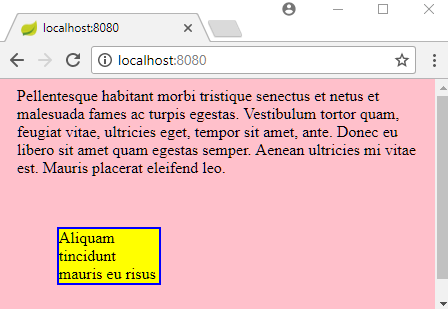
$ curl -s "http://localhost:8080/"

<html>
<head>
    <link rel="stylesheet" href="/themes/theme-1/main.css" type="text/css"/>
</head>
<body style="background-color:pink;">
    <div style="width:400px;margin:auto;">
        Pellentesque habitant morbi tristique senectus et netus et malesuada fames ac turpis egestas.
        Vestibulum tortor quam, feugiat vitae, ultricies eget, tempor sit amet, ante.
        Donec eu libero sit amet quam egestas semper. Aenean ultricies
        mi vitae est. Mauris placerat eleifend leo.
    </div>
    <div class="summary">Aliquam tincidunt mauris eu risus</div>
</body>
</html>
Example ProjectDependencies and Technologies Used: - spring-webmvc 6.0.0 (Spring Web MVC)
Version Compatibility: 4.1.0.RELEASE - 6.2.19 Version compatibilities of spring-webmvc with this example: Versions in green have been tested.
- jakarta.servlet-api 6.0.0 (Jakarta Servlet API documentation)
- JDK 17
- Maven 3.9.11
|



