A Model instance can add objects without a specified name by using the following methods:
Model addAttribute(Object attributeValue)
Model addAllAttributes(Collection<?> attributeValues)
The Model object auto-generates the attribute name and then forwards the call to addAttribute(String attributeName, Object attributeValue)
The following are the rules of the name generation strategy:
- For an object that is not a collection, a short class name is generated. For example, for java.lang.String, 'string' will be generated.
- For collections/arrays, 'List' is appended after the type of the elements it contains, e.g. 'stringList'. The collection/array must not be empty, because the logic uses the first element to determine its type.
Example
package com.logicbig.example;

import org.springframework.stereotype.Controller;
import org.springframework.ui.Model;
import org.springframework.web.bind.annotation.RequestMapping;

import java.util.Arrays;
import java.util.List;

@Controller
public class TheController {

    @RequestMapping("/")
    public String handleRequest (Model model) {
        String string1 = "my string value";
        model.addAttribute(string1);

        int i = 10;
        model.addAttribute(i);

        List<String> list = Arrays.asList("one", "two");
        model.addAttribute(list);
        return "myPage";
    }
}
myPage.jsp
src/main/webapp/WEB-INF/pages/myPage.jsp<%@ page language="java"
contentType="text/html; charset=ISO-8859-1"
pageEncoding="ISO-8859-1"%>
<%@ taglib uri="http://www.springframework.org/tags/form" prefix="fm"%>
<html>
<body style="margin:15px;">
<p>String value: ${string}</p>
<p>int value: ${integer}</p>
StringList:
<fm:checkboxes path="stringList" items="${stringList}" />
</body>
</html>
Output
To try examples, run embedded Jetty (configured in pom.xml of example project below):
mvn jetty:run 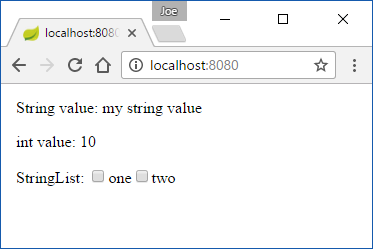
$ curl -s "http://localhost:8080/"


<html>
  <body style="margin:15px;">

      <p>String value: my string value</p>
      <p>int value: 10</p>
      StringList:
      <span><input id="1" type="checkbox" value="one"/><label for="1">one</label></span><span><input id="2" type="checkbox" value="two"/><label for="2">two</label></span><input type="hidden" name="_" value="on"/>

  </body>
</html>
If the same object type is populated multiple times in a single Model, an explicit attribute name should be used rather than relying on auto name generation.
Some developers prefer to use explicit names anyway, so that they have more control over attribute names. It's a good feature to use in simple cases, though.
The logic of name generation is actually delegated to Conventions#getVariableName(..). Here's a test to understand the auto-generation rules:
package com.logicbig.example;

import org.springframework.core.Conventions;
import java.util.*;

public class VariableNameTest {
    public static void main(String[] args) {

        Object obj = "test string";
        print(obj, "\"test string\"");

        obj = new String[]{"one", "two"};
        print(obj, "new String[]{\"one\", \"two\"};");

        obj = 5;
        print(obj, "5");

        obj = Integer.valueOf(5);
        print(obj, "Integer.valueOf(5)");

        obj = 'z';
        print(obj, "'z'");

        obj = Arrays.asList(1, 2, 3);
        print(obj, "Arrays.asList(1, 2, 3)");

        obj = new LinkedList<>(Arrays.asList(1, 2, 3));
        print(obj, "new LinkedList<>(Arrays.asList(1, 2, 3))");

        obj = new HashSet<>(Arrays.asList("1", "2"));
        print(obj, "new HashSet<>(Arrays.asList(\"1\", \"2\"))");

        obj = new HashMap<String, Integer>();
        print(obj, "new HashMap<String, Integer>()");

        obj = new LinkedHashMap<>();
        print(obj, "new LinkedHashMap<>()");

        obj = new TreeMap<>();
        print(obj, "new TreeMap<>()");

        obj = new MyNestedObject();
        print(obj, "MyNestedObject()");

        obj = new TheController();
        print(obj, "new TheController()");

        //a collection cannot be empty (map is ok)
        // following will throw IllegalArgumentException:

        // Set<Integer> integerTreeSet = new TreeSet<>();
        // name = Conventions.getVariableName(integerTreeSet);
        // print("Set<Integer> integerTreeSet = new TreeSet<>();", name)

    }

    private static void print(Object obj,
                              String declaration) {
        String name = Conventions.getVariableName(obj);
        System.out.printf("%40s: %s%n", declaration, name);
    }

    private static class MyNestedObject {
    }
}
Output "test string": string
new String[]{"one", "two"};: stringList
5: integer
Integer.valueOf(5): integer
'z': character
Arrays.asList(1, 2, 3): integerList
new LinkedList<>(Arrays.asList(1, 2, 3)): integerList
new HashSet<>(Arrays.asList("1", "2")): stringList
new HashMap<String, Integer>(): hashMap
new LinkedHashMap<>(): linkedHashMap
new TreeMap<>(): treeMap
MyNestedObject(): myNestedObject
new TheController(): theController
Example ProjectDependencies and Technologies Used: - spring-webmvc 7.0.6 (Spring Web MVC)
Version Compatibility: 3.2.9.RELEASE - 7.0.6 Version compatibilities of spring-webmvc with this example: Versions in green have been tested.
- spring-test 7.0.6 (Spring TestContext Framework)
- junit-jupiter-engine 6.0.3 (Module "junit-jupiter-engine" of JUnit)
- jakarta.servlet-api 6.1.0 (Jakarta Servlet API documentation)
- hamcrest 3.0 (Core API and libraries of hamcrest matcher framework)
- JDK 25
- Maven 3.9.11
|
|



