Some web applications may want to provide an option for users to select a preferred theme, rather than always showing a server-side selected theme. CookieThemeResolver is another implementation of ThemeResolver (we previously saw the default FixedThemeResolver example) that uses a cookie, persisted on the client browser, containing the last selected theme name.
Note: Spring's theming support (ThemeResolver, ThemeSource, CookieThemeResolver, FixedThemeResolver, SessionThemeResolver, ThemeChangeInterceptor, and related classes such as Theme and UiApplicationContextUtils) was deprecated in Spring Framework 6.0 in favor of using CSS directly, and has since been removed entirely in Spring Framework 7.0 (the version aligned with Spring Boot 4). None of these classes exist anymore on that version of the framework, so this example only applies to applications still on Spring Framework 6.x or earlier. This tutorial is kept for historical/version-history reference; new applications should implement theming with CSS directly instead.
To understand how CookieThemeResolver works, let's look at the methods the ThemeResolver interface declares:
package org.springframework.web.servlet;
 ....
public interface ThemeResolver {
	/**
	      *  Resolve the current theme name for the given request.
	      *  The returned theme name is used by the ThemeSource implementation to
	      *  load theme properties file
	      */
	String resolveThemeName(HttpServletRequest request);

	/**
	      *  Set the current theme name for the given request and response
	      */
	void setThemeName(HttpServletRequest request, @Nullable HttpServletResponse response,
									@Nullable String themeName);

}
FixedThemeResolver#resolveThemeName() always returns a fixed theme name, and its setThemeName() method throws UnsupportedOperationException, meaning it does not support changing the theme name dynamically.
CookieThemeResolver#resolveThemeName() looks for an HTTP request attribute with a particular name to find the user-selected theme name. If it is not found, it then looks for a cookie to find the previously persisted theme selection.
CookieThemeResolver#setThemeName() persists a cookie at runtime containing the user-selected theme name. This method should be called when the user has selected a theme via a link, a form, etc.
We can use CookieThemeResolver in our controller to invoke the above methods and achieve the desired result. The good news is that Spring's ThemeChangeInterceptor provides this functionality out of the box. If interested, check out the source code of ThemeChangeInterceptor#preHandle(). This interceptor is not tied to CookieThemeResolver; instead, it works with a ThemeResolver instance, meaning it can be used with any other ThemeResolver implementation that wants to change themes dynamically at runtime.
Example
Java Config class
package com.logicbig.example;

import org.springframework.context.annotation.Bean;
import org.springframework.context.annotation.ComponentScan;
import org.springframework.context.annotation.Configuration;
import org.springframework.web.servlet.DispatcherServlet;
import org.springframework.web.servlet.ThemeResolver;
import org.springframework.web.servlet.config.annotation.*;
import org.springframework.web.servlet.theme.CookieThemeResolver;
import org.springframework.web.servlet.theme.ThemeChangeInterceptor;

@EnableWebMvc
@Configuration
@ComponentScan
public class MyWebConfig implements WebMvcConfigurer {

    @Bean(name = DispatcherServlet.THEME_RESOLVER_BEAN_NAME)
    public ThemeResolver customThemeResolver() {
        CookieThemeResolver ctr = new CookieThemeResolver();
        ctr.setDefaultThemeName(ThemeInfo.DefaultThemeInfo.getThemeName());
        return ctr;
    }

    @Override
    public void addInterceptors(InterceptorRegistry registry) {
        ThemeChangeInterceptor themeChangeInterceptor = new ThemeChangeInterceptor();
        themeChangeInterceptor.setParamName("themeName");
        registry.addInterceptor(themeChangeInterceptor);
    }

    @Override
    public void configureViewResolvers(ViewResolverRegistry registry) {
        registry.jsp().prefix("/WEB-INF/views/").suffix(".jsp");
    }
}
Theme Properties files
src/main/resources/metal-theme.propertiesbackground=hsla(0,0%,90%,1);
content-style=width:500px;border:solid 2px grey;margin:auto;padding:30px;
src/main/resources/ocean-theme.propertiesbackground=hsla(205, 89%, 25%, 0.3);
content-style=width:500px;border:solid 2px blue;margin:auto;padding:30px;
The Controller
In this example, we allow the user to select a theme from a dropdown 'option' component.
package com.logicbig.example;

import org.springframework.stereotype.Controller;
import org.springframework.ui.Model;
import org.springframework.web.bind.annotation.RequestMapping;
import org.springframework.web.servlet.ThemeResolver;
import org.springframework.web.servlet.support.RequestContextUtils;
import jakarta.servlet.http.HttpServletRequest;
import java.util.Map;
import java.util.stream.Collectors;

@Controller
public class ThemeController {

    @RequestMapping("/")
    public String getIndexPage(Model model, ThemeInfo themeInfo, HttpServletRequest request) {
        if (themeInfo.getThemeName() == null) {
            //this is needed for the situation when form first loaded via get method
            //so that the option component can select the last selected theme
            ThemeResolver themeResolver = RequestContextUtils.getThemeResolver(request);
            String themeName = themeResolver.resolveThemeName(request);
            themeInfo = ThemeInfo.getThemeInfoByName(themeName);
        }
        model.addAttribute("themeInfo", themeInfo);
        Map<String, String> themeChoices = ThemeInfo.getAllThemes()
                                                    .stream()
                                                    .collect(Collectors.toMap(
                                                            info -> info.getThemeName(),
                                                            info -> info.getDisplayName())
                                                    );
        //map's key/value equivalent to
        // html's <option value='key'>value</option>
        // used for theme selection
        model.addAttribute("themeChoices", themeChoices);
        return "index";
    }

    @RequestMapping("/otherView")
    public String getPage2() {
        return "other-page";
    }
}
The command object
package com.logicbig.example;

import java.util.Arrays;
import java.util.List;

public class ThemeInfo {
    public static final ThemeInfo DefaultThemeInfo =
            new ThemeInfo("metal-theme", "Metal Theme");
    private String themeName;
    private String displayName;

    public ThemeInfo() {
    }

    public ThemeInfo(String themeName, String displayName) {
        this.themeName = themeName;
        this.displayName = displayName;
    }

    public static List<ThemeInfo> getAllThemes() {
        return Arrays.asList(
                new ThemeInfo("ocean-theme", "Ocean Theme"),
                DefaultThemeInfo
        );
    }

    public static ThemeInfo getThemeInfoByName(String themeName) {
        if (themeName == null) {
            return ThemeInfo.DefaultThemeInfo;
        }
        return getAllThemes().stream()
                             .filter(i -> i.getThemeName().equals(themeName))
                             .findAny().orElse(null);
    }

    public String getThemeName() {
        return themeName;
    }

    public void setThemeName(String name) {
        this.themeName = name;
    }

    public String getDisplayName() {
        return displayName;
    }

    public void setDisplayName(String displayName) {
        this.displayName = displayName;
    }
}
JSP Views:
/src/main/webapp/WEB-INF/views/index.jsp<%@ taglib prefix="spring" uri="http://www.springframework.org/tags"%>
<%@ taglib uri="http://www.springframework.org/tags/form" prefix="fm"%>
<html>
<body style="background-color:<spring:theme code='background'/>;">
<fm:form method="post" action="/" modelAttribute="themeInfo">
<fm:select path="themeName">
<fm:options items="${themeChoices}"/>
</fm:select>
<input type="submit" value="Change Theme"/>
</fm:form>
<div style="<spring:theme code='content-style'/>">
This is index page content
</div>
<a href="/otherView">Other View</a>
<br/>
</body>
</html>
/src/main/webapp/WEB-INF/views/other-page.jsp<%@ taglib prefix="spring" uri="http://www.springframework.org/tags"%>
<html>
<body style="background-color:<spring:theme code='background'/>;">
<div style="<spring:theme code='content-style'/>">
This is other page content
</div>
<a href="/">Home Page</a>
</body>
</html>
To try examples, run embedded Jetty (configured in pom.xml of example project below):
mvn jetty:run Output
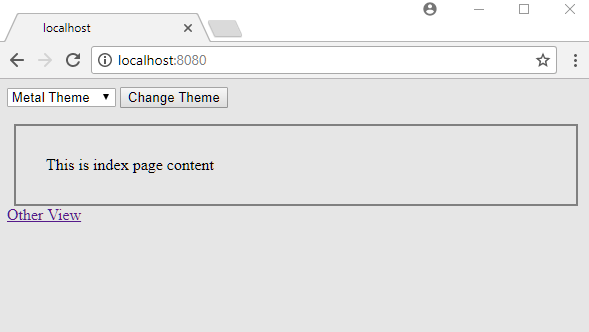
On first access, the default theme is selected:
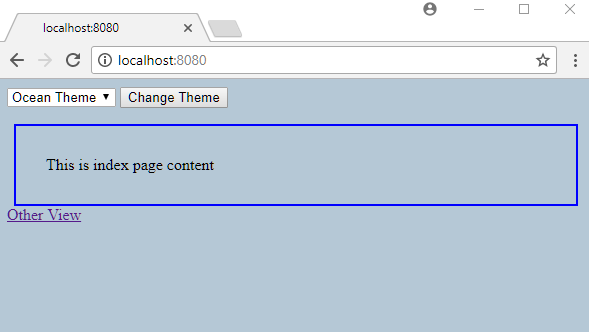
Changing and submitting the theme (by clicking the 'Change Theme' button):
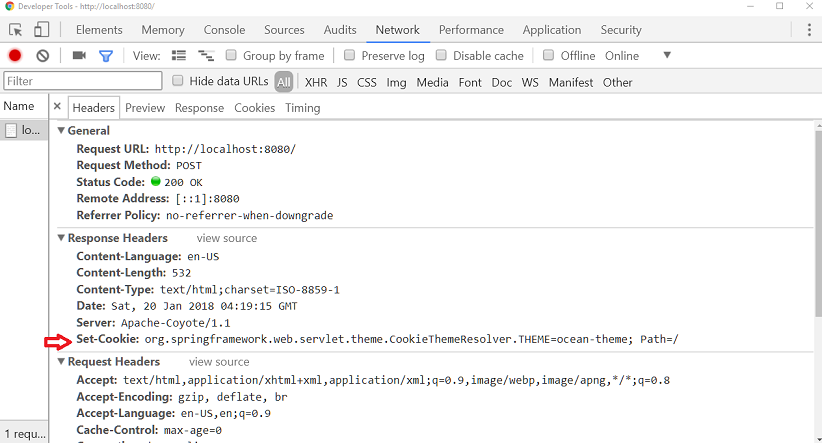
As seen in Chrome Developer Tools, the server sends the desired cookie in the response when the form is submitted.
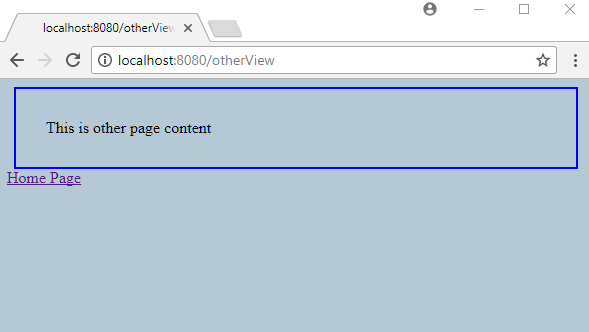
Visiting the 'Other View' link, the user-selected theme is still remembered:
Integration Test
package com.logicbig.example;

import jakarta.servlet.http.Cookie;
import org.hamcrest.Matchers;
import org.junit.jupiter.api.BeforeEach;
import org.junit.jupiter.api.Test;
import org.junit.jupiter.api.extension.ExtendWith;
import org.springframework.beans.factory.annotation.Autowired;
import org.springframework.mock.web.MockHttpServletResponse;
import org.springframework.test.context.ContextConfiguration;
import org.springframework.test.context.junit.jupiter.SpringExtension;
import org.springframework.test.context.web.WebAppConfiguration;
import org.springframework.test.web.servlet.MockMvc;
import org.springframework.test.web.servlet.setup.MockMvcBuilders;
import org.springframework.web.context.WebApplicationContext;
import org.springframework.web.servlet.DispatcherServlet;
import org.springframework.web.servlet.theme.CookieThemeResolver;
import static org.junit.jupiter.api.Assertions.assertEquals;
import static org.springframework.test.util.AssertionErrors.assertNotNull;
import static org.springframework.test.web.servlet.request.MockMvcRequestBuilders.get;
import static org.springframework.test.web.servlet.request.MockMvcRequestBuilders.post;
import static org.springframework.test.web.servlet.result.MockMvcResultMatchers.*;

@ExtendWith(SpringExtension.class)
@WebAppConfiguration
@ContextConfiguration(classes = MyWebConfig.class)
public class CookieThemeResolverMvcTest {

    @Autowired
    private WebApplicationContext webApplicationContext;

    private MockMvc mockMvc;
    private String themeCookieName;

    @BeforeEach
    public void setup() {
        mockMvc = MockMvcBuilders.webAppContextSetup(webApplicationContext)
                                 .build();
        themeCookieName = ((CookieThemeResolver) webApplicationContext.getBean(
                DispatcherServlet.THEME_RESOLVER_BEAN_NAME))
                .getCookieName();
    }

    @Test
    public void themeCookieIsRememberedAndUpdatedAcrossRequests() throws Exception {
        mockMvc.perform(get("/"))
               .andExpect(status().isOk())
               .andExpect(view().name("index"))
               .andExpect(model().attribute("themeInfo",
                                            Matchers.hasProperty("themeName",
                                                                 Matchers.equalTo(
                                                                         "metal-theme"))))
               .andExpect(cookie().doesNotExist(themeCookieName));

        MockHttpServletResponse firstChange =
                mockMvc.perform(post("/")
                                        .param("themeName", "ocean-theme")
                       )
                       .andExpect(status().isOk())
                       .andExpect(cookie().value(themeCookieName,
                                                 "ocean-theme"))
                       .andReturn().getResponse();

        Cookie oceanCookie = firstChange.getCookie(themeCookieName);
        assertNotNull("theme cookie should be set once the theme is changed",
                      oceanCookie);
        assertEquals("ocean-theme", oceanCookie.getValue());

        mockMvc.perform(get("/").cookie(oceanCookie))
               .andExpect(status().isOk())
               .andExpect(model().attribute("themeInfo",
                                            Matchers.hasProperty("themeName",
                                                                 Matchers.equalTo(
                                                                         "ocean-theme"))));

        mockMvc.perform(get("/otherView").cookie(oceanCookie))
               .andExpect(status().isOk())
               .andExpect(view().name("other-page"));

        mockMvc.perform(get("/").cookie(oceanCookie))
               .andExpect(status().isOk())
               .andExpect(model().attribute("themeInfo",
                                            Matchers.hasProperty("themeName",
                                                                 Matchers.equalTo(
                                                                         "ocean-theme"))));

        MockHttpServletResponse secondChange =
                mockMvc.perform(post("/").cookie(oceanCookie)
                                         .param("themeName", "metal-theme"))
                       .andExpect(status().isOk())
                       .andExpect(cookie().value(themeCookieName,
                                                 "metal-theme"))
                       .andReturn().getResponse();

        Cookie metalCookie = secondChange.getCookie(themeCookieName);
        assertNotNull("theme cookie should be updated on the second change",
                      metalCookie);
        assertEquals("metal-theme", metalCookie.getValue());

        mockMvc.perform(get("/").cookie(metalCookie))
               .andExpect(status().isOk())
               .andExpect(model().attribute("themeInfo",
                                            Matchers.hasProperty("themeName",
                                                                 Matchers.equalTo(
                                                                         "metal-theme"))));
    }
}
mvn clean test Output$ mvn clean test
[INFO] Scanning for projects...
[INFO]
[INFO] ---------< com.logicbig.example:spring-cookie-theme-resolver >----------
[INFO] Building spring-cookie-theme-resolver 1.0-SNAPSHOT
[INFO] from pom.xml
[INFO] --------------------------------[ war ]---------------------------------
[INFO]
[INFO] --- clean:3.2.0:clean (default-clean) @ spring-cookie-theme-resolver ---
[INFO] Deleting D:\example-projects\spring-mvc\themes\spring-cookie-theme-resolver\target
[INFO]
[INFO] --- resources:3.3.1:resources (default-resources) @ spring-cookie-theme-resolver ---
[INFO] Copying 2 resources from src\main\resources to target\classes
[INFO]
[INFO] --- compiler:3.7.0:compile (default-compile) @ spring-cookie-theme-resolver ---
[INFO] Changes detected - recompiling the module!
[INFO] Compiling 4 source files to D:\example-projects\spring-mvc\themes\spring-cookie-theme-resolver\target\classes
[INFO] /D:/LogicBig/example-projects/spring-mvc/themes/spring-cookie-theme-resolver/src/main/java/com/logicbig/example/MyWebConfig.java: Some input files use or override a deprecated API.
[INFO] /D:/LogicBig/example-projects/spring-mvc/themes/spring-cookie-theme-resolver/src/main/java/com/logicbig/example/MyWebConfig.java: Recompile with -Xlint:deprecation for details.
[INFO]
[INFO] --- resources:3.3.1:testResources (default-testResources) @ spring-cookie-theme-resolver ---
[INFO] skip non existing resourceDirectory D:\example-projects\spring-mvc\themes\spring-cookie-theme-resolver\src\test\resources
[INFO]
[INFO] --- compiler:3.7.0:testCompile (default-testCompile) @ spring-cookie-theme-resolver ---
[INFO] Changes detected - recompiling the module!
[INFO] Compiling 1 source file to D:\example-projects\spring-mvc\themes\spring-cookie-theme-resolver\target\test-classes
[INFO] /D:/LogicBig/example-projects/spring-mvc/themes/spring-cookie-theme-resolver/src/test/java/com/logicbig/example/CookieThemeResolverMvcTest.java: D:\example-projects\spring-mvc\themes\spring-cookie-theme-resolver\src\test\java\com\logicbig\example\CookieThemeResolverMvcTest.java uses or overrides a deprecated API.
[INFO] /D:/LogicBig/example-projects/spring-mvc/themes/spring-cookie-theme-resolver/src/test/java/com/logicbig/example/CookieThemeResolverMvcTest.java: Recompile with -Xlint:deprecation for details.
[INFO]
[INFO] --- surefire:3.2.5:test (default-test) @ spring-cookie-theme-resolver ---
[INFO] Using auto detected provider org.apache.maven.surefire.junitplatform.JUnitPlatformProvider
[INFO]
[INFO] -------------------------------------------------------
[INFO] T E S T S
[INFO] -------------------------------------------------------
[INFO] Running com.logicbig.example.CookieThemeResolverMvcTest
[INFO] Tests run: 1, Failures: 0, Errors: 0, Skipped: 0, Time elapsed: 0.677 s -- in com.logicbig.example.CookieThemeResolverMvcTest
[INFO]
[INFO] Results:
[INFO]
[INFO] Tests run: 1, Failures: 0, Errors: 0, Skipped: 0
[INFO]
[INFO] ------------------------------------------------------------------------
[INFO] BUILD SUCCESS
[INFO] ------------------------------------------------------------------------
[INFO] Total time: 3.366 s
[INFO] Finished at: 2026-09-12T03:31:05-05:00
[INFO] ------------------------------------------------------------------------
INFO: Completed initialization in 2 ms
Example ProjectDependencies and Technologies Used: - spring-webmvc 6.0.0 (Spring Web MVC)
Version Compatibility: 4.1.0.RELEASE - 6.2.19 Version compatibilities of spring-webmvc with this example: Versions in green have been tested.
- jakarta.servlet-api 6.0.0 (Jakarta Servlet API documentation)
- spring-test 6.0.0 (Spring TestContext Framework)
- junit-jupiter-engine 5.8.2 (Module "junit-jupiter-engine" of JUnit 5)
- hamcrest 3.0 (Core API and libraries of hamcrest matcher framework)
- JDK 17
- Maven 3.9.11
|



