Following are the commonly used ways to enable Spring MVC CORS support:
- Using the @CrossOrigin annotation
This annotation can be used at the controller class or method (Spring MVC handler) level. It provides various optional elements for specifying Access-Control-* headers. Using this annotation without any elements allows all origins, along with other sensible defaults.
- JavaConfig configuration
By implementing Web Mvc Configurer# add Cors Mappings( Cors Registry registry), we can bind a path pattern to various CORS-related configuration.
Example
Using @CrossOrigin in a Controller
@Controller
public class MyController {

    @CrossOrigin(origins = {"http://localhost:9000"})
    @RequestMapping("/test")
    @ResponseBody
    public String handle() {
        return "test response from spring handle() method . time: " + LocalTime.now();
    }
    .............
}
Overriding WebMvcConfigurer#addCorsMappings
It's another way to setup CORS. In this example we are targeting /test2 URI.
@EnableWebMvc
@Configuration
@ComponentScan
public class WebConfig implements WebMvcConfigurer {

    @Override
    public void addCorsMappings(CorsRegistry registry) {
        registry.addMapping("/test2")
                .allowedOrigins("http://localhost:9000")
                .allowedMethods("GET", "POST");
    }
}
Running The Example
To try examples, run embedded Jetty (configured in pom.xml of example project below):
mvn jetty:run To test our handler, we need to run another web application on port 9000 that will make a request to this handler method, i.e. http://localhost:8080/test. For that we created a server based on Java Core HttpServer.
HttpServer at Port 9000
package com.logicbig.example;

import com.sun.net.httpserver.HttpServer;
import java.io.IOException;
import java.io.OutputStream;
import java.net.InetSocketAddress;
import java.nio.file.Files;
import java.nio.file.Paths;

public class OtherWebServer {
    public static void main(String[] args) throws IOException {
        int port = 9000;
        HttpServer server = HttpServer.create(new InetSocketAddress(port), 0);

        server.createContext("/", exchange -> {
            java.nio.file.Path filePath = Paths.get("index.html");

            if (Files.exists(filePath)) {
                byte[] fileBytes = Files.readAllBytes(filePath);

                exchange.getResponseHeaders()
                        .set("Content-Type", "text/html; charset=UTF-8");
                exchange.sendResponseHeaders(200, fileBytes.length);
                try (OutputStream os = exchange.getResponseBody()) {
                    os.write(fileBytes);
                }
            } else {
                throw new RuntimeException("No  index.html found");
            }
        });

        System.out.println("Serving index.html on http://localhost:" + port);
        server.start();
    }
}
index.html<!DOCTYPE html>
<html>
<head>
<script src="https://ajax.googleapis.com/ajax/libs/jquery/3.2.0/jquery.min.js"></script>
<script>
$(document).ready(function(){
$("button").click(function(){
$("#idDiv").load("http://localhost:8080/test");
$("#idDiv2").load("http://localhost:8080/test2");
});
});
</script>
</head>
<body>
<h2>CORS CLIENT</h2>
<div id="idDiv"></div>
<div id="idDiv2"></div>
<br/>
<button>Make Ajax call to /test and /test2</button>
</body>
</html>
Run above main method.
$ mvn exec:java -Dexec.mainClass="com.logicbig.example.OtherWebServer"
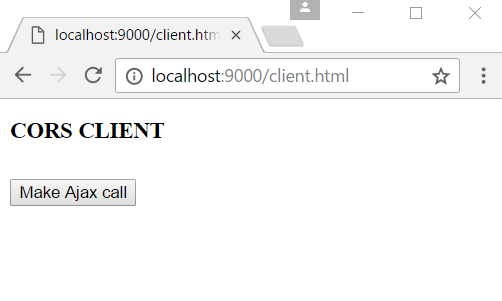
Access the page hosted by our HttpServer at port 9000.
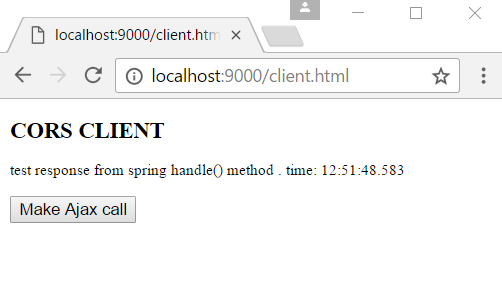
Now click the button "Make Ajax call to /test and /test2" which will send Ajax request to the both end points:
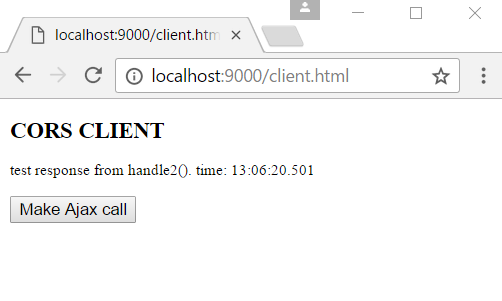
If we remove @CrossOrigin from our controller and addCorsMappings() method from the class WebConfig and restart the Jetty Server, refresh the index.html and click the button again:
CORS Preflight Tests
package com.logicbig.example;

import org.junit.jupiter.api.BeforeEach;
import org.junit.jupiter.api.Test;
import org.springframework.beans.factory.annotation.Autowired;
import org.springframework.test.context.junit.jupiter.web.SpringJUnitWebConfig;
import org.springframework.test.web.servlet.assertj.MockMvcTester;
import org.springframework.web.context.WebApplicationContext;
import static org.assertj.core.api.Assertions.assertThat;

@SpringJUnitWebConfig(WebConfig.class)
public class CorsPreflightTest {

    @Autowired
    private WebApplicationContext webApplicationContext;

    private MockMvcTester mockMvcTester;

    @BeforeEach
    public void setUp() {
        mockMvcTester = MockMvcTester.from(webApplicationContext);
    }

    @Test
    public void testCorsPreflight_annotationBased_test() {
        assertThat(
                mockMvcTester.options()
                             .uri("/test")
                             .header("Origin",
                                     "http://localhost:9000")
                             .header("Access-Control-Request-Method",
                                     "GET"))
                .hasStatusOk()
                .headers().hasValue("Access-Control-Allow-Origin",
                                    "http://localhost:9000");
    }

    @Test
    public void testCorsPreflight_javaConfigBased_test2() {
        assertThat(
                mockMvcTester.options()
                             .uri("/test2")
                             .header("Origin",
                                     "http://localhost:9000")
                             .header("Access-Control-Request-Method",
                                     "POST")
                             .header("Access-Control-Request-Headers",
                                     "Content-Type"))
                .hasStatusOk()
                .headers()
                .hasValue("Access-Control-Allow-Origin",
                          "http://localhost:9000")
                .hasValue("Access-Control-Allow-Methods", "GET,POST");
    }
}
mvn clean test -Dtest="CorsPreflightTest" Output$ mvn clean test -Dtest="CorsPreflightTest"
[INFO] Scanning for projects...
[INFO]
[INFO] --------------< com.logicbig.example:spring-cors-example >--------------
[INFO] Building spring-cors-example 1.0-SNAPSHOT
[INFO] from pom.xml
[INFO] --------------------------------[ war ]---------------------------------
[INFO]
[INFO] --- clean:3.2.0:clean (default-clean) @ spring-cors-example ---
[INFO] Deleting D:\example-projects\spring-mvc\spring-cors-example\target
[INFO]
[INFO] --- resources:3.3.1:resources (default-resources) @ spring-cors-example ---
[INFO] skip non existing resourceDirectory D:\example-projects\spring-mvc\spring-cors-example\src\main\resources
[INFO]
[INFO] --- compiler:3.3:compile (default-compile) @ spring-cors-example ---
[INFO] Changes detected - recompiling the module!
[INFO] Compiling 4 source files to D:\example-projects\spring-mvc\spring-cors-example\target\classes
[INFO]
[INFO] --- resources:3.3.1:testResources (default-testResources) @ spring-cors-example ---
[INFO] skip non existing resourceDirectory D:\example-projects\spring-mvc\spring-cors-example\src\test\resources
[INFO]
[INFO] --- compiler:3.3:testCompile (default-testCompile) @ spring-cors-example ---
[INFO] Changes detected - recompiling the module!
[INFO] Compiling 1 source file to D:\example-projects\spring-mvc\spring-cors-example\target\test-classes
[INFO]
[INFO] --- surefire:3.2.5:test (default-test) @ spring-cors-example ---
[INFO] Using auto detected provider org.apache.maven.surefire.junit4.JUnit4Provider
[INFO]
[INFO] -------------------------------------------------------
[INFO] T E S T S
[INFO] -------------------------------------------------------
[INFO] Running com.logicbig.example.CorsPreflightTest
[INFO] Tests run: 2, Failures: 0, Errors: 0, Skipped: 0, Time elapsed: 0.582 s -- in com.logicbig.example.CorsPreflightTest
[INFO]
[INFO] Results:
[INFO]
[INFO] Tests run: 2, Failures: 0, Errors: 0, Skipped: 0
[INFO]
[INFO] ------------------------------------------------------------------------
[INFO] BUILD SUCCESS
[INFO] ------------------------------------------------------------------------
[INFO] Total time: 2.769 s
[INFO] Finished at: 2026-09-21T03:08:47-05:00
[INFO] ------------------------------------------------------------------------
Example ProjectDependencies and Technologies Used: - spring-webmvc 7.0.6 (Spring Web MVC)
Version Compatibility: 4.2.0.RELEASE - 7.0.6 Version compatibilities of spring-webmvc with this example: Versions in green have been tested.
- spring-test 7.0.6 (Spring TestContext Framework)
- junit-jupiter-engine 6.0.3 (Module "junit-jupiter-engine" of JUnit)
- jakarta.servlet-api 6.1.0 (Jakarta Servlet API documentation)
- hamcrest 3.0 (Core API and libraries of hamcrest matcher framework)
- assertj-core 3.26.3 (Rich and fluent assertions for testing in Java)
- JDK 25
- Maven 3.9.11
|



