Following example shows how to use PieChartModel to draw Pie Chart.
Example
View
src/main/webapp/index.xhtml<?xml version="1.0" encoding="UTF-8"?>
<!DOCTYPE html PUBLIC "-//W3C//DTD XHTML 1.0 Transitional//EN"
"http://www.w3.org/TR/xhtml1/DTD/xhtml1-transitional.dtd">
<html xmlns="http://www.w3.org/1999/xhtml"
xmlns:h="http://java.sun.com/jsf/html"
xmlns:p="http://primefaces.org/ui">
<h:head></h:head>
<h:body style="margin:50px;">
<h2>Programming Job Market</h2>
<p:chart type="pie"
responsive="true"
model="#{jobMarketBean.model}" />
</h:body>
</html>
Managed Bean
package com.logicbig.example;

import org.primefaces.model.chart.PieChartModel;
import javax.annotation.PostConstruct;
import javax.faces.bean.ManagedBean;

@ManagedBean
public class JobMarketBean {
    private PieChartModel model;

    @PostConstruct
    public void init() {
        model = new PieChartModel();
        model.set("Java", 62);//jobs in thousands
        model.set("Python", 46);
        model.set("JavaScript", 38);
        model.set("C++", 31);
        model.set("C#", 27);
        model.set("PHP", 14);
        model.set("Perl", 14);

        //followings are some optional customizations:
        //set title
        model.setTitle("2018 Jobs for top languages");
        //set legend position to 'e' (east), other values are 'w', 's' and 'n'
        model.setLegendPosition("e");
        //enable tooltips
        model.setShowDatatip(true);
        //show labels inside pie chart
        model.setShowDataLabels(true);
        //show label text  as 'value' (numeric) , others are 'label', 'percent' (default). Only one can be used.
        model.setDataFormat("value");
        //format: %d for 'value', %s for 'label', %d%% for 'percent'
        model.setDataLabelFormatString("%dK");
        //pie sector colors
        model.setSeriesColors("aaf,afa,faa,ffa,aff,faf,ddd");
    }

    public PieChartModel getModel() {
        return model;
    }
}
Running
To try examples, run embedded tomcat (configured in pom.xml of example project below):
mvn tomcat7:run-war Output
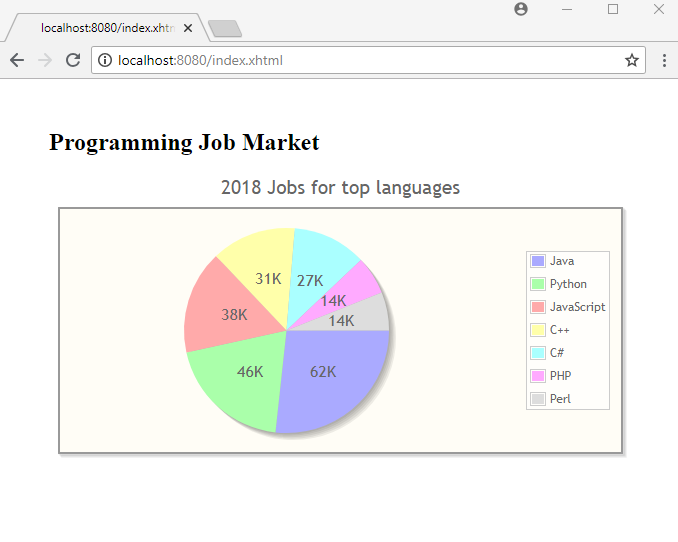 Example ProjectDependencies and Technologies Used: - primefaces 6.1 primefaces
- jsf-api 2.2.14:
This is the master POM file for Oracle's Implementation of the JSF 2.2 Specification.
- jsf-impl 2.2.14:
This is the master POM file for Oracle's Implementation of the JSF 2.2 Specification.
- JDK 1.8
- Maven 3.3.9
|
|



