↗ JetBrains 20% discount
Buy any product from JetBrains and get a 20% discount.
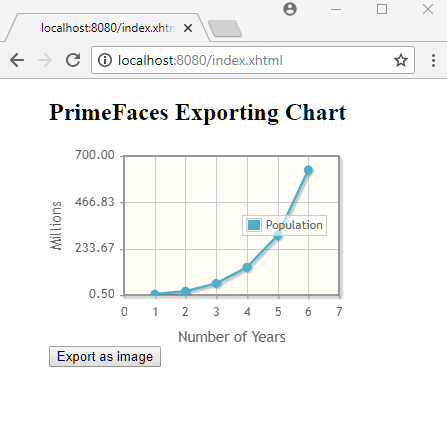
Following example shows how to export Chart component as an image.
<?xml version="1.0" encoding="UTF-8"?>
<!DOCTYPE html PUBLIC "-//W3C//DTD XHTML 1.0 Transitional//EN"
        "http://www.w3.org/TR/xhtml1/DTD/xhtml1-transitional.dtd">
<html xmlns="http://www.w3.org/1999/xhtml"
      xmlns:h="http://java.sun.com/jsf/html"
      xmlns:p="http://primefaces.org/ui"
      xmlns:ui="http://java.sun.com/jsf/facelets">
<h:head></h:head>
<h:body style="margin-left:50px">
    <h2>PrimeFaces Exporting Chart</h2>
    <p:chart type="line"
             model="#{lineChartBean.lineModel}"
             style="height:200px;width:300px"
             widgetVar="chart"/>
    <h:form>
        <h:commandButton id="login"
                         value="Export as image"
                         onclick="return downloadImage();"
                         type="Submit" />
    </h:form>

    <script type="application/javascript">
       function downloadImage(){
       var image = PF('chart').exportAsImage();
       var imageSrc = $(image).attr('src');
       var url = imageSrc.replace(/^data:image\/[^;]+/, 'data:application/octet-stream');
       var link = document.createElement('a');
       link.download = "chart.png";
       link.href = url;
       document.body.appendChild(link);
       link.click();
       document.body.removeChild(link);
       return false;
    }
    </script>
</h:body>
</html>
@ManagedBean
@ViewScoped
public class LineChartBean {
    private LineChartModel lineModel;

    @PostConstruct
    public void init() {
        lineModel = new LineChartModel();
        LineChartSeries s = new LineChartSeries();
        s.setLabel("Population");

        s.set(1, 5.20);
        s.set(2, 19.63);
        s.set(3, 59.01);
        s.set(4, 139.76);
        s.set(5, 300.4);
        s.set(6, 630);

        lineModel.addSeries(s);
        lineModel.setLegendPosition("e");
        Axis y = lineModel.getAxis(AxisType.Y);
        y.setMin(0.5);
        y.setMax(700);
        y.setLabel("Millions");

        Axis x = lineModel.getAxis(AxisType.X);
        x.setMin(0);
        x.setMax(7);
        x.setTickInterval("1");
        x.setLabel("Number of Years");
    }

    public LineChartModel getLineModel() {
        return lineModel;
    }
}
To try examples, run embedded tomcat (configured in pom.xml of example project below):
mvn tomcat7:run-war
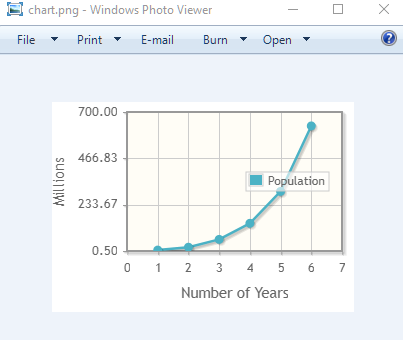
Clicking on 'Export as image' will download the image.
Dependencies and Technologies Used: