In the last tutorial we saw how to use ViewControllerRegistry during configuration time to map a URL directly to a view. Here we are going to look at another feature of ViewControllerRegistry: how to redirect one URL to another URL directly, without using a @Controller.
Note that Spring also supports URL redirection from a @Controller method by using RedirectView or by returning a 'redirect:' prefix. If you're not already familiar with URL redirection, we suggest checking out Basics of URL redirection and URL redirection in Java Servlet tutorials.
Example
The configuration class
package com.logicbig.example;

import org.springframework.context.annotation.ComponentScan;
import org.springframework.context.annotation.Configuration;
import org.springframework.web.servlet.config.annotation.EnableWebMvc;
import org.springframework.web.servlet.config.annotation.RedirectViewControllerRegistration;
import org.springframework.web.servlet.config.annotation.ViewControllerRegistry;
import org.springframework.web.servlet.config.annotation.WebMvcConfigurer;
import org.springframework.web.servlet.config.annotation.ViewResolverRegistry;

@EnableWebMvc
@Configuration
@ComponentScan
public class WebConfig implements WebMvcConfigurer {

    @Override
    public void addViewControllers(ViewControllerRegistry registry) {
        RedirectViewControllerRegistration r =
                registry.addRedirectViewController("/test", "/test2");
    }
}
In the above configuration, we are redirecting '/test' to '/test2'. To handle /test2, we are going to map it to a controller method.
The Controller handling /test2
package com.logicbig.example;

import org.springframework.stereotype.Controller;
import org.springframework.web.bind.annotation.RequestMapping;
import org.springframework.web.bind.annotation.ResponseBody;

@Controller
public class MyController {

    @RequestMapping("/test2")
    @ResponseBody
    private String handleRequest () {
        return "response from controller";
    }
}
Running web application
To try examples, run embedded Jetty (configured in pom.xml of example project below):
mvn jetty:run Output
Enter URL http://localhost:8080/test:
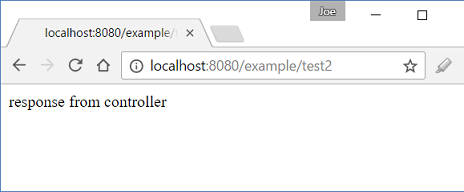
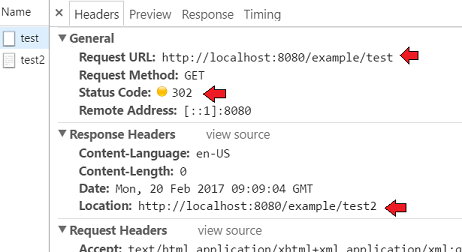
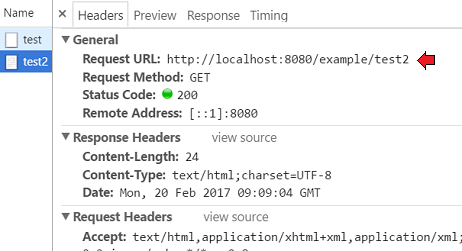
In the Chrome browser, Developer tools > Network tab:
To handle a 302 redirect in cURL, use the -L (or --location) flag. Also use -i to see the hop history along with the final page body.
$ curl -s -iL "http://localhost:8080/test"
HTTP/1.1 302 Found
Date: Sun, 27 Sep 2026 08:30:47 GMT
Content-Language: en-US
Location: http://localhost:8080/test2
Content-Length: 0
Server: Jetty(9.4.53.v20231009)

HTTP/1.1 200 OK
Date: Sun, 27 Sep 2026 08:30:47 GMT
Content-Type: text/plain;charset=iso-8859-1
Content-Length: 24
Server: Jetty(9.4.53.v20231009)

response from controller
Changing the default status code of 302
As seen in the output above, the response for '/test' returns a status code of 302, along with a Location header specifying the new redirect URL. We can change the default 302 status code by using the method RedirectViewControllerRegistration #setStatusCode(..):
@Override
    public void addViewControllers (ViewControllerRegistry registry) {
        RedirectViewControllerRegistration r =
                  registry.addRedirectViewController("/test", "/test2");
        r.setStatusCode(HttpStatus.SEE_OTHER);
    }
The above code will set the status code to 303 (See Other). If the status code is not one of the standard redirect codes (3xx), an exception will be thrown at application startup:
Caused by: java.lang.IllegalArgumentException: Not a redirect status code.
	at org.springframework.util.Assert.isTrue(Assert.java:68)
	at org.springframework.web.servlet.config.annotation.RedirectViewControllerRegistration.setStatusCode(RedirectViewControllerRegistration.java:57)
    .......
Resolving the URL relative to the root context
The flag set by RedirectViewControllerRegistration #setContextRelative(boolean) is used to resolve the provided redirect URI. If true, the URI is resolved relative to the current ServletContext. By default it's set to true. Note that a similar flag exists on RedirectView, but there it defaults to false. We would probably never want to set this flag to false, because resolving the URI relative to the application context root is a much more convenient way to go.
Passing query parameters to the redirected resource
By using the method RedirectViewControllerRegistration #setKeepQueryParams(boolean), we can specify whether the query parameters should be carried over to the redirected destination. By default it's false, meaning that if we send query parameters with the original URI '/test' (e.g. '/test?param=paramValue'), they won't be carried over to the destination URI '/test2' unless we set this flag to true.
Example ProjectDependencies and Technologies Used: - spring-webmvc 7.0.6 (Spring Web MVC)
Version Compatibility: 4.1.0.RELEASE - 7.0.6 Version compatibilities of spring-webmvc with this example: Versions in green have been tested.
- jakarta.servlet-api 6.1.0 (Jakarta Servlet API documentation)
- JDK 25
- Maven 3.9.11
|



