In this example, we will learn how to trigger container managed authentication programmatically by using HttpServletRequest.authenticate() method. In this case, we will not use @ServletSecurity (like last example) which is a declarative approach to specify security constraints on a servlet.
Example
The Servlet
@WebServlet(name = "myServlet", urlPatterns = {"/"})
public class MyServlet extends HttpServlet {

    @Override
    protected void doGet(HttpServletRequest req, HttpServletResponse resp)
            throws ServletException, IOException {
        resp.setContentType("text/html");
        PrintWriter writer = resp.getWriter();

        if (shouldAuthenticate(req)) {
            boolean authenticated = req.authenticate(resp);
            if (authenticated) {
                if (req.getUserPrincipal() != null) {
                    writer.println("user authenticated " + req.getUserPrincipal().getName());
                }
            } else {
                return;
            }
        }

        writer.println("<p>some data</p>");
    }

    private boolean shouldAuthenticate(HttpServletRequest req) {
        //todo: apply some real condition
        return true;
    }
}
Adding login-config in web.xml
src/main/webapp/WEB-INF/web.xml<web-app xmlns="http://xmlns.jcp.org/xml/ns/javaee"
xmlns:xsi="http://www.w3.org/2001/XMLSchema-instance"
xsi:schemaLocation="http://xmlns.jcp.org/xml/ns/javaee
http://xmlns.jcp.org/xml/ns/javaee/web-app_3_1.xsd" version="3.1">
<login-config>
<auth-method>BASIC</auth-method>
<realm-name>default</realm-name>
</login-config>
</web-app>
Adding tomcat-users.xml
As we are going to run embedded tomcat for this example, we will add tomcat-user.xml in the project:
src/main/webapp/config/tomcat-users.xml<?xml version="1.0" encoding="UTF-8"?>
<tomcat-users>
<role rolename="employee"/>
<user username="tina" password="123" roles="employee"/>
</tomcat-users>
Specifying tomcat-user.xml location
pom.xml
<plugin>
  <groupId>org.apache.tomcat.maven</groupId>
  <artifactId>tomcat7-maven-plugin</artifactId>
  <version>2.2</version>
  <configuration>
   <path>/</path>
   <tomcatUsers>src/main/webapp/config/tomcat-users.xml</tomcatUsers>
  </configuration>
 </plugin>
To try examples, run embedded tomcat (configured in pom.xml of example project below):
mvn tomcat7:run-war Output
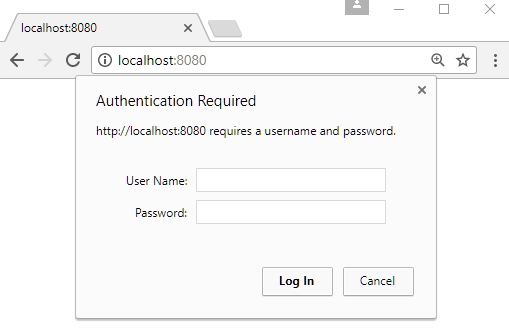
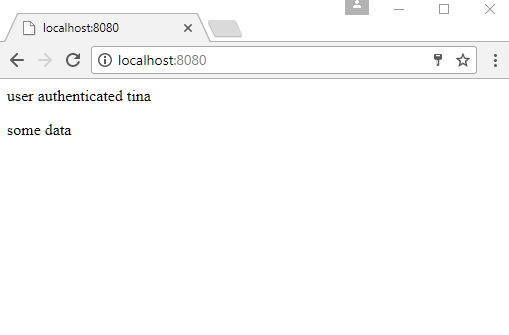
On submitting user/password:
Example ProjectDependencies and Technologies Used: - javax.servlet-api 3.1.0 Java Servlet API
- JDK 1.8
- Maven 3.5.4
|



