What is Retrieval-Augmented Generation (RAG)?
Retrieval-Augmented Generation (RAG) is a technique where an LLM does not rely solely on its internal training data. Instead, it retrieves relevant information from an external knowledge source and uses that content as context while generating a response. Please check out the RAG basics tutorial here.
In LangChain4j, RAG typically consists of three steps:
- Splitting and embedding documents
- Storing embeddings in a vector store
- Retrieving relevant segments and injecting them into the prompt
Also check out the RAG component tutorial here.
Why RAG is Needed
LLMs are static after training and cannot know about your private data, internal documentation, or frequently changing content. RAG allows you to combine the reasoning capabilities of an LLM with up-to-date or domain-specific knowledge without retraining the model.
Example
package com.logicbig.example;

import dev.langchain4j.data.document.Document;
import dev.langchain4j.data.document.DocumentSplitter;
import dev.langchain4j.data.document.splitter.DocumentSplitters;
import dev.langchain4j.data.segment.TextSegment;
import dev.langchain4j.model.chat.ChatModel;
import dev.langchain4j.model.embedding.EmbeddingModel;
import dev.langchain4j.model.ollama.OllamaChatModel;
import dev.langchain4j.model.ollama.OllamaEmbeddingModel;
import dev.langchain4j.rag.content.Content;
import dev.langchain4j.rag.content.retriever.ContentRetriever;
import dev.langchain4j.rag.content.retriever.EmbeddingStoreContentRetriever;
import dev.langchain4j.rag.query.Query;
import dev.langchain4j.store.embedding.EmbeddingStore;
import dev.langchain4j.store.embedding.inmemory.InMemoryEmbeddingStore;
import java.util.List;

public class RagIntroExample {
    private static EmbeddingModel embeddingModel;
    private static EmbeddingStore<TextSegment> embeddingStore;

    static {
        embeddingModel = OllamaEmbeddingModel.builder()
                                             .baseUrl("http://localhost:11434")
                                             .modelName("all-minilm")
                                             .build();

        embeddingStore = new InMemoryEmbeddingStore<>();
        storeDocuments();
    }

    private static void storeDocuments() {
        //document 1
        Document document = Document.from(
                """
                        MySimpleRestFramework is old framework for creating REST APIs.
                        It provides auto-configuration and embedded servers.
                        """);

        DocumentSplitter splitter = DocumentSplitters.recursive(200, 20);
        List<TextSegment> segments = splitter.split(document);

        embeddingStore.addAll(
                embeddingModel.embedAll(segments).content(),
                segments
        );

        //document 2
        Document document2 = Document.from(
                """
                        MySimpleAiFramework is a Java framework for building
                         LLM-powered applications.
                         It supports chat models, embeddings, and
                         retrieval-augmented generation.
                        """
        );

        List<TextSegment> segments2 =
                splitter.split(document2);

        embeddingStore.addAll(
                embeddingModel.embedAll(segments2).content(),
                segments2
        );
    }

    public static void main(String[] args) {

        ChatModel chatModel =
                OllamaChatModel.builder()
                               .baseUrl("http://localhost:11434")
                               .modelName("phi3:mini-128k")
                               .build();

        ContentRetriever retriever =
                EmbeddingStoreContentRetriever.builder()
                                              .embeddingStore(embeddingStore)
                                              .embeddingModel(embeddingModel)
                                              .maxResults(1)
                                              .build();

        String question = "What is MySimpleAiFramework?";

        List<Content> contents = retriever.retrieve(Query.from(question));

        String context = contents.get(0).textSegment().text();

        System.out.println("Context retrieved: " + context);

        String prompt = """
                Use the following context to answer the question:

                %s

                Question: %s
                """.formatted(context, question);

        String answer = chatModel.chat(prompt);

        System.out.println("LLM response: " + answer);
    }
}
OutputContext retrieved: MySimpleAiFramework is a Java framework for building
LLM-powered applications.
It supports chat models, embeddings, and
retrieval-augmented generation.
LLM response: MySimpleAiFramework is a Java-based framework designed to facilitate the creation of Large Language Model (LLM)-powered applications by leveraging chat models, embeddings, and retrieval-augmented generation techniques. It provides developers with necessary tools and functionalities required for building complex AI-driven apps in Java environment efficiently.
Understanding the code
- EmbeddingModel: The
EmbeddingModel is responsible for converting text into numerical vectors that capture semantic meaning. In this example, a third-party embedding model (all-minilm) is used because the LLM (phi3:mini-128k) only supports text generation and does not expose embeddings. all-minilm is lightweight, fast, and suitable for systems with limited memory while still providing reasonable semantic similarity for RAG. Please use ollama pull all-minilm to download all-minilm.
- EmbeddingStore: The
EmbeddingStore persists embeddings and enables similarity search. InMemoryEmbeddingStore is used here because it is simple, requires no external infrastructure, and is ideal for tutorials, demos, and small datasets. It keeps all vectors in RAM and performs linear similarity search.
- Document: A
Document represents raw, unstructured source content before it is prepared for retrieval. It is the logical unit used by LangChain4j to hold text that will later be split, embedded, and indexed.
- DocumentSplitter:
DocumentSplitters.recursive(200, 20) splits a document into smaller chunks of up to 200 characters with an overlap of 20 characters. This improves retrieval accuracy by ensuring that each embedded chunk is focused and small enough to match user queries while preserving context across boundaries via overlap.
- TextSegment (list): A
TextSegment is a single chunk produced by the splitter. The list of TextSegment objects represents all searchable units derived from the original document. Each segment will be embedded independently and stored in the vector store.
- Embedding and storing segments:
embeddingModel.embedAll(segments).content() converts each TextSegment into an embedding vector. embeddingStore.addAll(..., segments) stores the vectors together with their corresponding text segments, allowing semantic lookup later.
- ContentRetriever: The
EmbeddingStoreContentRetriever encapsulates the retrieval logic. It embeds incoming queries using the same embedding model and performs similarity search against the EmbeddingStore, returning the most relevant content segments. In this example, maxResults(1) is used because we are interested only in the single highest-scoring (most relevant) match, which helps keep the prompt concise and avoids injecting less relevant or noisy context into the LLM.
- Retrieving relevant content:
retriever.retrieve(Query.from(question)) embeds the user question, searches the vector store, and returns a List<Content>. Each item contains a matched TextSegment that is semantically close to the query and suitable for injection into the LLM prompt.
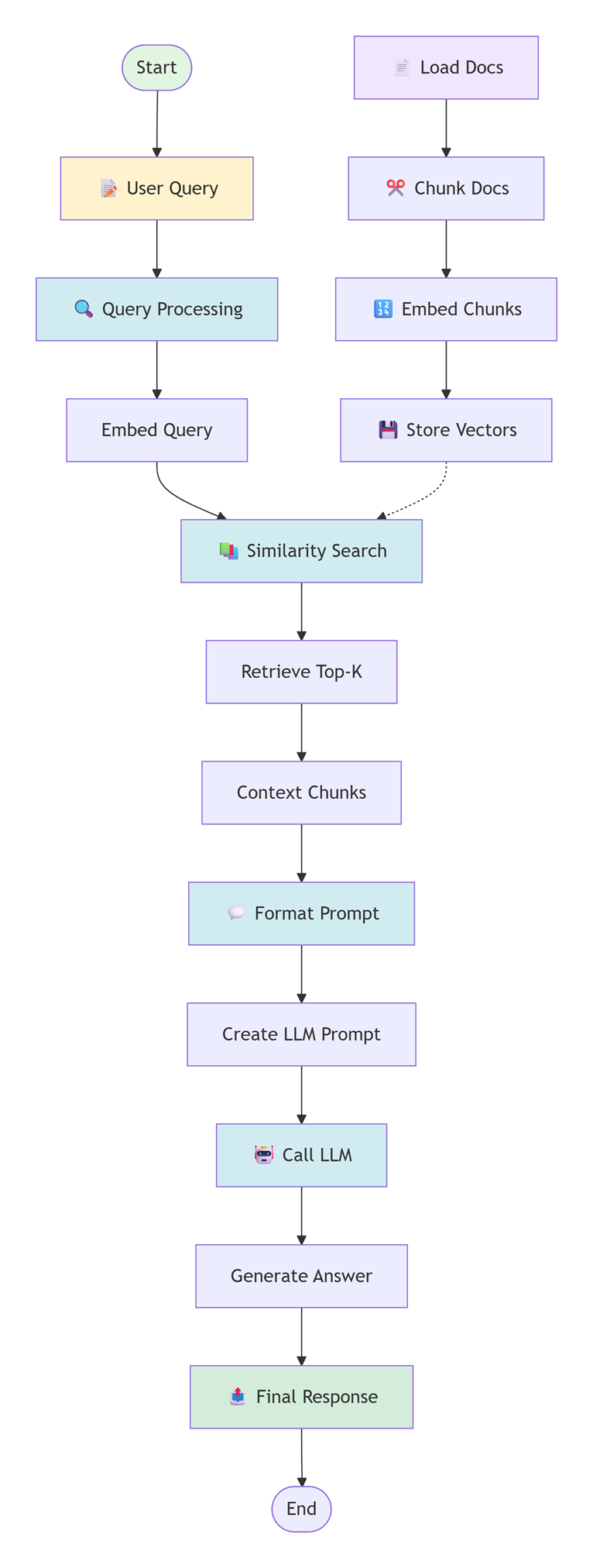
Following digram shows summarizes the steps involved in this example:
Conclusion
This example clearly demonstrates the core idea of Retrieval-Augmented Generation (RAG). Although multiple documents were stored in the embedding store, only the document whose content was most semantically relevant to the user’s question was retrieved and injected into the prompt. The unrelated document was not selected because its embedding similarity score was lower.
As a result, the LLM generated an answer strictly based on the retrieved context rather than guessing or hallucinating additional information. This confirms how retrieval and generation work together: the retriever controls what knowledge is exposed to the LLM, and the LLM focuses solely on generating a response grounded in that selected context.
Example ProjectDependencies and Technologies Used: - langchain4j 1.10.0 (Build LLM-powered applications in Java: chatbots, agents, RAG, and much more)
- langchain4j-ollama 1.10.0 (LangChain4j :: Integration :: Ollama)
- JDK 17
- Maven 3.9.11
|
|



