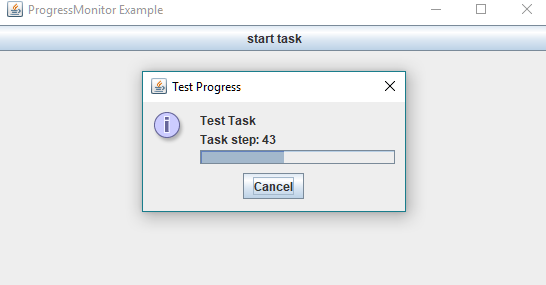
ProgressMonitor monitors the progress of a user task and pops up a dialog if necessary. It's not a component but a helper class which manages a JProgressBar instance and shows that in a JDialog at the right time.
Example
package com.logicbig.example;

import javax.swing.*;
import java.awt.*;
import java.awt.event.ActionListener;
import java.util.concurrent.TimeUnit;

public class ProgressMonitorExample {

    public static void main(String[] args) {
        JFrame frame = createFrame("ProgressMonitor Example");
        JButton button = new JButton("start task");
        button.addActionListener(createStartTaskActionListener(frame));
        frame.add(button, BorderLayout.NORTH);
        frame.setVisible(true);
    }

    private static ActionListener createStartTaskActionListener(Component parent) {
        //for progress monitor dialog title
        UIManager.put("ProgressMonitor.progressText", "Test Progress");
        return (ae) -> {
            new Thread(() -> {
                //creating ProgressMonitor instance
                ProgressMonitor pm = new ProgressMonitor(parent, "Test Task",
                        "Task starting", 0, 100);

                //decide after 100 millis whether to show popup or not
                pm.setMillisToDecideToPopup(100);
                //after deciding if predicted time is longer than 100 show popup
                pm.setMillisToPopup(100);
                for (int i = 1; i <= 100; i++) {
                    //updating ProgressMonitor note
                    pm.setNote("Task step: " + i);
                    //updating ProgressMonitor progress
                    pm.setProgress(i);
                    try {
                        //delay for task simulation
                        TimeUnit.MILLISECONDS.sleep(200);
                    } catch (InterruptedException e) {
                        System.err.println(e);
                    }
                }
                pm.setNote("Task finished");
            }).start();
        };
    }

    public static JFrame createFrame(String title) {
        JFrame frame = new JFrame(title);
        frame.setDefaultCloseOperation(JFrame.EXIT_ON_CLOSE);
        frame.setSize(new Dimension(800, 700));
        return frame;
    }
}