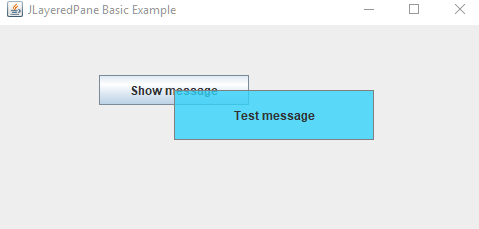
Following example shows the basic use of JLayeredPane.
JLayeredPane is a container which can be used to display its children components in different layers (depths). That allows the children to overlap with each other when needed.
Example
package com.logicbig.example;

import javax.swing.*;
import javax.swing.border.LineBorder;
import java.awt.*;
import java.awt.event.MouseAdapter;
import java.awt.event.MouseEvent;

public class ExampleMain {
    public static void main(String[] args) {
        JFrame frame = createFrame();

        JLayeredPane layeredPane = new JLayeredPane();

        //adding a button to the JLayeredPane
        JButton button = new JButton("Show message");
        //need to do absolute positioning because by default LayeredPane has null layout,
        button.setBounds(100, 50, 150, 30);
        layeredPane.add(button, JLayeredPane.DEFAULT_LAYER);//depth 0

        //adding an initially invisible JLabel in an upper layer
        JLabel label = new JLabel("Test message");
        label.setOpaque(true);
        label.setHorizontalAlignment(SwingConstants.CENTER);
        //setting background with transparency value to see though the label
        label.setBackground(new Color(50, 210, 250, 200));
        //just set the size for now
        label.setSize(200, 50);
        label.setBorder(new LineBorder(Color.gray));
        label.setVisible(false);
        layeredPane.add(label, JLayeredPane.POPUP_LAYER);//depth 300

        //to make label visible
        button.addActionListener(e -> {
            JComponent source = (JComponent) e.getSource();
            //set the  popup label location at center of the source component
            label.setLocation(new Point(source.getX() + source.getWidth() / 2,
                    source.getY() + source.getHeight() / 2));
            label.setVisible(true);
        });

        //to hide the label
        frame.addMouseListener(new MouseAdapter() {
            @Override
            public void mousePressed(MouseEvent e) {
                label.setVisible(false);
            }
        });

        frame.add(layeredPane);
        frame.setLocationRelativeTo(null);
        frame.setVisible(true);
    }

    private static JFrame createFrame() {
        JFrame frame = new JFrame("JLayeredPane Basic Example");
        frame.setDefaultCloseOperation(JFrame.EXIT_ON_CLOSE);
        frame.setSize(new Dimension(500, 400));
        return frame;
    }
}
Output
On clicking the button:
Clicking anywhere in the frame will dismiss the label.