On operating system level (Windows and Linux), the Shift+F10 key is a keyboard shortcut for calling up the context menu on the selected item. Programs should not try to register custom keys for invoking context menus.
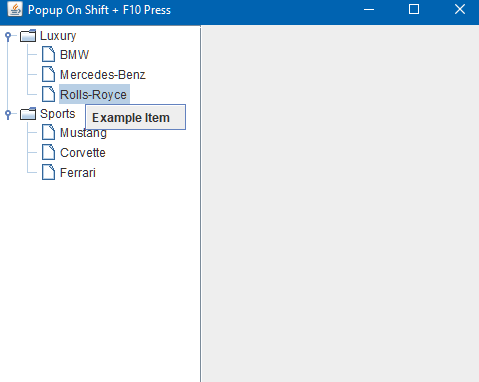
Following example assigns a JPopup to JTree (via JComponent.setComponentPopupMenu()), so when JTree is in the focus and we press Shift + F10 then popup should show up. But it can show anywhere on the JTree. We can programmatically set a desired location before the popup shows up.
Example
public class ExampleMain {

    public static void main(String[] args) {
        JTree tree = new JTree(new Hashtable<>(createTreeData()));

        JPopupMenu popupMenu = new JPopupMenu();
        popupMenu.add(new JMenuItem("Example Item"));
        tree.setComponentPopupMenu(popupMenu);

        initPopupListener(tree, popupMenu);

        JFrame frame = createFrame();
        tree.setPreferredSize(new Dimension(200, tree.getPreferredSize().height));
        frame.add(new JScrollPane(tree), BorderLayout.WEST);
        frame.setLocationRelativeTo(null);
        frame.setVisible(true);
    }

    private static void initPopupListener(JTree tree, JPopupMenu popupMenu) {
        popupMenu.addPopupMenuListener(new PopupMenuListener() {
            @Override
            public void popupMenuWillBecomeVisible(PopupMenuEvent e) {
                //get selected node's rectangle
                Rectangle rect = tree.getPathBounds(tree.getSelectionPath());
                Arrays.stream(popupMenu.getComponents()).forEach(c -> c.setEnabled(rect != null));
                if (rect == null) {
                    return;
                }

                Point p = new Point(rect.x + rect.width / 2, rect.y + rect.height);
                SwingUtilities.convertPointToScreen(p, tree);
                popupMenu.setLocation(p.x, p.y);
            }

            @Override
            public void popupMenuWillBecomeInvisible(PopupMenuEvent e) {

            }

            @Override
            public void popupMenuCanceled(PopupMenuEvent e) {

            }
        });
    }

    private static Map<?, ?> createTreeData() {
        return Map.of("Sports",
                new String[]{"Mustang", "Corvette", "Ferrari"},
                "Luxury",
                new String[]{"BMW", "Mercedes-Benz", "Rolls-Royce"});
    }

    private static JFrame createFrame() {
        JFrame frame = new JFrame("Popup On Shift + F10 Press");
        frame.setDefaultCloseOperation(JFrame.EXIT_ON_CLOSE);
        frame.setSize(new Dimension(500, 400));
        return frame;
    }
}
Output
On selecting a node and pressing SHIFT + F10:
Example ProjectDependencies and Technologies Used:
|
|



