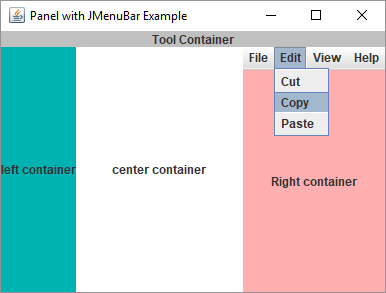
This example shows how to add JMenuBar to a child container panel. We just need to add JRootPane instead of our child container (usually a JPanel). JRootPane supports JMenuBar, GlassPane, LayeredPane etc. We will add our child panel to content pane of the JRootPane.
Example
public class ContainerWithMenuBarExample {
    public static void main(String[] args) {
        JFrame frame = createFrame();
        //child container with menu
        frame.add(createContainerWithMenu(), BorderLayout.EAST);
        //others
        frame.add(createLabel("Tool Container", Color.LIGHT_GRAY), BorderLayout.NORTH);
        frame.add(createLabel("left container", Color.CYAN.darker()), BorderLayout.WEST);
        frame.add(createLabel("center container", Color.WHITE), BorderLayout.CENTER);
        frame.setLocationRelativeTo(null);
        frame.setVisible(true);
    }

    private static Component createContainerWithMenu() {
        JRootPane rootPane = new JRootPane();
        rootPane.getContentPane().add(createLabel("Right container", Color.PINK));
        JMenuBar menuBar = new JMenuBar();
        menuBar.add(createMenu("File", "Open", "Close", "New", "Exit"));
        menuBar.add(createMenu("Edit", "Cut", "Copy", "Paste"));
        menuBar.add(createMenu("View", "view 1", "view 2"));
        menuBar.add(createMenu("Help", "help 1", "help 2"));
        rootPane.setJMenuBar(menuBar);
        return rootPane;
    }

    private static JMenu createMenu(String menuLabel, String... subMenuLabels) {
        JMenu menu = new JMenu(menuLabel);
        for (String subMenuLabel : subMenuLabels) {
            JMenuItem menuItem = new JMenuItem(subMenuLabel);
            menu.add(menuItem);
        }
        return menu;
    }

    private static JLabel createLabel(String text, Color color) {
        JLabel label = new JLabel(text, SwingConstants.CENTER);
        label.setOpaque(true);
        label.setBackground(color);
        return label;
    }

    private static JFrame createFrame() {
        JFrame frame = new JFrame("Panel with JMenuBar Example");
        frame.setDefaultCloseOperation(JFrame.EXIT_ON_CLOSE);
        frame.setSize(new Dimension(400, 300));
        return frame;
    }
}
Output
Example ProjectDependencies and Technologies Used: - datafactory 0.8: Library to generate data for testing.
- JDK 1.8
- Maven 3.3.9
|
|



