Following example shows how to sent parameters to the dialog while using RequestContext#openDialog() method.
Example
We are going to reuse our previous example. We are using <p:selectCheckboxMenu /> to select multiple 'Department' values which will be send to the dialog as a parameter. The employees table in the dialog will filter the rows, based on the selected departments.
JSF page
src/main/webapp/index.xhtml<h:body>
<h2>PrimeFaces - Programmatic Dialog</h2>
<h:form>
<h:outputLabel for="idDept" value="Departments:" />
<p:selectCheckboxMenu id="idDept" value="#{mainBean.selectedDepartments}"
label="Departments"
multiple="true"
panelStyle="width:250px">
<f:selectItems value="#{mainBean.departmentList}" />
</p:selectCheckboxMenu>
<br/><br/><br/>
<p:commandButton value="Show Employees" actionListener="#{mainBean.showEmployees}"/>
</h:form>
</h:body>
The manage bean
@ManagedBean
@ViewScoped
public class MainBean {
    public String[] selectedDepartments =
            Arrays.copyOf(Employee.DepartmentList, Employee.DepartmentList.length);

    public void showEmployees(ActionEvent ae) {
        String selectedDeptsAsParam = Arrays.stream(getSelectedDepartments())
                                            .collect(Collectors.joining("|"));
        Map<String, List<String>> params = new HashMap<>();
        params.put("selectedDepartments", Arrays.asList(selectedDeptsAsParam));
        RequestContext.getCurrentInstance().openDialog("employee",
                getDialogOptions(), params);
    }

    public Map<String, Object> getDialogOptions() {
        Map<String, Object> options = new HashMap<>();
        options.put("resizable", false);
        options.put("draggable", true);
        options.put("modal", true);
        options.put("height", 400);
        options.put("contentHeight", "100%");
        return options;
    }

    public String[] getDepartmentList() {
        return Employee.DepartmentList;
    }

    public String[] getSelectedDepartments() {
        return selectedDepartments;
    }

    public void setSelectedDepartments(String[] selectedDepartments) {
        this.selectedDepartments = selectedDepartments;
    }
}
Note that instead of sending multiple selected departments values as a '|' separated param, we can alternatively populate the department list object in the session map.
public class Employee {
    public static String[] DepartmentList = {"IT", "Sales", "Account", "Admin"};
    private long id;
    private String name;
    private String phoneNumber;
    private String department;
    .............
}
The Employee Page
src/main/webapp/employee.xhtml<?xml version="1.0" encoding="UTF-8"?>
<!DOCTYPE html PUBLIC "-//W3C//DTD XHTML 1.0 Transitional//EN"
"http://www.w3.org/TR/xhtml1/DTD/xhtml1-transitional.dtd">
<html xmlns="http://www.w3.org/1999/xhtml"
xmlns:h="http://java.sun.com/jsf/html"
xmlns:p="http://primefaces.org/ui">
<h:head>
<title>Employees</title>
</h:head>
<h:body>
<h:form>
<p:dataTable var="employee" value="#{employeeBean.employeeList}">
<p:column headerText="Id">
<h:outputText value="#{employee.id}"/>
</p:column>
<p:column headerText="Name">
<h:outputText value="#{employee.name}"/>
</p:column>
<p:column headerText="Phone Number">
<h:outputText value="#{employee.phoneNumber}"/>
</p:column>
<p:column headerText="Department">
<h:outputText value="#{employee.department}"/>
</p:column>
</p:dataTable>
</h:form>
</h:body>
</html>
The Employee bean
@ManagedBean
@RequestScoped
public class EmployeeBean {
    private List<Employee> employeeList = new ArrayList<>();

    @PostConstruct
    private void postConstruct() {
        DataFactory dataFactory = new DataFactory();
        for (int i = 1; i < 50; i++) {
            Employee employee = new Employee();
            employee.setId(i);
            employee.setName(dataFactory.getName());
            employee.setPhoneNumber(String.format("%s-%s-%s", dataFactory.getNumberText(3),
                    dataFactory.getNumberText(3),
                    dataFactory.getNumberText(4)));
            employee.setDepartment(dataFactory.getItem(Employee.DepartmentList));
            employeeList.add(employee);
        }
    }

    public List<Employee> getEmployeeList() {
        return filterBySelectedDepartment(employeeList);
    }

    private List<Employee> filterBySelectedDepartment(List<Employee> employeeList) {
        String depts = FacesContext.getCurrentInstance()
                                   .getExternalContext()
                                   .getRequestParameterMap()
                                   .get("selectedDepartments");

        List<String> selectedDepartments = Arrays.asList(depts.split("\\|"));
        return employeeList.stream()
                           .filter(e -> selectedDepartments.contains(e.getDepartment()))
                           .collect(Collectors.toList());
    }
}
faces-config.xhtml
For Dialog Framework to work, we need to add following configurations in faces-config.xhtml.
src/main/webapp/WEB-INF/faces-config.xml<?xml version="1.0" encoding="UTF-8"?>
<faces-config xmlns="http://java.sun.com/xml/ns/javaee"
xmlns:xsi="http://www.w3.org/2001/XMLSchema-instance"
xsi:schemaLocation="http://java.sun.com/xml/ns/javaee
http://java.sun.com/xml/ns/javaee/web-facesconfig_2_1.xsd"
version="2.1">
<application>
<action-listener>
org.primefaces.application.DialogActionListener
</action-listener>
<navigation-handler>
org.primefaces.application.DialogNavigationHandler
</navigation-handler>
<view-handler>
org.primefaces.application.DialogViewHandler
</view-handler>
</application>
</faces-config>
To try examples, run embedded tomcat (configured in pom.xml of example project below):
mvn tomcat7:run-war Output
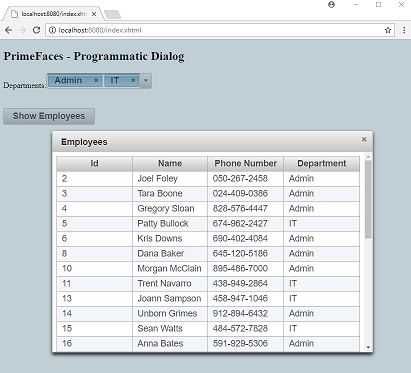
Example ProjectDependencies and Technologies Used: - primefaces 6.1 primefaces
- jsf-api 2.2.14:
This is the master POM file for Oracle's Implementation of the JSF 2.2 Specification.
- jsf-impl 2.2.14:
This is the master POM file for Oracle's Implementation of the JSF 2.2 Specification.
- datafactory 0.8: Library to generate data for testing.
- JDK 1.8
- Maven 3.3.9
|



