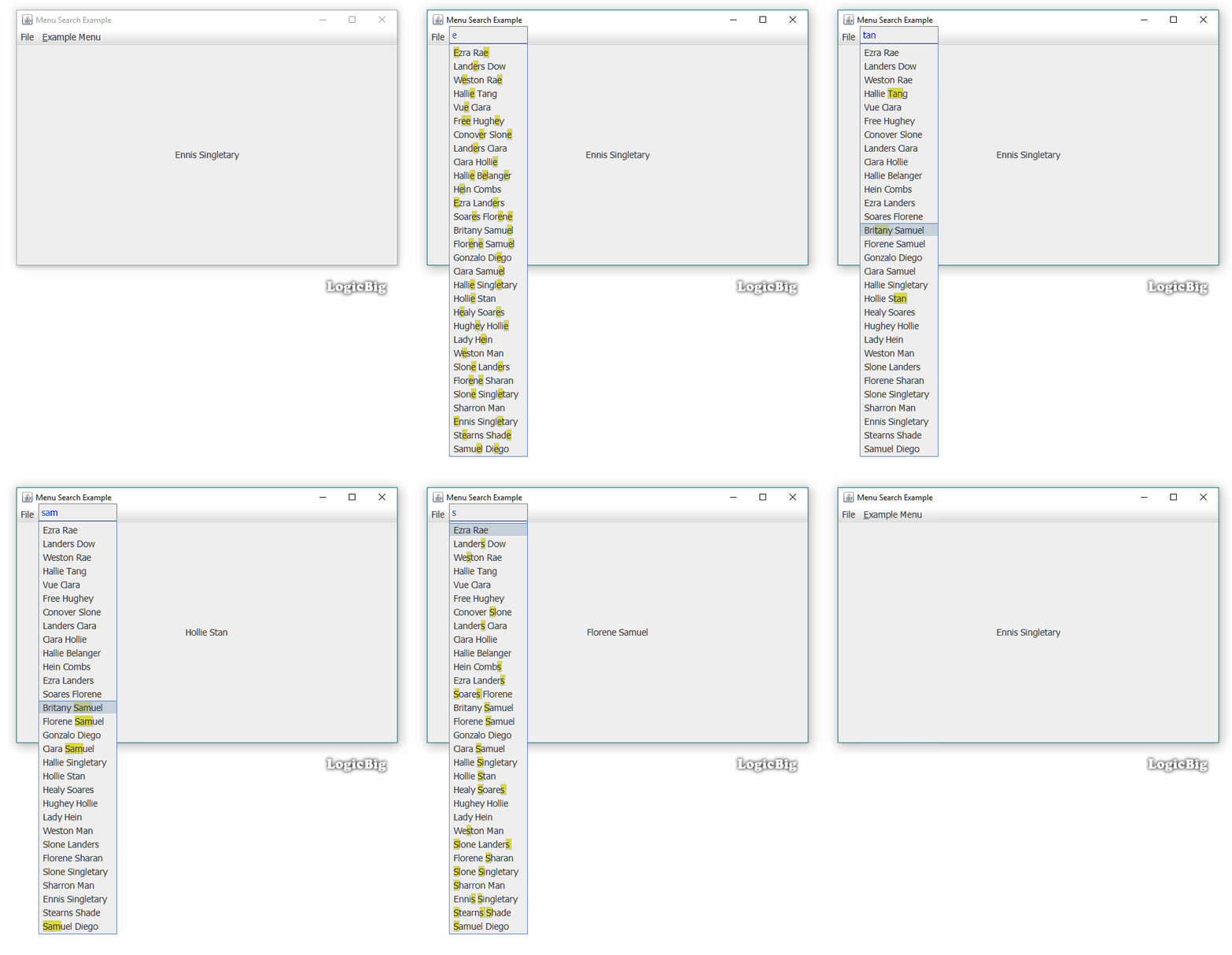
This example shows how to add search and highlighting functionality in JMenu items. This can be useful for very large menus or dynamic menu where shortcut keys are not possible or not user friendly.
We are going to use custom search popup component approach. Also we are going to reuse code from LabelHighlighted (a custom JLabel) to show highlighting for search results.
This example does not filter the menu items by removing unmatched items but just highlights the matched items. Once there're matches, user can jump to the next match by up/down arrow keys. To cancel a match, backspace or escape keys can be used.
Main class
public class MenuBuilderExampleMain {
    public static void main(String[] args) {
        setFonts();
        //to display menu selection
        JLabel selectionLabel = new JLabel();
        //creating menu bar
        JMenuBar jMenuBar = new JMenuBar();
        JMenu menu = new JMenu("File");//just an empty menu
        jMenuBar.add(menu);
        menu = buildExampleMenu(selectionLabel);
        jMenuBar.add(menu);

        JFrame frame = createFrame();
        frame.setLayout(new GridBagLayout());
        frame.add(selectionLabel);
        frame.setJMenuBar(jMenuBar);
        frame.setLocationRelativeTo(null);
        frame.setVisible(true);
    }

    private static JMenu buildExampleMenu(JLabel selectionLabel) {
        //just add some transparency
        Color color = UIManager.getColor("MenuItem.selectionBackground");
        UIManager.put("MenuItem.selectionBackground",
                new Color(color.getRed(), color.getGreen(), color.getBlue(), 135));

        //selecting a menu will update the JLabel
        ActionListener al = (ae) -> selectionLabel.setText(ae.getActionCommand());

        //building menu capable for searching
        JMenu exampleMenu = new JMenu("Example Menu");
        exampleMenu.setMnemonic(KeyEvent.VK_E);
        for (int i = 0; i < 30; i++) {
            //menu item must be HighlightedMenuItem subclass of JMenuItem
            HighlightedMenuItem menuItem = new HighlightedMenuItem();
            menuItem.setText(RandomUtil.getFullName());
            menuItem.addActionListener(al);
            exampleMenu.add(menuItem);
        }
        MenuSearchDecorator.decorate(exampleMenu);
        return exampleMenu;
    }

    private static JFrame createFrame() {
        JFrame frame = new JFrame("Menu Search Example");
        frame.setDefaultCloseOperation(JFrame.EXIT_ON_CLOSE);
        frame.setSize(new Dimension(600, 400));
        return frame;
    }

    private static void setFonts() {
        System.setProperty("swing.aatext", "true");
        System.setProperty("swing.plaf.metal.controlFont", "Tahoma-14");
        System.setProperty("swing.plaf.metal.userFont", "Tahoma-14");
    }
}
The decorator
public class MenuSearchDecorator {
    private JMenu[] menus;

    public MenuSearchDecorator(JMenu[] menus) {
        this.menus = menus;
    }

    //the provided menus must add HighlightedMenuItem
    public static void decorate(JMenu... menus) {
        if (menus == null) {
            throw new IllegalArgumentException("menus cannot be null");
        }
        new MenuSearchDecorator(menus).init();
    }

    private void init() {
        for (JMenu menu : menus) {
            SearchPopupHandler searchPopupHandler =
                    new SearchPopupHandler(menu.getPopupMenu(), text -> performSearch(text, menu));
            searchPopupHandler.init();
            menu.addMenuKeyListener(createKeyListener(menu, searchPopupHandler));
            menu.getPopupMenu().addPopupMenuListener(createPopupMenuListener(menu, searchPopupHandler));
        }
    }

    private PopupMenuListener createPopupMenuListener(JMenu menu, SearchPopupHandler searchPopupHandler) {
        return new PopupMenuListener() {
            @Override
            public void popupMenuWillBecomeVisible(PopupMenuEvent e) {

            }

            @Override
            public void popupMenuWillBecomeInvisible(PopupMenuEvent e) {
                searchPopupHandler.resetSearchPopup();

            }

            @Override
            public void popupMenuCanceled(PopupMenuEvent e) {

            }
        };
    }

    private MenuKeyListener createKeyListener(JMenu menu, SearchPopupHandler searchPopupHandler) {

        return new MenuKeyListener() {

            @Override
            public void menuKeyTyped(MenuKeyEvent e) {
            }

            @Override
            public void menuKeyPressed(MenuKeyEvent e) {
                KeyEvent ke = new KeyEvent(menu, e.getID(),
                        e.getWhen(),
                        e.getModifiersEx(),
                        e.getKeyCode(),
                        e.getKeyChar(),
                        e.getKeyLocation());
                searchPopupHandler.handleKeyPressedEvent(ke);
                if (ke.isConsumed()) {
                    e.consume();
                    return;
                }

                int keyCode = e.getKeyCode();
                if (keyCode == KeyEvent.VK_DOWN || keyCode == KeyEvent.VK_UP) {
                    if (searchPopupHandler.hasMatches()) {
                        //if there're matches then up/down keys will jump to previous/next match
                        // this feature is similar to intellij project-explorer/file-dialog search
                        if (jumpToOtherMatch(menu, searchPopupHandler.getSearchText(), keyCode == KeyEvent.VK_DOWN)) {
                            e.consume();
                        }
                    }
                }
            }

            @Override
            public void menuKeyReleased(MenuKeyEvent e) {
            }
        };
    }

    private boolean jumpToOtherMatch(JMenu menu, String searchText, boolean forward) {
        MenuElement last = JMenuUtil.getCurrentSelection();

        if (last instanceof HighlightedMenuItem) {
            List<Component> menuComponents = new ArrayList<>(List.of(menu.getMenuComponents()));
            if (!forward) {
                //just reverse it, instead of doing reversed loop
                Collections.reverse(menuComponents);
            }
            int currentIndex = menuComponents.indexOf(last);

            int size = menuComponents.size();
            //find next match
            for (int i = currentIndex + 1; i < size; i++) {
                Component component = menuComponents.get(i);
                if (component instanceof HighlightedMenuItem) {
                    if (((HighlightedMenuItem) component).highlightText(searchText)) {
                        JMenuUtil.setCurrentSiblingSelection((MenuElement) component);
                        return true;
                    }
                }
            }
        }
        return false;
    }

    private static boolean performSearch(String text, JMenu menu) {
        boolean match = false;
        for (Component menuComponent : menu.getMenuComponents()) {
            if (menuComponent instanceof HighlightedMenuItem) {
                match |= ((HighlightedMenuItem) menuComponent).highlightText(text);
            }
        }
        return match;
    }
}
The popup component
This class can be reused for other components as well:
//A reusable search handler which shows a search popup and
// uses in memory key inputs
public class SearchPopupHandler {
    private Popup searchPopup;
    private JLabel searchLabel;
    private JComponent userSearchComponent;
    private Predicate<String> userSearchHandler;
    private TextHandler textHandler = new TextHandler();
    private boolean hasMatches;

    public SearchPopupHandler(JComponent userSearchComponent, Predicate<String> userSearchHandler) {
        this.userSearchComponent = userSearchComponent;
        this.userSearchHandler = userSearchHandler;
    }

    public void init() {
        initSearchLabel();
    }

    //handles stuff related to popup text component
    public void handleKeyPressedEvent(KeyEvent e) {
        char keyChar = e.getKeyChar();
        if (!Character.isDefined(keyChar)) {
            return;
        }
        int keyCode = e.getKeyCode();
        switch (keyCode) {
            case KeyEvent.VK_DELETE:
                return;
            case KeyEvent.VK_ENTER:
                resetSearchPopup();
                return;
            case KeyEvent.VK_ESCAPE:
                if (resetSearchPopup()) {
                    e.consume();
                }
                return;
            case KeyEvent.VK_BACK_SPACE:
                textHandler.removeCharAtEnd();
                break;
            default:
                textHandler.add(keyChar);
        }

        if (!textHandler.text.isEmpty()) {
            showSearchPopup();
            performSearch();
        } else {
            resetSearchPopup();
        }
        e.consume();
    }

    public String getSearchText() {
        return searchLabel.getText();
    }

    private void initSearchLabel() {
        searchLabel = new JLabel();
        searchLabel.setOpaque(true);
        searchLabel.setFont(searchLabel.getFont().deriveFont(Font.PLAIN)
                                       .deriveFont(userSearchComponent.getFont().getSize()));
        searchLabel.setBorder(new CompoundBorder(BorderFactory.createLineBorder(Color.gray),
                BorderFactory.createEmptyBorder(4, 4, 4, 4)));
    }

    private void showSearchPopup() {
        if (textHandler.getText().isEmpty()) {
            return;
        }
        if (searchPopup == null) {
            Point p = new Point(0, 0);
            SwingUtilities.convertPointToScreen(p, userSearchComponent);
            Dimension comboSize = userSearchComponent.getPreferredSize();
            int height = searchLabel.getFontMetrics(searchLabel.getFont()).getHeight();
            Insets borderInsets = searchLabel.getBorder().getBorderInsets(searchLabel);
            height += borderInsets.top + borderInsets.bottom;
            searchLabel.setPreferredSize(new Dimension(comboSize.width, height));
            searchPopup = PopupFactory.getSharedInstance().getPopup(userSearchComponent, searchLabel, p.x,
                    p.y - height);
        }
        searchPopup.show();
    }

    public boolean resetSearchPopup() {
        if (!textHandler.isEditing()) {
            return false;
        }
        if (searchPopup != null) {
            searchPopup.hide();
            searchPopup = null;
            searchLabel.setText("");
            textHandler.reset();
            userSearchHandler.test("");
            return true;
        }
        return false;
    }

    private void performSearch() {
        searchLabel.setText(textHandler.getText());
        if (userSearchHandler.test(textHandler.getText())) {
            searchLabel.setForeground(Color.blue);
            hasMatches = true;
        } else {
            //if no match then red font
            searchLabel.setForeground(Color.red);
            hasMatches = false;
        }
    }

    public boolean hasMatches() {
        return hasMatches;
    }

    private static class TextHandler {
        private String text = "";
        private boolean editing;

        public void add(char c) {
            text += c;
            editing = true;
        }

        public void removeCharAtEnd() {
            if (text.length() > 0) {
                text = text.substring(0, text.length() - 1);
                editing = true;
            }
        }

        public void reset() {
            text = "";
            editing = false;
        }

        public String getText() {
            return text;
        }

        public boolean isEditing() {
            return editing;
        }
    }
}
The custom JMenuItem for highlighting
In this example we have separated highlighting logic from the actual component by using Java 8 default methods:
//very less code after moving logic up the hierarchy.
//also this design demonstrates how to do multiple
//inheritance by using Java 8 default methods
public class HighlightedMenuItem extends JMenuItem implements HighlightedComponent {
    private List<Rectangle2D> rectangles = new ArrayList<>();

    public HighlightedMenuItem() {
        setOpaque(false);
        //try with icon:
        //setIcon(UIManager.getIcon("OptionPane.questionIcon"));
    }

    @Override
    public Collection<Rectangle2D> getHighlightedRectangles() {
        return rectangles;
    }

    @Override
    protected void paintComponent(Graphics g) {
        doHighlightPainting(g);
        super.paintComponent(g);

    }
}
//using Java 8 default methods to reuse the same logic for different components
public interface HighlightedComponent extends IText {

    public static Color colorHighlight = new Color(220, 220, 50);

    default void reset() {
        getHighlightedRectangles().clear();
        repaint();
    }

    default boolean highlightText(String textToHighlight) {
        if (textToHighlight == null) {
            return false;
        }
        reset();

        final String textToMatch = textToHighlight.toLowerCase().trim();
        if (textToMatch.length() == 0) {
            return false;
        }
        textToHighlight = textToHighlight.trim();

        final String labelText = getText().toLowerCase();
        if (labelText.contains(textToMatch)) {
            FontMetrics fm = getFontMetrics(getFont());
            float w = -1;
            final float h = fm.getHeight() - 1;
            int i = 0;
            while (true) {
                i = labelText.indexOf(textToMatch, i);
                if (i == -1) {
                    break;
                }
                if (w == -1) {
                    String matchingText = getText().substring(i,
                            i + textToHighlight.length());
                    w = fm.stringWidth(matchingText);
                }
                String preText = getText().substring(0, i);
                float x = fm.stringWidth(preText);
                int y = 0;

                //taking care of margins if there's border
                if (getBorder() != null) {
                    Insets borderInsets = getBorder().getBorderInsets((Component) this);
                    if (borderInsets != null) {
                        x += borderInsets.left;
                        y += borderInsets.top;
                    }
                }
                //taking care of margin if there's icon
                if (getIcon() != null) {//assuming LEFT_TO_RIGHT orientation
                    x += getIcon().getIconWidth();
                    if (getIcon().getIconHeight() > fm.getHeight()) {
                        y += 1 + (getIcon().getIconHeight() - fm.getHeight()) / 2;//vertical middle
                    }
                }

                //taking care of left margin for icon-text-gap
                int gap = getIconTextGap();
                //gap is on both sides of the icon
                x += getIcon() != null ? gap * 2 : gap;


                getHighlightedRectangles().add(new Rectangle2D.Float(x, y, w, h));
                i = i + textToMatch.length();
            }
            repaint();
            return true;
        }
        return false;
    }

    //to be called from subclass's paintComponent(g)
    default void doHighlightPainting(Graphics g) {
        if (isOpaque()) {
            g.setColor(getBackground());
            g.fillRect(0, 0, getWidth(), getHeight());
        }

        if (getHighlightedRectangles().size() > 0) {

            Graphics2D g2d = (Graphics2D) g;
            Color c = g2d.getColor();
            for (Rectangle2D rectangle : getHighlightedRectangles()) {
                g2d.setColor(colorHighlight);
                g2d.fill(rectangle);
                g2d.setColor(Color.LIGHT_GRAY);
                g2d.draw(rectangle);
            }
            g2d.setColor(c);
        }
    }

    //since interfaces cannot have instance variables ask subclass to provide one
    Collection<Rectangle2D> getHighlightedRectangles();
}
//an interface representing component which
// has text, e.g. JTextComponent, JLabel, JButton, JMenuItem etc
public interface IText extends IComponent {

    int getIconTextGap();

    String getText();
}
//interface representing a JComponent
public interface IComponent {

    FontMetrics getFontMetrics(Font f);

    Font getFont();

    int getHeight();

    int getWidth();

    Color getBackground();

    boolean isOpaque();

    Icon getIcon();

    Border getBorder();

    void repaint();
}
Instead of adding all abstract methods in HighlightedComponent interface, we created IText and IComponent interfaces, this is to demonstrate how to create interface based JComponent hierarchy so that it can be reused for different purposes, where we want to add common logic in default methods. Generally, this design shows how to do multiple inheritance via Java 8 default methods.
Output
Example ProjectDependencies and Technologies Used:
|
|



