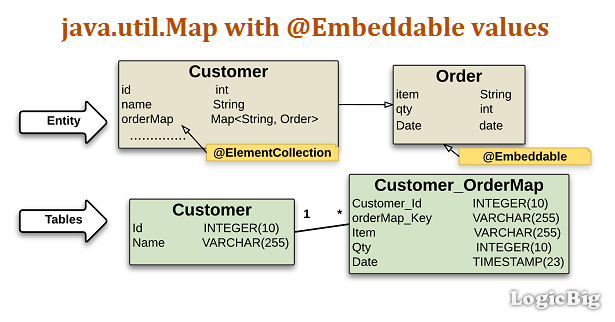
- Just like the Map of basic type keys and basic values, a Map of basic type keys and embeddable values can be persisted by using @ElementCollection on the Map reference in the entity class.
- The corresponding class of the map values, must have @Embeddable annotation.
- The Entity and the Map are mapped to two separate foreign/primary-key tables. One for the entity and other for keys and embeddable fields/properties values. The Map table has the foreign key pointing to the primary key of the entity.
- By default, JPA specific naming conventions are used for the mapping. We can customize that by using; @CollectionTable annotation and @MapKeyColumn along with @ElementCollection (check out our last tutorials for quick details).
- Note that all cases of @Embeddable class are applied here: we can use an embeddable class within another one, the embeddable can have entity relationship, and/or we can also use multiple instances of the maps having same embeddable values in our entity.
Example
@Entity
public class Customer {
    @Id
    @GeneratedValue
    private int id;
    private String name;
    @ElementCollection
    @CollectionTable(name = "ORDERS")
    @MapKeyColumn(name = "TYPE")
    private Map<String, Order> orderMap;
    .............
}
@Embeddable
public class Order {
    private String item;
    private int qty;
    private Date date;
    .............
}
public class ExampleMain {

    public static void main(String[] args) {
        EntityManagerFactory emf = Persistence.createEntityManagerFactory("example-unit");
        try {
            EntityManager em = emf.createEntityManager();
            nativeQuery(em, "SHOW TABLES");
            nativeQuery(em, "SHOW COLUMNS from Customer");
            nativeQuery(em, "SHOW COLUMNS from ORDERS");
        } finally {
            emf.close();
        }
    }
    .............
}Output'SHOW TABLES'
[CUSTOMER, PUBLIC]
[ORDERS, PUBLIC]
'SHOW COLUMNS from Customer'
[ID, INTEGER(10), NO, PRI, NULL]
[NAME, VARCHAR(255), YES, , NULL]
'SHOW COLUMNS from ORDERS'
[CUSTOMER_ID, INTEGER(10), NO, PRI, NULL]
[DATE, TIMESTAMP(23), YES, , NULL]
[ITEM, VARCHAR(255), YES, , NULL]
[QTY, INTEGER(10), NO, , NULL]
[TYPE, VARCHAR(255), NO, PRI, NULL]
A quick overview (with the default column/table names):
Persisting and loading data
public class ExampleMain2 {

    public static void main(String[] args) {
        EntityManagerFactory emf = Persistence.createEntityManagerFactory("example-unit");
        try {
            persistEntity(emf);
            runNativeQueries(emf);
            loadEntity(emf);
        } finally {
            emf.close();
        }
    }

    private static void persistEntity(EntityManagerFactory emf) {
        System.out.println("-- Persisting entities --");
        EntityManager em = emf.createEntityManager();

        Customer c1 = new Customer();
        c1.setName("Lindsey Craft");
        c1.addOrder("online", "XYZ Blender", 2);
        c1.addOrder("store", "ZZZ Beer Glass", 4);
        System.out.println(c1);

        Customer c2 = new Customer();
        c2.setName("Morgan Philips");
        c2.addOrder("online", "AA Glass Cleaner", 3);
        System.out.println(c2);

        em.getTransaction().begin();
        em.persist(c1);
        em.persist(c2);
        em.getTransaction().commit();
        em.close();
    }

    private static void runNativeQueries(EntityManagerFactory emf) {
        System.out.println("-- Native queries --");
        EntityManager em = emf.createEntityManager();
        ExampleMain.nativeQuery(em, "Select * from Customer");
        ExampleMain.nativeQuery(em, "Select * from Orders");
    }

    private static void loadEntity(EntityManagerFactory emf) {
        System.out.println("-- Loading Customer --");
        EntityManager em = emf.createEntityManager();
        List<Customer> entityAList = em.createQuery("Select t from Customer t")
                                       .getResultList();
        entityAList.forEach(System.out::println);
        em.close();
    }
}Output-- Persisting entities --
Customer{id=0, name='Lindsey Craft', orderMap={online=Order{item='XYZ Blender', qty=2, date=Wed Oct 29 13:02:39 CST 2025}, store=Order{item='ZZZ Beer Glass', qty=4, date=Wed Oct 29 13:02:39 CST 2025}}}
Customer{id=0, name='Morgan Philips', orderMap={online=Order{item='AA Glass Cleaner', qty=3, date=Wed Oct 29 13:02:39 CST 2025}}}
-- Native queries --
'Select * from Customer'
[1, Lindsey Craft]
[2, Morgan Philips]
'Select * from Orders'
[1, 2025-10-29 13:02:39.002, XYZ Blender, 2, online]
[1, 2025-10-29 13:02:39.002, ZZZ Beer Glass, 4, store]
[2, 2025-10-29 13:02:39.005, AA Glass Cleaner, 3, online]
-- Loading Customer --
Customer{id=1, name='Lindsey Craft', orderMap={online=Order{item='XYZ Blender', qty=2, date=2025-10-29 13:02:39.002}, store=Order{item='ZZZ Beer Glass', qty=4, date=2025-10-29 13:02:39.002}}}
Customer{id=2, name='Morgan Philips', orderMap={online=Order{item='AA Glass Cleaner', qty=3, date=2025-10-29 13:02:39.005}}}
Example ProjectDependencies and Technologies Used: - h2 1.4.193: H2 Database Engine.
- hibernate-core 5.2.8.Final: The core O/RM functionality as provided by Hibernate.
Implements javax.persistence:javax.persistence-api version 2.1 - JDK 1.8
- Maven 3.3.9
|
|



