↗ JetBrains 20% discount
Buy any product from JetBrains and get a 20% discount.
Java
Following example shows how to find available runtime memory in Java.
package com.logicbig.example;

import java.text.DecimalFormat;

public class MemoryUtil {
    //just to allocate some memory for demo
    static double[] arr = new double[1000000000];

    public static void main(String[] args) {
        String memoryInfo = getMemoryInfo();
        System.out.println(memoryInfo);
    }

    public static String getMemoryInfo() {
        long freeMemory = Runtime.getRuntime().freeMemory();
        long totalMemory = Runtime.getRuntime().totalMemory();
        return "Memory available: " + formatMemoryValue(freeMemory) + " / " + formatMemoryValue(totalMemory);
    }

    public static String formatMemoryValue(long size) {
        final String[] units = new String[]{"B", "KB", "MB", "GB", "TB"};
        int unitIndex = (int) (Math.log10(size) / Math.log10(1024));
        DecimalFormat decimalFormat = new DecimalFormat("#,##0.#");
        String formattedValue = decimalFormat.format(size / Math.pow(1024, unitIndex));
        return formattedValue + " " + units[unitIndex];
    }
}
Memory available: 257 MB / 640 MB
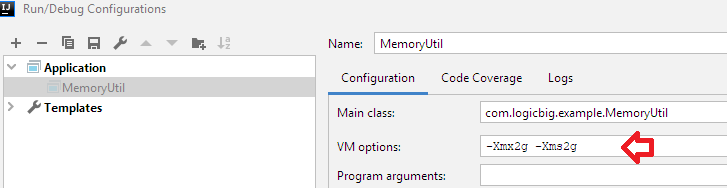
Let's specify -Xmx2g and -Xms2g
In Intellij:
Now run above class again:
Memory available: 1.6 GB / 2 GB