What is Spring Boot?
Spring Boot helps us avoid writing boilerplate configuration and code, so that we can focus on the application's business logic.
Basically, it provides the following:
- Auto-configuration based on the libraries found on the project's classpath. For example, in a Maven-based project, adding a single dependency, called a starter, pulls in a curated set of version-compatible libraries, and Spring Boot then configures them with sensible defaults.
- An embedded server (Tomcat by default, or Jetty), so that we can run web projects as stand-alone applications without deploying a WAR file to an external server.
- Automatic registration of Spring beans and infrastructure whenever possible, which removes the need for most XML or Java-based configuration.
- Production-ready features such as health checks and metrics (via Spring Boot Actuator), and externalized configuration.
KickStart Example
Writing a normal Spring MVC Controller
package com.logicbig.example;

import org.springframework.web.bind.annotation.GetMapping;
import org.springframework.web.bind.annotation.RestController;

@RestController
public class HelloWorldController {

    @GetMapping("/")
    public String helloHandler () {
        return "<h1>Hello World!</h1>";
    }
}
Normally, we have to write XML or Java configuration to register the controller with the Spring MVC application context, but with Spring Boot we don't have to do that. To achieve that, we first have to set up the build-level dependency configuration. In this example we are using Maven (Spring Boot is not limited to Maven; Gradle is fully supported as well).
Note: @RestController is a shortcut for @Controller plus @ResponseBody, and @GetMapping("/") is a shortcut for @RequestMapping(value = "/", method = RequestMethod.GET).
Maven configuration
pom.xml<?xml version="1.0" encoding="UTF-8"?>
<project xsi:schemaLocation="http://maven.apache.org/POM/4.0.0 http://maven.apache.org/xsd/maven-4.0.0.xsd" xmlns="http://maven.apache.org/POM/4.0.0"
xmlns:xsi="http://www.w3.org/2001/XMLSchema-instance">
<modelVersion>4.0.0</modelVersion>
<parent>
<groupId>org.springframework.boot</groupId>
<artifactId>spring-boot-starter-parent</artifactId>
<version>4.1.1</version>
</parent>
<groupId>com.logicbig.example</groupId>
<artifactId>spring-boot-hello-world</artifactId>
<version>1.0-SNAPSHOT</version>
<properties>
<java.version>25</java.version>
</properties>
<dependencies>
<dependency>
<groupId>org.springframework.boot</groupId>
<artifactId>spring-boot-starter-web</artifactId>
</dependency>
</dependencies>
</project>
Three things to notice above: we specified
- spring-boot-starter-parent as the Maven project parent
- the Java version in
properties
- spring-boot-starter-web as a dependency.
spring-boot-starter-parent brings a number of benefits. It already contains a lot of configuration that we don't have to repeat in every project. For example, we can declare dependencies on Spring modules and other supported libraries without specifying their versions. The parent manages the versions for us, and they are tested for compatibility with that parent version. In the above pom.xml, we used the spring-boot-starter-web dependency without specifying any version.
The java.version property is defined by spring-boot-starter-parent and is used to configure the Maven compiler's release option. Setting it to 25 makes the project compile for Java 25. It doesn't install or select a JDK for us, so a matching JDK (or newer) must be installed and used to run Maven. Specifying the property is optional; we can omit it to use the parent's default.
We can also declare the spring-boot-maven-plugin in the build section of the pom.xml. Its version and defaults are managed by spring-boot-starter-parent, so we don't specify them. mvn spring-boot:run works even without this declaration, but the plugin must be declared for mvn package to produce an executable JAR (run with java -jar).
spring-boot-starter-parent brings a number of benefits. It already contains a lot of configuration that we don't have to repeat in every project. For example, we can declare dependencies on Spring modules and other supported libraries without specifying their versions. The parent manages the versions for us, and they are guaranteed to be compatible with the spring-boot-starter-parent version. In the above pom.xml, we used the spring-boot-starter-web dependency without specifying any version.
Spring Boot 4.x requires Java 17 or later (a newer LTS release such as Java 21 or 25 is recommended) and is built on Spring Framework 7. The latest patch release of the 4.1.x line should be used in practice; the newest version can be found on start.spring.io, which can also generate this whole project skeleton for us.
Main class
We are going to use the Spring Boot specific API to run the MVC application from the main method.
package com.logicbig.example;

import org.springframework.boot.SpringApplication;
import org.springframework.boot.autoconfigure.SpringBootApplication;
import org.springframework.context.ApplicationContext;

@SpringBootApplication
public class HelloWorldApplication {
    public static void main (String[] args) {
        ApplicationContext ctx =
                    SpringApplication.run(HelloWorldApplication.class, args);

    }
}
@SpringBootApplication is the one annotation you put on your main class to turn a plain Java class into a Spring Boot app. We will learn more about this annotation in next tutorials.
Running the example
To try examples, run spring-boot maven plugin (configured in pom.xml of example project below):
mvn spring-boot:run . ____ _ __ _ _
/\\ / ___'_ __ _ _(_)_ __ __ _ \ \ \ \
( ( )\___ | '_ | '_| | '_ \/ _` | \ \ \ \
\\/ ___)| |_)| | | | | || (_| | ) ) ) )
' |____| .__|_| |_|_| |_\__, | / / / /
=========|_|==============|___/=/_/_/_/
:: Spring Boot :: (v4.1.1)
2026-10-11T23:34:04.135-05:00 INFO 30188 --- [ main] c.l.example.HelloWorldApplication : Starting HelloWorldApplication using Java 25 with PID 30188 (D:\LogicBig\example-projects\spring-boot\spring-boot-hello-world\target\classes started by joe2 in D:\LogicBig\example-projects\spring-boot\spring-boot-hello-world)
2026-10-11T23:34:04.138-05:00 INFO 30188 --- [ main] c.l.example.HelloWorldApplication : No active profile set, falling back to 1 default profile: "default"
2026-10-11T23:34:04.812-05:00 INFO 30188 --- [ main] o.s.boot.tomcat.TomcatWebServer : Tomcat initialized with port 8080 (http)
2026-10-11T23:34:04.825-05:00 INFO 30188 --- [ main] o.apache.catalina.core.StandardService : Starting service [Tomcat]
2026-10-11T23:34:04.825-05:00 INFO 30188 --- [ main] o.apache.catalina.core.StandardEngine : Starting Servlet engine: [Apache Tomcat/11.0.24]
2026-10-11T23:34:04.861-05:00 INFO 30188 --- [ main] b.w.c.s.WebApplicationContextInitializer : Root WebApplicationContext: initialization completed in 674 ms
2026-10-11T23:34:05.145-05:00 INFO 30188 --- [ main] o.s.boot.tomcat.TomcatWebServer : Tomcat started on port 8080 (http) with context path '/'
2026-10-11T23:34:05.149-05:00 INFO 30188 --- [ main] c.l.example.HelloWorldApplication : Started HelloWorldApplication in 1.382 seconds (process running for 1.982)
Spring runs an embedded Tomcat server on port 8080 by default. The port can be changed with the server.port property in application.properties.
Accessing from the browser
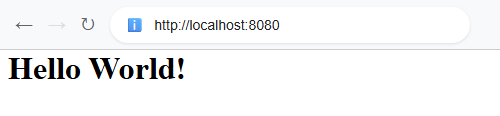 $ curl -s "http://localhost:8080"
<h1>Hello World!</h1>
Example ProjectDependencies and Technologies Used: - Spring Boot 4.1.1
Corresponding Spring Version 7.0.9
Version Compatibility: 1.2.0.RELEASE - 4.1.1
- spring-boot-starter-web (Starter for building web, including RESTful, applications using Spring MVC. Uses Tomcat as the default embedded container (deprecated in favor of spring-boot-starter-webmvc))
- JDK 25
- Maven 3.9.11
|



