In Spring Boot, we can connect to a remote database by specifying following properties:
spring.datasource.url
spring.datasource.username
spring.datasource.password
spring.datasource.driver-class-name
In the presence of above properties (at least spring.datasource.url) DataSourceProperties uses the specified parameters to initialize DataSource (see DataSourceProperties#initializeDataSourceBuilder) instead of using an embedded database.
Example
In this example we are going to connect to MySql server (follow this tutorial to install MySql database). Create a schema (my_schema) in MySql Workbench and create following table:
CREATE TABLE PERSON(
ID BIGINT  PRIMARY KEY AUTO_INCREMENT,
FIRST_NAME VARCHAR(255),
LAST_NAME VARCHAR(255),
ADDRESS VARCHAR(255)
);
Example Boot application
pom.xml<dependency>
<groupId>org.springframework.boot</groupId>
<artifactId>spring-boot-starter-jdbc</artifactId>
</dependency>
<dependency>
<groupId>mysql</groupId>
<artifactId>mysql-connector-java</artifactId>
</dependency>
src/main/resources/application.propertiesspring.datasource.url=jdbc:mysql://localhost:3306/my_schema
spring.datasource.username=root
spring.datasource.password=1234
spring.datasource.driver-class-name=com.mysql.jdbc.Driver
DAO
@Repository
public class PersonDao {

    @Autowired
    private JdbcTemplate jdbcTemplate;

    public void save(Person person) {
        String sql = "insert into Person (first_Name, Last_Name, Address) values (?, ?, ?)";
        jdbcTemplate.update(sql, person.getFirstName(), person.getLastName(),
                person.getAddress());
    }

    public List<Person> loadAll() {
        return jdbcTemplate.query("select * from Person", (resultSet, i) -> {
            return toPerson(resultSet);
        });
    }

    private Person toPerson(ResultSet resultSet) throws SQLException {
        Person person = new Person();
        person.setId(resultSet.getLong("ID"));
        person.setFirstName(resultSet.getString("FIRST_NAME"));
        person.setLastName(resultSet.getString("LAST_NAME"));
        person.setAddress(resultSet.getString("ADDRESS"));
        return person;
    }
}
public class Person {
    private long id;
    private String firstName;
    private String lastName;
    private String address;
    .............
}
Example client
@Component
public class ExampleClient {
    @Autowired
    private PersonDao dao;

    public void run() {
        Person person = Person.create("Dana", "Whitley", "464 Yellow Drive");
        System.out.println("saving person: " + person);
        dao.save(person);

        person = Person.create("Robin", "Cash", "64 Logic Park");
        System.out.println("saving person: " + person);
        dao.save(person);

        System.out.println("-- loading all --");
        List<Person> persons = dao.loadAll();
        persons.forEach(System.out::println);
    }
}
Main class
@SpringBootApplication
public class SpringBootExampleMain implements CommandLineRunner {

    @Autowired
    private ExampleClient exampleClient;

    public static void main(String[] args) {
        SpringApplication sa = new SpringApplication(SpringBootExampleMain.class);
        sa.setBannerMode(Banner.Mode.OFF);
        sa.run(args);
    }

    @Override
    public void run(String... args) {
        exampleClient.run();
    }
}
Running example
To try examples, run spring-boot maven plugin (configured in pom.xml of example project below):
mvn spring-boot:run Or run the main method class from IDE. On running the main method:
saving person: Person{id=0, firstName='Dana', lastName='Whitley', address='464 Yellow Drive'}
saving person: Person{id=0, firstName='Robin', lastName='Cash', address='64 Logic Park'}
-- loading all --
Person{id=1, firstName='Dana', lastName='Whitley', address='464 Yellow Drive'}
Person{id=2, firstName='Robin', lastName='Cash', address='64 Logic Park'}
In MySQL workbench:
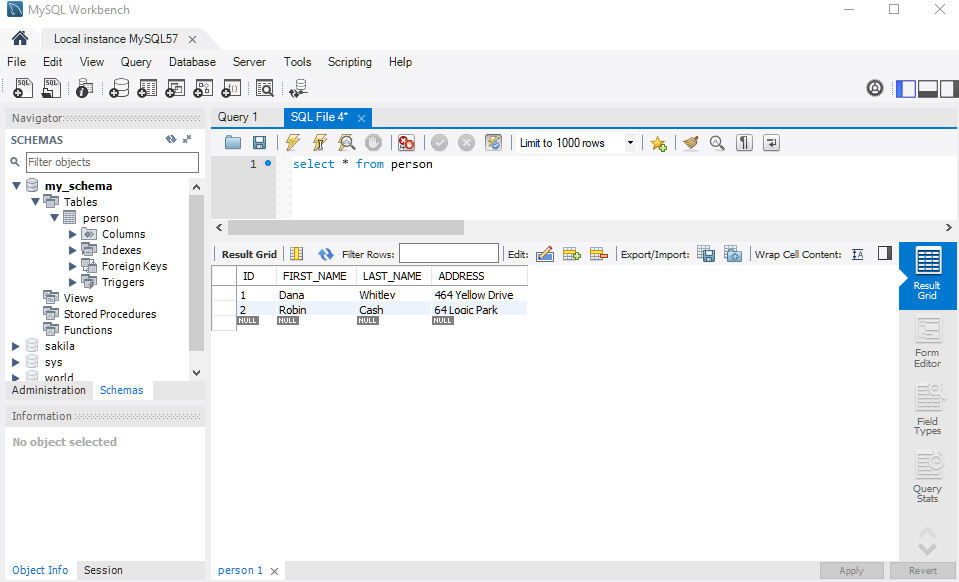
Example ProjectDependencies and Technologies Used: - Spring Boot 2.0.2.RELEASE
Corresponding Spring Version 5.0.6.RELEASE - spring-boot-starter-jdbc : Starter for using JDBC with the HikariCP connection pool.
Uses org.springframework:spring-jdbc version 5.0.6.RELEASE
Uses com.zaxxer:HikariCP version 2.7.9 - mysql-connector-java 5.1.46: MySQL JDBC Type 4 driver.
- JDK 1.8
- Maven 3.3.9
|



