This example demonstrates how to use a custom login page.
Java Config class
- We have to configure HttpSecurity to override the defaults. We are not going to replace the default handlers just the login URI.
- We have to set up AuthenticationManager with user, password and their roles.
- Map our custom login URI to the view by overriding WebMvcConfigurerAdapter#addViewControllers().
@Configuration
@EnableWebSecurity
@EnableWebMvc
@ComponentScan
public class AppConfig extends WebSecurityConfigurerAdapter {

    @Override
    protected void configure(HttpSecurity http) throws Exception {
        http.authorizeRequests()
            .anyRequest()//allow all urls
            .authenticated()//all URLs are allowed by any authenticated user, no role restrictions.
            .and()
            .formLogin()//enable form based authentication
            .loginPage("/my-login")//use a custom login URI
            .permitAll(true)//login URI can be accessed by anyone
            .and()
            .logout()//default logout handling
            .logoutSuccessUrl("/my-login?logout")//our new logout success url, we are not replacing other defaults.
            .permitAll();//allow all as it will be accessed when user is not logged in anymore

    }

    @Override
    public void configure(AuthenticationManagerBuilder builder)
            throws Exception {
        builder.inMemoryAuthentication()
               .withUser("joe")
               .password("123")
               .roles("ADMIN");
    }

    @Bean
    WebMvcConfigurer myWebMvcConfigurer() {
        return new WebMvcConfigurerAdapter() {

            @Override
            public void addViewControllers(ViewControllerRegistry registry) {
                ViewControllerRegistration r = registry.addViewController("/my-login");
                r.setViewName("my-login-page");
            }
        };
    }

    @Bean
    public ViewResolver viewResolver() {
        InternalResourceViewResolver viewResolver = new InternalResourceViewResolver();
        viewResolver.setPrefix("/WEB-INF/views/");
        viewResolver.setSuffix(".jsp");
        return viewResolver;
    }
}
A Controller
@Controller
public class ExampleController {

    @RequestMapping("/")
    public String handleRequest2(ModelMap map) {
        map.addAttribute("time", LocalDateTime.now().toString());
        return "my-page";
    }
}
The JSP pages
src/main/webapp/WEB-INF/views/my-login-page.jsp<%@ taglib prefix="c" uri="http://java.sun.com/jsp/jstl/core"%>
<html>
<head>
<title>My Custom Login Page</title>
</head>
<body style='margin:50px;'>
<h2>My Custom Login Page</h2>
<form action="/my-login" method="post">
<c:if test="${param.error != null}">
<p style='color:red'>
Invalid username and password.
</p>
</c:if>
<c:if test="${param.logout != null}">
<p style='color:blue'>
You have been logged out.
</p>
</c:if>
<p>
<label for="username">Username</label>
<input type="text" id="username" name="username"/>
</p>
<p>
<label for="password">Password</label>
<input type="password" id="password" name="password"/>
</p>
<input type="hidden"
name="${_csrf.parameterName}"
value="${_csrf.token}"/>
<button type="submit">Log in</button>
</form>
</body>
</html>
src/main/webapp/WEB-INF/views/my-page.jsp<%@ taglib prefix="c" uri="http://java.sun.com/jsp/jstl/core"%>
<html lang="en">
<body>
<h2>Spring Security Example</h2>
<p>Time: ${time}</p>
<form action="/logout" method="post">
<input type="hidden"
name="${_csrf.parameterName}"
value="${_csrf.token}"/>
<input type="submit" value="Logout">
</form>
</body>
</html>
To try examples, run embedded tomcat (configured in pom.xml of example project below):
mvn tomcat7:run-war
Output
Initial access to URI '/' will redirect to '/my-login':

After submitting user name and password as we setup in our AppConfig class:

Clicking on 'Logout' button:
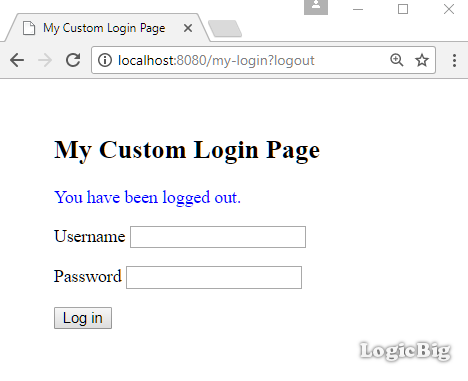
Example ProjectDependencies and Technologies Used: - spring-security-web 4.2.3.RELEASE: spring-security-web.
- spring-security-config 4.2.3.RELEASE: spring-security-config.
- spring-webmvc 4.3.9.RELEASE: Spring Web MVC.
- javax.servlet-api 3.1.0 Java Servlet API
- jstl 1.2 javax.servlet:jstl
- JDK 1.8
- Maven 3.3.9
|



