Following example shows how to integrate JavaMail with Spring application.
Spring provides MailSender interface which hides the specifics of the underlying mailing system. JavaMailSender is a sub-interface which integrates with JavaMail; JavaMailSenderImpl is its implementation.
Example
Maven dependencies
pom.xml<dependency>
<groupId>org.springframework</groupId>
<artifactId>spring-context-support</artifactId>
<version>5.0.8.RELEASE</version>
</dependency>
<dependency>
<groupId>com.sun.mail</groupId>
<artifactId>javax.mail</artifactId>
<version>1.6.1</version>
</dependency>
JavaConfig
package com.logicbig.example;

import org.springframework.context.annotation.Bean;
import org.springframework.context.annotation.ComponentScan;
import org.springframework.context.annotation.Configuration;
import org.springframework.mail.MailSender;
import org.springframework.mail.SimpleMailMessage;
import org.springframework.mail.javamail.JavaMailSenderImpl;
import java.util.Properties;

@ComponentScan
@Configuration
public class AppConfig {
    private static final String SENDER_EMAIL = "mail-test@logicbig.com";//change with your sender email

    @Bean
    public MailSender mailSender() {
        JavaMailSenderImpl mailSender = new JavaMailSenderImpl();

        Properties props = new Properties();
        props.put("mail.smtp.auth", "true");//Outgoing server requires authentication
        props.put("mail.smtp.starttls.enable", "true");//TLS must be activated
        mailSender.setJavaMailProperties(props);

        mailSender.setUsername(SENDER_EMAIL);
        mailSender.setPassword("12345678");//change with your sender email password
        mailSender.setHost("smtp.1and1.com"); //Outgoing smtp server - change it to your SMTP server
        mailSender.setPort(587);//Outgoing port
        return mailSender;
    }

    @Bean
    public SimpleMailMessage defaultMessage() {
        SimpleMailMessage smm = new SimpleMailMessage();
        smm.setTo("default@example.com");
        smm.setFrom(SENDER_EMAIL);
        smm.setSubject("Default subject");
        smm.setText("Default text");
        return smm;
    }
}
SimpleMailMessage is an implementation of MailMessage which encapsulates email message details. In above example we registered an instance of SimpleMailMessage as bean which we are going to use as a template message to create final message.
Example Client
package com.logicbig.example;

import org.springframework.beans.factory.annotation.Autowired;
import org.springframework.mail.MailSender;
import org.springframework.mail.SimpleMailMessage;
import org.springframework.stereotype.Component;

@Component
public class ExampleClient {

    @Autowired
    private MailSender mailSender;
    @Autowired
    private SimpleMailMessage mailMessage;

    public void sendMail(){
        System.out.println("sending mail");
        SimpleMailMessage msg = new SimpleMailMessage(mailMessage);//using copy constructor
        msg.setTo("receiver@gmail.com");
        msg.setSubject("test subject");
        msg.setText("spring email integration test");
        mailSender.send(msg);
        System.out.println("done");
    }
}
Main class
public class SpringEmailExampleMain {

    public static void main(String[] args) {
        AnnotationConfigApplicationContext context =
                new AnnotationConfigApplicationContext(AppConfig.class);
        ExampleClient bean = context.getBean(ExampleClient.class);
        bean.sendMail();
    }
}
sending mail
done
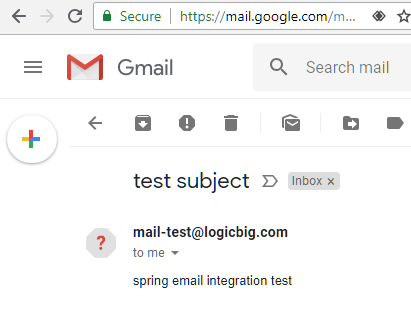
The receiver:
Example ProjectDependencies and Technologies Used: - spring-context-support 5.0.8.RELEASE: Spring Context Support.
- javax.mail 1.6.1 JavaMail API
- JDK 9
- Maven 3.5.4
|



